Computer and USB skype phone or earphones and mike. Download Skype and Skype mate (both free) and install. Straightforward. Skype to skype is free all over world. If you want to use it to call non Skype nos i.e. land lines or mobiles you can if you set up an account with Skype. You will need credit card.
Great system. Has reduced my many internation calls to next to nothing as against lots of money
As for buying credit to make skype to landline/mobile calls, I don't know.....but if the other person has a PC/Mac, get them on skype as well and you'll never need to.
Once you have registered with Skype, If you buy a Skype phone, it plugs into both landline & ethernet port on Router.
It then works as a standard phone, and also a Skype phone, you both being able to make & receive calls without a computer.
Myke
FREE SKYPE just needs a Wi Fi PC with sound and a web cam, which can be bought very cheaply.
The better laptops have built in mic's and cameras and are an absolute doddle to use.
To get Skype for simple use you just need to download the software, register and configure. Simple really, but can be frustrating like many registration required downloads.
Video Skype (via web cam) is just fantastic, a bit fiddly at first getting volumes and cam acceptance sorted.
So get the kit, register and fiddle
I'll be your skype friend from the US with Bilco and Aiden and Garfy !!!!
Micky send me your Skype address and I'll have a natter wi thee one night
Do you log into XP/Vista? If you both create accounts you can have your own friends 'automatically' 'cos Skype saves friends lists seperately depending on who's logged in.
Do you log into XP/Vista? If you both create accounts you can have your own friends 'automatically' 'cos Skype saves friends lists seperately depending on who's logged in.
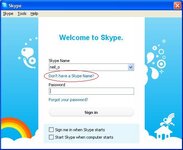
Start Skype and then Click on 'Don't have a Skype name?':-
I still think you'd do better creating seperate login accounts for you and Mrs Monkey. It will mean you get your own seperate place to store documents/web favourites/porn etc and when you start the computer and log in everything will start up/open in your name and not the Mrs's, so confusion will be averted!:-
A lot of the smart phones such as iPhone also allow Skype calls, free to download too. Skype works quite well to developed countries where both parties have good broadband connections but strangely I have problems with Paris...says it all really!
Right. I'm now trying to install Skype on my other computer and it won't download. It keeps popping a box up saying "Internet Download Manager has been registered with a fake Serial Number or the Serial Number has been blocked. IDM is exiting..."
Wossat all about then?
Edit: In fact I can't seem to download anything now, it keeps coming up with that message.