Solution for transferring GPX to Montana 7xx without Explore

Berin

Well-known member
UKGSer Subscriber
Joined
May 29, 2006
Messages
7,679
Reaction score
3,470
Location
South Oxfordshire
Transferring a GPX file to a Montana whist on the road requires either carrying a laptop or using the dreadful Explore app.

However, there is another way if you have an new style iPad Pro with a USB C connector there's an easy way, since the iPad recognises external mass storage devices.

1) Open the File app on the iPad, create a folder called GPX or some such and drop your GPX file into it - you can save it from an email, or from whatever app you created it in, or from a download like the TET website.
2) Connect the Montana to the iPad - I use an Apple USB C to USB B connector and the Garmin micro USB cable
3) The Montana appears in the File app as a mass storage device
4) Find your GPX file, long press and "copy"
5) Navigate to the Garmin>GPX folder on the Montana. Long press, "paste" and you'll see your GPX file
6) Disconnect the Montana, then Where To>Tracks, and your track will be there!

Since the iPad Pro has a much better file manager, you can also store tracks for example in Drop Box, or even an external USB drive or SD card so you can't lose them while on a trip
 
Shouldn't you be able to transfer via Bluetooth too?

I know they are two different devices and operating systems, but a couple of times already I managed to download .GPX routes (off my TRF local group forum) and send them to the XT from the iPhone (download to dropbox on iphone and then send to XT) while in the meeting point with the rest of the group in the morning.
Surely you can skip the cable with the Montana too?

Interested as I'm always looking at the Montana 7xx and might get one at some point :)
 
I guess you send gpx files to your XT via Garmin Drive on your phone. It works very well.

The Montana doesn’t support Drive, only Explore and Connect. Connect doesn’t do any file transfer and Explore is nasty, and requires an internet connection.

So, no, it’s not possible to send a gpx to the Montana via Bluetooth- at least I haven’t found a way.


Sent from my iPhone using Tapatalk
 
Yes Berin, you are correct.

Ok. Good to know.
I'll follow the thread to learn more.
 
I tried this with a track so far, which appeared in the Montana in the Tracks app (unsuprisingly!).

But, the Garmin folder where I put the track has only one subfolder for the current track. I'll test putting a route in the folder, and see what it does with that - since like the XT there are separate "apps" for tracks and routes, and I don't know how, by looking at a gpx file, the device knows if it's a route or a track.
 
I tried this with a track so far, which appeared in the Montana in the Tracks app (unsuprisingly!).

But, the Garmin folder where I put the track has only one subfolder for the current track. I'll test putting a route in the folder, and see what it does with that - since like the XT there are separate "apps" for tracks and routes, and I don't know how, by looking at a gpx file, the device knows if it's a route or a track.

I agree it’s odd how a device knows the difference. But MyRoute can spot and differentiate between tracks and routes, when it comes to uploads.
 
@ Berin re:"Transferring a GPX file to a Montana whist on the road requires either carrying a laptop or using the dreadful Explore app."
Well, not nececessarily.

What works for me.
Two methods
My tracks, routes and waypoints are all saved in a file.gpx which I keep in my phone.

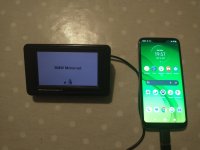
Using my android phone, connected directly to my Montana 700, using file manager app on phone => copy and paste into 700s' Garmin/gpx folder.
Nice, fast and easy. Or you can always copy maps or .gpx files (file manager on android) onto a micro SD from the phone and put micro SD into 700.
Sorry, no idea about anything 'apple'.
 
Thanks, that’s the conclusion I came to as well. The Montana appears as mass storage on the ipad so I can just copy over
 
Just to add to this discussion. I bought a USB C to USB A connector for my mobile phone. Older garmin units like the Nav 4, 340/390 etc show up when connected to the Android phone as USB devices. You can use Myroute app to design a route download it to the phone and then install it in the old device. I am going to get a lightning cable to USB adaptor to try it on the Ipad. Make of an light on the road route planning setup for old devices and easier to put routes on a number of units than swapping SD cards.

IMG_20231031_195702573.jpg
 
sooooo....same as #7 then Mzokk! ;)
which does not require anything but a smartphone,, small and light, some of which, these days, are more powerful that our old desktops / laptops and Surface pro for us heathens who only use Windows ! no need to lump these anymore.
 
Yip.. Use Windows and Linux. I like Macs I'm just to tight to buy into them :D
 
I agree it’s odd how a device knows the difference. But MyRoute can spot and differentiate between tracks and routes, when it comes to uploads.
A track has the <trk> tag (along with <trkseg>) and a route has the <rte> tag and <rtept> :)
 
Last edited:
I guess you send gpx files to your XT via Garmin Drive on your phone. It works very well.

The Montana doesn’t support Drive, only Explore and Connect. Connect doesn’t do any file transfer and Explore is nasty, and requires an internet connection.

So, no, it’s not possible to send a gpx to the Montana via Bluetooth- at least I haven’t found a way.


Sent from my iPhone using Tapatalk
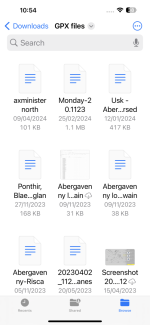
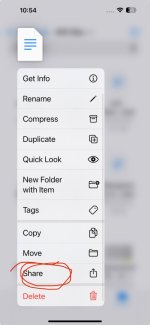
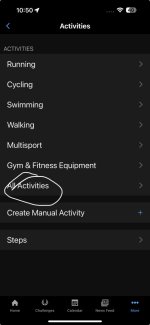
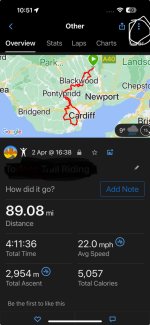
Connect DOES do file transfers on IOS
Long hold on the file.
Scroll down to "Share".
Tap on it.
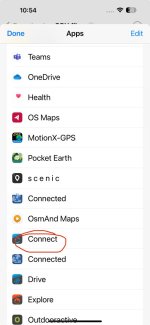
Then if its not showing on the top line, tap on "... more".
Scroll to Connect.
That will open Connect and you then choose the type of activity - I use "Hiking" otherwise sometimes it will change the .gpx like Outdooractive does.
Tap save.
Simple.
 

Attachments

  • IMG_1752.png
    IMG_1752.png
    133 KB · Views: 5
  • IMG_1753.jpeg
    IMG_1753.jpeg
    46.5 KB · Views: 5
  • IMG_1754.jpeg
    IMG_1754.jpeg
    53.8 KB · Views: 5
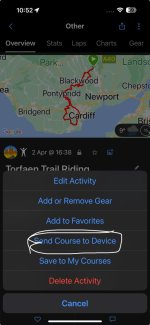
You can then either let it sync or send it to the device.
 

Attachments

  • IMG_1749.jpeg
    IMG_1749.jpeg
    39.2 KB · Views: 5
  • IMG_1750.jpeg
    IMG_1750.jpeg
    83.1 KB · Views: 4
  • IMG_1751.jpeg
    IMG_1751.jpeg
    70.3 KB · Views: 4
Isn’t that still done via the Connect web site though, not Bluetooth?

It looks an update to the last time I checked, but in any case it’s pretty easy to transfer using a cable and file manager


Sent from my iPhone using Tapatalk
 
Isn’t that still done via the Connect web site though, not Bluetooth?

It looks an update to the last time I checked, but in any case it’s pretty easy to transfer using a cable and file manager


Sent from my iPhone using Tapatalk

Looks like it is Bluetooth, so,good find - I’m sure this is an update, as last time I tried it wasn’t possible,to share with Connect.


Sent from my iPad using Tapatalk
 
Isn’t that still done via the Connect web site though, not Bluetooth?

It looks an update to the last time I checked, but in any case it’s pretty easy to transfer using a cable and file manager


Sent from my iPhone using Tapatalk
Bluetooth
 
Or.... KISS :love:
Have the .gpx file/files on your android, connect it direct to the Montana via micro usb and usb-c lead and copy and paste using file manager.
No external 'wombattry' needed.👍
Why is it that I feel a

Déjà vu moment :nenau

 
Last edited:
Or.... KISS :love:
Have the .gpx file/files on your android, connect it direct to the Montana via micro usb and usb-c lead and copy and paste using file manager.
No external 'wombattry' needed.
Why is it that I feel a

Déjà vu moment :nenau


Like I said 5 posts ago, only for iOS.

The connect method is handy if you don’t have a cable and don’t mind Garmin knowing where you’re going though


Sent from my iPad using Tapatalk


Back
Top Bottom