Split Screen / Multiple programs in XP

  • Thread starter Thread starter riverking
  • Start date Start date
Do you mean two different progs on dual screens from the same PC??

In which case, yes.
 
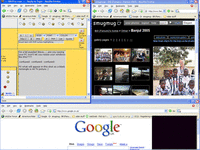
I know I can do that Bill, but can I do it on one large screen, ie. without cycling betweeen minimise / maximise ?? Guess not.
At the moment I lose either ukgser or smugmug each time I go back and forward between between themfor multiple photos, Whatten reckons it's an Explorer setting not allowing me to have multiple windows open so I'm trying to track down the option now:)
 
I'm a bit puzzled Steve......are you saying your PC won't let you resize your windows like this????

:confused: :confused: :confused:

PS what will appear in this shot as a black rectangle is my TV picture ;)
 

Attachments

  • screen.gif
    screen.gif
    99.8 KB · Views: 66
Not saying it won't let me Bill, saying I'm too thick to work out how! (but at least i've posted multiple pics today - (lands end) - result!
 
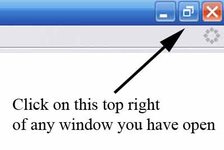
Ok, in the top right corner of your browser screen, you'll see three icons......a red cross, one that looks like two sheets of paper and a small horizontal line...the latter minimises the box, the cross closes the window and the two sheets one allows you to resize the window.......click it and it'll turn intoa single sheet (window) icon, then you can drag the window around and resize it by dragging the edges in and out.

 
Like this you mean?


20406622-M.jpg


Cheers Bill :thumb :thumb


Back
Top Bottom