Starting up

ChrisJF

Where does this bit go ?
UKGSer Subscriber
Joined
Jul 10, 2003
Messages
240
Reaction score
10
Location
West Sussex
HNY :)

All being well I should be back on 2-wheels in the near future - my 2019 RTLE has been extensively and, of course, expensively accessorised to suit, and despite my ever-expanding girth my (Rukka) outfits still fit :D and I have - I think - successfully set up my Neotec2 helmet Mesh Bluetooth connections for my GPS, the bike and my android smartphone.

Although it's claimed that the Mesh system "remembers" its settings, on checking that all's well, more often than not I have to "re-pair" the phone and/or the GPS in order to get up and running. Is there a particular startup sequence required - e.g. do you switch on the helmet before or after switching on the bike's ignition or is there a more elaborate sequence required?

Grateful for the collective's advice as always and yes, all the hardware and software are up-to-date
 
Being a bit of a Luddite, I don't know if my Neotec2 Comms are 'Mesh' or not.

How would I tell the difference??
 
Being a bit of a Luddite, I don't know if my Neotec2 Comms are 'Mesh' or not.

How would I tell the difference??
Hello Mr P

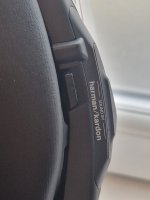
short of dismantling the helmet to see if the speakers are the better (?) Harmon Kardon type, you can plug the helmet into a PC using the Sena's USB lead and the SenaBluetoothDeviceManager program (download from Sena if necessary) will tell you if its an SRL or a Mesh. It will also allow you to keep the hardware up to date and let you make adjustments to the (many) settings available. Hours of fun

HTH
 
Many thanks.

I think mine is the SRL as I can't recall seeing anything stating Mesh in the device manager but I will try your advice on my PC and see what shows up.
 
If its a Sena Mesh headset it will have Harman/Kardon on the right hand button (on the bottom).

Also when you connect to the app it will show a Mesh button to allow you to connect.
Also if you click the cog in the top right and then device setting it will state under Device Name Sena-Mesh v1.4 (v1.4 being the latest firmware)

20240102_104230.jpg
 
Last edited:
If its a Sena Mesh headset it will have Harman/Kardon on the right hand button (on the bottom).

Also when you connect to the app it will show a Mesh button to allow you to connect.
Also if you click the cog in the top right and then device setting it will state under Device Name Sena-Mesh v1.4 (v1.4 being the latest firmware)

View attachment 298877
This ^^^ is incorrect !
 
The standard SRL charging port is micro USB, isn't the Mesh USB C?

Might be a quick way to identify the difference.

Sent from my ELE-L29 using Tapatalk
 
My Neotec2 SRL Mesh helmet does have the Harman/Kardon lettering on the RH panel's underside - I hadn't noticed this before:sick: And yes the USB ports are indeed different (y)

And back to my original headache, a GPS master system reset seems to have sorted things out for the time being. Let's see.
 
My Neotec2 SRL Mesh helmet does have the Harman/Kardon lettering on the RH panel's underside - I hadn't noticed this before:sick: And yes the USB ports are indeed different (y)

And back to my original headache, a GPS master system reset seems to have sorted things out for the time being. Let's see.

The easiest way to tell if Mesh or not is to look if there is a button on the right side . It’s to connect to other Mesh users . The non-Mesh SRL doesn’t have a button on right .


Sent from my Nokia 3310
 
Turns out mine is the SRL and NOT the MESH version, thanks for the advice. :thumb2

I only use mine for myself (music mostly) rather than as an intercom so the MESH is not an issue. I did try the intercom once with a mate on a Euro trip, his mike was keyed (VOX?) all the way from Winchester services to the Ashford so all I got was the sound of him snorting/grunting in his helmet and the wind noise. Never again ( in hindsight I should have just turned mine off).
 
My preferred start up is to switch bike ignition on first then the lid, which pairs to my NAVI6, then my phone, which also pairs with the NAVI. That way, I can make or receive calls using the navigation screen if needed as well as communicate with other riders. If I pair the headset to the phone, it runs into issues where navigation can get interrupted. Not sure on the TFT screen bikes whether this is the same though.


Back
Top Bottom