Synchronisation - How’s it done, mate?

Wapping

Well-known member
Moderator
Joined
Oct 21, 2005
Messages
91,168
Reaction score
16,392
Location
Wapping, London
I still haven’t got my head around the new synchronisation tool.

I have tapped around like a demon (safe in the knowledge I can’t break anything) but I still think I must be doing something wrong.

I don’t want or need to synchronise my entire library. All I want to do is synchronise a handful of individual routes for say, a single holiday. Has anyone made a simple step-by-step guide (hopefully with screen shots, to back up the narrative) showing the process from start to finish, including how to summon up a synchronised route when off line.

Many thanks for any assistance.

Richard
 
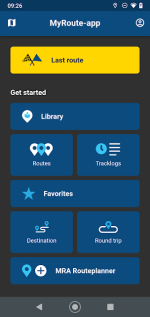
Hi Richard. At the moment it appears that you can only sync your whole library. So when you get to this screen and select routes
1725957280029.png

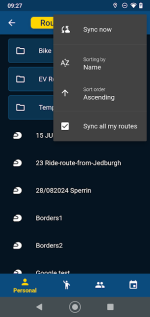
Click Routes and the three little dots on the top right of the screen.

1725957358941.png

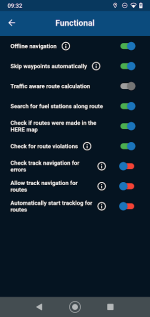
And of course have your navigation preferences set to offline.

1725957427401.png

The Library syncs incrementally so if you have worked on say three routes on your pc or I pad you will get a notification that 3 routes have been synced because changes have been made. You can of course force a sync to ensure your routes are updated before you leave wifi with a dumb (no sim) phone.
 
Oh and if you don't sync the library you are back effectively to downloading routes. It would be nice if you could tick or untick the folders you might wish to sync.
 
Thank you. Thank you in particular for tge reminder of the three little dots in the top right corner.

In the meantime, I have been tapping around some more, using a single test route only. have synchronised the single route, by tapping ‘sync’ on the downloads menu. I had somehow ignored the (very obvious) word ‘sync’ before.

I can also summon up the single synced route ‘off line’, so I am getting better at it.

I am now going to create a second single test route, to see if I can repeat everything.
 
Last edited:
More tapping, more progress….. Time for a recap:

1. I have now created a test route in Routeplanner and synced it.

2. I have now created a second separate test route in the app and synced that, too.

Now to go off line, to see if I can use the app to find either or both of the test routes, summon one or both up and run them……
 
Bingo!

In offline mode I can find both of the synced routes, summon them both up and run them. Phew! I am relieved that:

A. I can at least do it. Whether I’ll remember how I did it all, is a different matter entirely.

B. That it’s possible to synchronise single routes and summon them up at will. I really didn’t want my entire library synchronised. Why? Because I wanted to make sure that the original version of any route, stayed unaltered. I am happy enough to create copies of routes and synchronise those.

As Mzokk said, it’s a pity that it doesn’t seem to be possible to synchronise a folder of routes, say for a holiday, in one go. It’s either one route at a time or the entire library….. unless someone knows a way???
 
Last edited:
Bingo!

A. I can at least do it. Whether I’ll remember how I did it all, is a different matter entirely.

Write down a set of instructions and tuck them into your tank bag.
Or alternatevly type out a note on your iPhone with all the relevant steps, including annotated screenshots. Then pin it to the top.
You can even create a folder for all Navigating how to notes
 
Or just try really hard to remember.

To be honest, unless you really want or need to synchronise an entire library, there is no great advantage over downloading single routes. But hey, I might yet find a use for it and at least I’ve proved that you can’t break it.

PS Stepping away from the tapping around and trying to think logically, using test routes did help. As with the ‘p’ in personal computer, the app’s designers put it together in a way that was logical to them. Once I got onto their ‘wavelength’ (as it were) it suddenly fell into place. Made harder perhaps, as I have only recently started to use a phone and the MyRoute navigation app.
 
The only thing handy about having your whole library synced is that you can download random GPX files in 1.2or 1.1 format and the tracks and load it on your or someone else's Garmin device or to another phone via Bluetooth transfer. My MRA library is only 147 routes at the moment and they really don't take up a lot of space. That said if you had a tick box on the website of what synced it would be nice to have the choice.
 
The other nice feature is being able to plot and save a route using offline maps with no WiFi which magically syncs to your library when you are back online. Easy to try by putting your phone in airplane mode, plan a route, save it. Check its not on your online library then turn online mode back on on your phone and watch it magically appear when you refresh your browser. Obviously you have to have your library synced to do this.
 
The other nice feature is being able to plot and save a route using offline maps with no WiFi which magically syncs to your library when you are back online. Easy to try by putting your phone in airplane mode, plan a route, save it. Check its not on your online library then turn online mode back on on your phone and watch it magically appear when you refresh your browser.

Indeed, that is just what I have been doing, tapping around in and out of aeroplane mode, sat in my motorhome, whilst the wind buffets across Loch Lomond. In addition, switching between my iPad and my phone.
 
Indeed, that is just what I have been doing, tapping around in and out of aeroplane mode, sat in my motorhome, whilst the wind buffets across Loch Lomond. In addition, switching between my iPad and my phone.
No nicer spot for it. (y) Made nicer by a cup of tea and a chocolate biscuit :D
 
Now that I have:

A. Set up a separate folder, within a small group of folders I made for a trip to Spa later in the month and copied it into it the routes I wish to synchronise, changing just the route’s name.

B. Updated all the off-line maps. With this, I found it just as easy to download all of Europe overnight, rather than fannying around selecting individual maps.

C. Reconfirmed that it’s possible to synchronise individual routes, as opposed to the entire library. This was important to me, as I want to keep all my library of routes ‘original’. I still though haven’t found a way to synchronise a batch of routes in a folder, in one go. It seems routes can only be synchronised individually or as a part of the entire library. Batch synchronisation doesn’t seem to be an option.

D. Experimented a few times, with the phone off and on-line, as much as anything else to try to carve everything into my thick skull.

E. Successfully repeated same the experiments on a second phone and my iPad, just to make sure that that synchronisation worked there, too.

I think I have got it cracked and off pat.

PS I have asked on the MyRoute forum whether it is possible to batch synchronise a number of routes in one go? I have also asked whether, if batch synchronisation is not possible, it might be considered in a future update.
 
Last edited:
I've synced 2 routes, and the various devices happily tell me I've synced 2 routes everytime I switch them on. However, since I was fiddling, I have no idea which 2 routes were synced!

Any idea how I find that out?
 
Aha, I had that problem, too.

There is as yet, no easy way to find a list of synchronised routes. Or at least not one that I have heard of. I guess it’s because it is designed around the anticipation that most owners will synchronise their entire library.

Tap through your library. The synchronised routes will be shown in bold letters.

I got around the problem by creating a stand alone folder, called ‘Synchronised only’ into which I place a copy of the ‘original’ route(s) I wish to synchronise. I did though do this as much because:

A. I do not want or need to synchronise my entire library.

B. I want to leave the ‘original’ route unsynchronised.

That it makes the synchronised routes easy to find afterwards, was just a spin-off benefit.
 
Aha, I had that problem, too.

There is as yet, no easy way to find a list of synchronised routes. Or at least not one that I have heard of. I guess it’s because it is designed around the anticipation that most owners will synchronise their entire library.

Tap through your library. The synchronised routes will be shown in bold letters.

I got around the problem by creating a stand alone folder, called ‘Synchronised only’ into which I place a copy of the ‘original’ route(s) I wish to synchronise. I did though do this as much because:

A. I do not want or need to synchronise my entire library.

B. I want to leave the ‘original’ route unsynchronised.

That it makes the synchronised routes easy to find afterwards, was just a spin-off benefit.
Same. I don’t want to sync everything, and I want the routes on my phone to remain unmolested, which may happen if inadvertently fiddle with a route on the iPad.
 
Snap, indeed.

To be honest, I think you might have save any changes, in order to have the alterations fixed and synchronised. But I haven’t experimented enough to find out. Not least, I am happy with my work-around.
 
It looks like MyRoute can’t (as yet anyway) synchronise a number of individual routes en bloc. It’s either the whole library (something I don’t want ot need to do) or individual routes, something I do want to do and I’m happy with.

From the MyRoute forum, there is some support for the suggestion of allowing en bloc synchronisation of a group of routes in a folder. There is also some support with the suggestion of making it easier to find individual synchronised routes, if the entire library has not been synchronised.
 
I'm currently syncing all of my library, though it is considerably smaller than Wappings. I'm touring round the Borders next week with a few friends and the pre planned routes have been put in a folder called AA borders so that they appear at the top of the folder structure in the app and are the working routes that may or may not be altered or added to as the week goes on. Thats my work around so far, but agree it would be good to be able to tick and untick folders to sync to accomodate other workflows.


Back
Top Bottom