The Motorcyclist's Guide to Scotland book - J.G. Fergusson

And 15 miles to the east of Banff is Pennan, which is the harbour in Local Hero, and the phone box is still there.

Indeed. There is an excursion in the route to Pennan and the other villages on the coast. A great film and worth a detour, I'd say.
 
It’s coming on....

I see that you could easily tack his recommended four-day tour (highlighted in blue) onto the NC500 (highlighted in red) and make yourself an instant holiday.

2dc40dbe19dd2171addab3b6156c684f.jpg


The four-day tour is also quite good as he routes you past the ferry terminals that run out to the islands that feature in his book. Take a bit longer than four days and see some of them too, perhaps? If the book has a fault it is that it doesn't have a fold out map of all the routes on one sheet. This means it is sometimes hard to see how they might join up. It is only when I put them all together that I could see it. I'll drop the fellow a note to suggest it.
 
Indeed. There is an excursion in the route to Pennan and the other villages on the coast. A great film and worth a detour, I'd say.

Lovely little road full of dips and turns and views across the sea. On a clear day on the way back from Pennan towards Banff you can see the Cairngorms about 40 miles away, which is even more stunning when the hills have snow on the tops.
 
It’s coming on.... If the book has a fault it is that it doesn't have a fold out map of all the routes on one sheet. This means it is sometimes hard to see how they might join up. It is only when I put them all together that I could see it. I'll drop the fellow a note to suggest it.

As good as my word, I emailed the author. What a top man. By return came a nice quite long email, thanking me for the comments and suggestions. He’s agreed to take some of them up for a revised edition. From my side, I offered (which he’s accepted) to share my GPS routes with him. Bikermate cooperation, straight out of the top drawer.
 
30. Shetland

https://www.dropbox.com/s/t6csajt0cwxmgkl/30. shetland.gpx?dl=0

That's the lot!

Anyone planning to use them, please note:

1. I have not yet tidied them up

2. I have not yet added in the places to stay / things to do in the NC500 or into the 4-day tour. I will do these at some point

3. Sometimes I had to guess the precise location of something but I don't think I am too far out

4. It's not essential but having Open Street Map loaded onto your GPS device might help you sometimes navigating to the end of a few of the little roads up to B&B's or to the end of a couple of roads out on the edge of the sea

5. At the moment the routes are in separate files, one for each route. At some point I will combine them into one
 
Hello Richard,

The suggestion for the NC500 is excellent as this could be optional depending on the weather. I can see route 23 in your list on the map picture. It appears you not have shared it?
Totally agree with your comments re fold out map needed in the book.

Appreciate your time on this as it has genuinly saved a lot of time and frustration for myself and no doubt others. I looked a your routes via a gpx viewer and it shows multiple waypoints (i think that is what they are) and straight lines, i am guessing you did the straight line bit first then added the way points. I become confused at this point lol
I can import your routes via Kurgiver desktop and i now use Kurgiver pro app on my phone.

I loaded the 4 day route in gpx viewer and can see the 2 different coloured routes which seems to indicate AM & PM which is brilliant. I just need to think about how i start the 2nd, and 3rd day etc as the file appears to be one continuous route in Kurviger which is good as i can stop at any point or carry on a bit. I will have a play as you have "wiped my arse" enough i think:D

Thanks once again
 
As the points are numbered i am hoping that Kurviger will just navigate to the next one. if i write the point numbers down before hand and as i take my laptop it should be ok.
 

Attachments

  • Screen Shot 2020-06-08 at 09.35.16.jpg
    Screen Shot 2020-06-08 at 09.35.16.jpg
    123.6 KB · Views: 276
Thanks for all the hard work, Richard


Sent from my iPhone using Tapatalk
 
Hello Richard,

The suggestion for the NC500 is excellent as this could be optional depending on the weather. I can see route 23 in your list on the map picture. It appears you not have shared it?
Totally agree with your comments re fold out map needed in the book.

Appreciate your time on this as it has genuinly saved a lot of time and frustration for myself and no doubt others. I looked a your routes via a gpx viewer and it shows multiple waypoints (i think that is what they are) and straight lines, i am guessing you did the straight line bit first then added the way points. I become confused at this point lol
I can import your routes via Kurgiver desktop and i now use Kurgiver pro app on my phone.

I loaded the 4 day route in gpx viewer and can see the 2 different coloured routes which seems to indicate AM & PM which is brilliant. I just need to think about how i start the 2nd, and 3rd day etc as the file appears to be one continuous route in Kurviger which is good as i can stop at any point or carry on a bit. I will have a play as you have "wiped my arse" enough i think:D

Thanks once again

Thank you for the kind comments. I quite enjoy creating routes in BaseCamp, helped by the fact that I have a large screen iMac no doubt.

Route 23 is the NC500, why I didn't include it in the thread I cannot now remember. Probably old age! I will remedy that shortly.... Done... Post 98 below.

The waypoints you mention are probably the shaping points that I used to drag and then pin Garmin's magenta route line onto a specific road. The straight lines you are seeing are maybe nothing more than a mismatch between a route created in Garmin software, then being displayed in another piece of software, like gpx viewer.

The fault with something like Kurviger is that it can sometimes alter a route. The reason is all down to algorithms Kurviger uses versus the algorithms used in BaseCamp. For example. imagine a BaseCamp created route A to C, with an intermediate point, B. If there are no other roads from A to C via B, Kurviger will replicate it faultlessly. If however between A and B and / or between B and C, there are roads available which Kurrviger's algorithms tells it are more 'curvey' then it will join the three points up (A to B to C) according to its own parameters. You can see this happen when you display a Garmin created route in Kurviger or its sister app, Scenic. Display it and then switch between the four routing modes, you may well see the route alter, even though A, B and C are fixed points. You can see the same thing happening when a Garmin route is sent and then displayed on another Garmin device whose routing preferences are very different to those of the person who created the route in the first place.

I create and use Garmin routes, so this oddity does not bother me too much. I could get around it by putting many shaping points in, which would force the third party software to play ball nicely.

I could also create a track from a route but this sometimes brings with it other problems. The simple and best truth is, don't switch software! :D :beerjug:
 
Last edited:
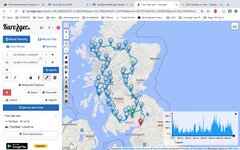
Malcopoplo, here’s an example of what I mean about Kurviger mucking around with imported Garmin routes. It’s not Kurviger’s fault, it’s just made that way. To be fair I might have been able to tamper about with the way the route was imported but I thought I’d use the way most people probably do it. In this example I have used route 01, which looks like this:

1f79e72e3174c16848f5b84ba8b4cc29.jpg


I exported the route into Kurviger, using my iMac:

fb11c8b78dcd767d44dbe3d0095bd909.jpg


You can see that the Kurviger route is significantly different and something truly bizarre has happened in the east south east corner, where an entire loop has appeared.

Switching to the motorway option (ie switching the Kurviger algorithm away from an over emphasis on curves) improves things a lot:

0fad31a31dfa83bd45c36aa3efeeac89.jpg


I then asked my Mac to create a track from the route, which it did perfectly, replicating it inch by inch.

The perceived wisdom is that the conversion of a track into a route in third party software is always perfect. This is not always true, as we can see in the last screen shot. Yes, it is near enough right but you can see where the blue Kurviger route does deviate from the red track. This might not matter too much but would be very annoying if you were meant to meet someone (or stop at a hotel) on a road covered by the track, only to sail past on a totally different road, following the blue line generated by Kurviger. You can see where the Kurviger blue line deviates from the red line of the track in the top north corner. I think I know why Kurviger did it. It’s all down to algorithms. By zooming in I can see that the Garmin track follows quite a small road, that runs parallel to a larger road. The least curvy Kurviger algorithm wants to head towards motorways (or at least not exclude them) so it favours the larger road, understandably.

ef8d5e54e587a08e91127b8887c09874.jpg


In short:

1. Stick to Garmin, wherever possible. It is not the monster everyone says it is. I couldn’t create 30 routes in pretty short order if it were.

2. Check things before you set out, no matter what software you use.

3. Use third party routing software that does not have any fancy algorithms attached to it. In other words, one that will just recreate things perfectly.

4. Get good at editing!



Back
Top Bottom