Unable to drag an open window between two screens

Fanum

Toubab
Joined
Apr 26, 2003
Messages
48,939
Reaction score
7
Location
Secure unit 2
It's not a serious problem, more of an irritation TBH, but I can't seem to drag an open window between two screens :(

I'm using two for a load of web design stuff I'm doing.......if I open a second browser in its own window, then try and drag it to the other screen, it stops where the mouse cursor 'hits' the first screen's border.......As long as I have more than half of the second window across, I can maximise it and it maximises onto the second screen, so I'm having to click/drag the window initially from the right hand end of its top bar.

I can drag an icon backwards and forwards with no problems though.

I have a feeling it may be because the second screen is at a different res than the primary and the pc/graphics card is having problems somehow, but as above, icons can be dragged straight across and are 'dealt with' in terms of resizing automatically no problem.

Maybe linked but not sure is the fact that if I have an open video running on secondary screen (BBC iPplayer for example) set to full screen, a click on the right screen, even though totally unnassociated with the activity in the secondary one, will drop the 'full screen' video back to its original size....a PITA 'cos I want to leave it running maximised while I work on the primary.


Actually, though I'd better try it before hitting the post button so I've just set both screens to same res (1152x864 is the only one they'll both do) but I still can't drag an open window across from one to t'other in one movement.

As I said, more of an irritation than a problem, but any thoughts would be appreciated to help solve it :)

PS Both running off same Grphx card (geforce 8400GS) with primary one using SVGA output to a Belinea flat screen monitor running at 1680x1050 and the other CRT unit running through SVGA adaptor on DVI output to bog standard CRT at 1152x864. Win xp SP3
 
Are both screens showing the same desktop wallpaper?

Was the setup working before?

I thought you had to have both monitors utilizing DVA outputs from the card, and that CRTs didn't use a digital input? :nenau

Have you set up the monitors as "Configured individually"? Cloning won't allow moving of apps.

Al :)
 

Attachments

  • Screens.jpg
    Screens.jpg
    68.7 KB · Views: 109
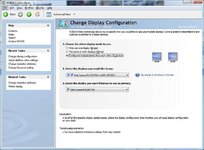
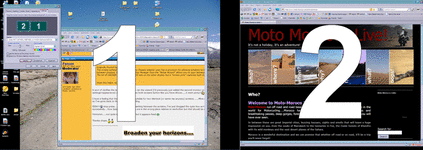
The nvidea software which is what my Dispaly adapter uses has a provision for allowing windows to be dragged between displays. I click nView Desktop Manager then the "Setup Wizard" allows you to span between displays. The bit of UKGSER window on the right was on the other display but a "screen print" captures both displays.

nvideadisplay.jpg


Hope this helps. :nenau:thumb2
 
Are both screens showing the same desktop wallpaper?

YES.

Was the setup working before?
No, it's been like this since I set up the second screen for this particular project.

I thought you had to have both monitors utilizing DVA outputs from the card, and that CRTs didn't use a digital input? :nenau

It works :nenau

The primary is connected to the VGA as normal and there's simply a DVI to SVGA adaptor inbetweent the DVI socket and the SVGA plug from the CRT monitor :nenau

GeForce%208400GS%20512MB.JPG


Have you set up the monitors as "Configured individually"? Cloning won't allow moving of apps.

Al :)

Yes.......both in NVidia control panel and windoze appearance settings.
 
The nvidea software which is what my Dispaly adapter uses has a provision for allowing windows to be dragged between displays. I click nView Desktop Manager then the "Setup Wizard" allows you to span between displays. The bit of UKGSER window on the right was on the other display but a "screen print" captures both displays.


Hope this helps. :nenau:thumb2

It sort of clarifies the issue I think....I just ran the wizard (I'd previously just added the second monitor under settings>appearance) and ticked the 'span both screens button like you have shown.....it went potty!!:blast

I have a feeling that that setting is only suitable for two identical (or same res anyway) screens.......Mine are very different, so I've gone back to the 'DUALVIEW' setting.

EEEK!!!:eek: stop press......after all that re-setting between the screens, I've just dragged the open box across successfully....how bizarre!! (the screens are in the wrong place relative to eachother but that should be easily solved)

Hmmmm.....not quite sure how or why, but it appears fixed :D

Thanks chaps :clap:clap
 
Oh crap :blast

If I swap the screens over using the windows api, i get the same problem occurring again...but the screens are in the correct place...if I do it using the Nvidia control panel.....I get the smooth window transfer and dragging, but they're in the wrong place (IE I have to go off the right hand side of the right screen to get onto the left hand screen:blast)

If I hit 'Identify', it labels them correctly on screen but when I take a screenshot.......it shows them the other way around :mad:

Problem not yet solved......I'll have a read of those links next :thumb
 

Attachments

  • screens.gif
    screens.gif
    85.2 KB · Views: 101
Hmmmmm...no luck :(

They're both analogue monitors, although one is connected to what ought to be a digital outpout through a pin-adaptor plug

I suspect that that fact, plus that they're running at different resolutions, is causing this problem.

I can get it working with the dragging completely between screens fine but with the screens running in the wrong place (which is confusing to use) or with both working in their respective positions but having to double drag things , but not both :blast

Ah well......I'll have to put up with it (or get a second Grphx card or Digital monitor) :blast
 
but they're in the wrong place (IE I have to go off the right hand side of the right screen to get onto the left hand screen:blast)

Select the little green box numbered 2 and drag it around the green box numbered 1 - try and centre it above/right if you run different resolutions.
 
Select the little green box numbered 2 and drag it around the green box numbered 1 - try and centre it above/right if you run different resolutions.

Did that Clive, had to on initial setup of 2nd screen. (on that screenshot, you can see that they're correct in the inset window where you're talking about but in the sourropunding pic, they're labelled the other way around)

It works no prob, but only in returning the numbered and physical positions of the screens to being correct....at which point, the ability to drag the opened window right into the other screen stopped again :blast

It's either a clash between the Nvidia control panel and windows appearance>setup, or a bug involving trying to use two analogue screens with one plugged into what's supposed to be a digital output I think :(
 
What card is it?

I can see a 8400gs above is that the model or.....

As for using a mix of DVI/VGA outputs are cross compatable unless your using a resolution not supported by VGA, but that doesn't cause any issues for switching programs >screen

Although it will mean the same "socket" will always be #1 on the pc afik.

So to resolve the #1 #2 monitor issue, you should just swap them, unless your DVI is used for a higher quality monitor which isn't a supported VGA output resolution/ doesnt have the VGA/Dvi input.


As for moving windows from one to the other I don't know of any reason you shouldn't be able to drag the application across, except if its "maximised".
 
Did that Clive, had to on initial setup of 2nd screen. (on that screenshot, you can see that they're correct in the inset window where you're talking about but in the sourropunding pic, they're labelled the other way around)

It works no prob, but only in returning the numbered and physical positions of the screens to being correct....at which point, the ability to drag the opened window right into the other screen stopped again :blast

It's either a clash between the Nvidia control panel and windows appearance>setup, or a bug involving trying to use two analogue screens with one plugged into what's supposed to be a digital output I think :(

Can't you physically swap the two monitors around then and change which one is the "This is my main desktop"?
 
Can't you physically swap the two monitors around then and change which one is the "This is my main desktop"?

Only in the way Maz just suggested....by swapping the two around on the Grphx card outputs......though I do seem to be able to tell the system that the FST monitor is no.2 :nenau even though it is plugged into the VGA output. (which seems to suggest that what Maz surmised about the position making a difference to the numbering incorrect)

The FST one is an infinitely nicer monitor for day to day use and the way my workspace is set up, it would be a major room-changing hassle to physically have the 2nd monitor on the right rather than left.

And yes Maz, it's an Nvidia 8400GS based card.....made by PNI I think.
 
(which seems to suggest that what Maz surmised about the position making a difference to the numbering incorrect)

To be perfectly honest its been an age since I used dual monitors at home they probably fixed a fair few things since my Nvidia 7600GS days, well over a year now using a 32" HDtv with PIP. (I can play my ps3 and chat on the pc :D)


:topic
I lost faith in Nvidia when i had 4 defective 8800GTX's in a row due to a well documented problem which causes the cores to fry themselves.
ATI all the way now cheaper and much more reliable imo.

newho sorry for the bad misinfo :p
 
To be perfectly honest its been an age since I used dual monitors at home they probably fixed a fair few things since my Nvidia 7600GS days, well over a year now using a 32" HDtv with PIP. (I can play my ps3 and chat on the pc :D)


:topic
I lost faith in Nvidia when i had 4 defective 8800GTX's in a row due to a well documented problem which causes the cores to fry themselves.
ATI all the way now cheaper and much more reliable imo.

newho sorry for the bad misinfo :p

NP maz, thanks for the attempt.

I've always had Nvidia based cards (bar one or two ATI'sd way back when) and like them.....they seem to release the chipsets to other manufacturers quicker and you rapidly get some great cards at fairly low prices coming out.....the last three I've had have been PNY cards and they've all been good.

Scary though......when I was looking for the pic of
of the card above, I saw the price of this card now....fek how they've dropped!! I stopped being an early adopter a good few years ago and tend to go for a one-down from the top card when i buy, but bloody hell this one's got cheap in a short time!! :eek:

Still a good card though...29+Fps on Halo 2 at a good res, so I'm still happy with it :)
 
or you could get a Mac...:augie

Why would I want to do that?

I have the innate ability to control more than one button on my mouse, I don't wear red rimmed specs or drive a Smart car/Toyota pious, I don't like Yukkas or Japanese gardens and I like getting value for my money rather than be a fashion victim :nenau

:hide

PS at certain times, I spend several days solid working with Mapsource and swapping things between a variety of GPS units in various formats......yes there are ways around it, but Pc's just work with Garmin.

I also want to use a computer the way I want to use it, not in the way that a flashy designer's brainchild wants me to use it.

I update my PC's and build them myself.......I can stick nearly any part from any supplier in it and know it's going to work and I can make them dance (to a degree :augie)

But then, we've been over this before and people know I'm not likely to change ;)
 
Halo 2 on PC...... I think that's a blacklisting offence ;) (console ports really annoy me :))

Yabbut you can't beat a good mouse/keyboard combo for a FPS :P
(I tried to recently...I've got an excellent cordless fully programmable gamepad but they're just not 'right' IYKWIM

PS it's undignified for men above 25 to even play on a games console, let alone own one :P


Back
Top Bottom