Update and now nothing

oly

Well-known member
UKGSer Subscriber
Joined
Nov 6, 2007
Messages
501
Reaction score
9
Location
Cockermouth Cumbria
Updated my xt2 via WiFi and now there’s no roads showing ,it won’t calculate a route , It wouldn’t reload the maps so I took out the sd card and now it has reloaded the maps. But still no roads showing and won’t calculate a routes. Not even a 5 mile route up the road . Anyone help?
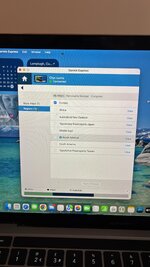
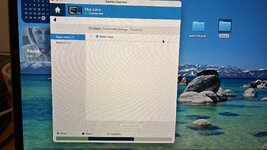
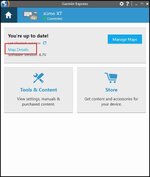
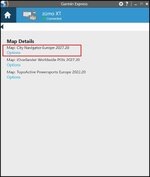
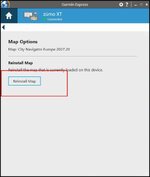
Pics of garmin express situation
 

Attachments

  • C4AC4A1A-2F2F-46AB-AE0C-E2B298D9D7EB.jpeg
    C4AC4A1A-2F2F-46AB-AE0C-E2B298D9D7EB.jpeg
    217.2 KB · Views: 16
  • 2C4F2A5F-B075-4D65-BBF7-BBCD012191B3.jpeg
    2C4F2A5F-B075-4D65-BBF7-BBCD012191B3.jpeg
    851 KB · Views: 16
Select only one (for the country you're in) and see if that helps it calculate.
 
Check on the Device
    • Select Settings from the main menu.
    • Tap Map Display.
    • Select myMaps to view a list of all installed and enabled map products on your XT2

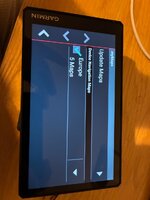
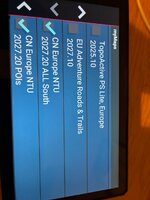
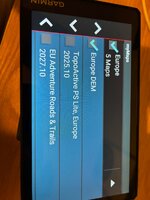
Take a screen shot of the list of all the maps you can see listed, please and share it here.

Thank you.
 
Here we go
 

Attachments

  • IMG_2529.jpeg
    IMG_2529.jpeg
    172 KB · Views: 8
  • IMG_2530.jpeg
    IMG_2530.jpeg
    219.3 KB · Views: 5
  • IMG_2531.jpeg
    IMG_2531.jpeg
    192.6 KB · Views: 10
Thank you.

Now on the main screen, move the map down to say Rome and zoom in. Do you see all the detailed roads?

Yes?
No?

Now try the same with, Athens.

I think you might only have the detailed maps of the south of Europe installed.

If you can’t scroll the screen, try a city search of Rome.
 
I don’t own an XT2 but Google tells me:

Method 1: Update via Wi-Fi (No Computer Needed)
    • Connect your zūmo XT2 to an external power source (battery power is usually insufficient for large map downloads).
    • Connect the device to a stable Wi-Fi network.
    • Go to the main menu and select Settings (the gear icon) > Updates.
    • If an update is ready, select Map > Install All (or Install All for both software and maps).
    • Read and accept the license agreements to begin the download. Keep the device plugged in until complete.

Method 2: Update via Computer (Garmin Express)
    • Download and install the Garmin Express software on your Mac or PC.
    • Connect your zūmo XT2 to the computer using a USB data cable.
    • On the GPS screen, tap Connect to Computer if prompted.
    • Open Garmin Express on your computer, click Add a Device, and follow the on-screen steps.
    • Click Install All or View Details next to the map updates and follow the prompts.
Map updates are very large files and can take a long time depending on your internet speed; if internal storage runs low, the device may prompt you to insert a microSD card.

I’d get a brand new good quality microSD card ready. It doesn’t need to be huge, 16 gb should be more than adequate, providing you don’t also intend to fill it with bangin’ tunes.

Away you go and report back, please.
 
Last edited:
Update, no maps are selectable to download, if I try and pick another map, say Africa , it won’t download it , just instantly fails.
If I zoom out from my house I can see the roads around me ie a595 , a66 etc
But it won’t calculate a route a mile
Away .
 
Update, no maps are selectable to download, if I try and pick another map, say Africa , it won’t download it , just instantly fails.
If I zoom out from my house I can see the roads around me ie a595 , a66 etc
But it won’t calculate a route a mile
Away .
Do you have access to a computer? I find the wireless updates often don’t work, at least on my XT, so I always do then update using Garmin Express.

It sounds to me as though you only have the base map installed,
 
On your screen shot I don’t see the CN NT North maps, only South. I’ve had this before when a map set download has failed but the update software still sees the incomplete map there and therefore
update it.
You can’t delete the map from the device because you can’t see it. If I recall, I had to manually delete the maps then reinstall using Garmin Express
 
And see how you go after that. CN 2027.20 was a bit awkward on my XT for some reason??


Back
Top Bottom