
VIA POINT PROBLEM.

Taff

Well-known member
UKGSer Subscriber
Joined
Feb 21, 2004
Messages
7,351
Reaction score
6
Location
South West Wales
I understood that way points were just markers on route to a chose destination which could be taken, and that via points were markers which had to be taken.

Using my SP3 on yesterdays route as a dry run for a big trip, I was alarmed to find that I didn't understand the GPS as much as I thought I did. Basically, we had wandered off the chosen route so much (and fed up with being told that the GPS was "Off Route - Recalculating" I unplugged the audio prompts).

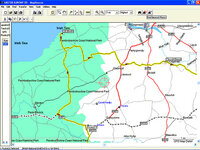
The route actually taken can be seen as a series of blacks dots (running roughly horizontally across the bottom of the screen shot) travelling left to right. I should have turned left towards "CEIBWR" which was marked as a VIA POINT but I missed the turning. Instead of taking me to Ceibwr via another road, the unit sent me on the correct route towards the final destination, but not the correct route towards the next Via Point. Why?

On the next trip, there are several waypoints a day that I want to visit. Originally, the whole trip had been broken into 8 daily routes, but given the problem I had above, would I be better off splitting the daily routes into a number of smaller routes eg DAY 1A, DAY 1B, DAY 1C etc - each one specifically for each essential place that I want to visit ?

And before anyone kicks off - I know that the easiest thing to do would be not to miss the turning. :D
 

Attachments

  • untitled-1 copy.jpg
    untitled-1 copy.jpg
    106.8 KB · Views: 208
First off, turn off the 'Auto-recalculate' function. That way, Bettie will ask you if you want to recalculate when you originally deviate form the route - you can either select yes, no, or, as I do, ignore her and, after a while the error message will disappear and she won't bother you again.

Secondly, check the software version you have loaded. I'm not sure what unit you are using, but on my SPIII, one of the software upgrades had a bug that resulted in exactly this problem - when you recalculated it cut out the via points and pointed you at your destination directly. I can't remember the software version, but it was fixed in the next release. It's possible that your unit has this load.

Mike:)

Edit - Unless I want to follow a specific route, in which case I'll load it as a planned route, I generally just 'find' the locations I want to visit, then get Bettie to calculate a route to them in turn. That way, they'll all be stored in the 'Recent Finds' file in the unit, so they'll be easy to find, and it saves using up Waypoints.
 
AFAIK - Waypoints are simply markers to "places" - they can also be used as VIAs in a route, to effectively "force" the route (to the final destination) to go the way you want it rather than the way the software/GPSR would prefer to go.

If you don't follow the exact route as initially loaded and you have auto-recalculation set, then it's *only* job is to get you to your final destination - it won't care about your VIAs.

As you suggest, setting up "smaller" routes is one way of doing what you want - the place you *must* visit being the final destination.

Also, if you know you have gone off route (and you know which VIA you wanted to visit next) you could also stop the current route - find the via and go there and then "restart" the original route when you reach the VIA.

If you have a specific route you want to follow (including all the VIAs) then I suggest you switch off the Auto-recalculation - of course it is up to you to then get back on route if you miss your turning :)
 
To begin with, go into the "System Setup -> Guidance" menu and set "Off-Route Recalculation" to "Off".

To my opinion the navigator is useless with any other setting. If you, for example, decide to take an alternative road for some distance you don't want the navigator to "destroy" your originally planned route.

If you, for some reason, want to calculate a new route from "here" to your destination you can still do that by manually order the SP3 to recalculate.

One other useful setting is "Map Setup -> Map -> AutoZoom = Off" to avoid the irritating changes of map scale. This will give you a nice moving map with a red line that is easy to follow. Now you can set "System Setup -> Guidance -> Next Turn Pop-up = SPEAK Key Only" to kill all nosens audio messages. You get guidance when you need it by pressing the SPEAK key.

Also, I agree fully with the comments given by Clive above.
 
The version on the GPS unit is 2.8 (updated a month or so ago) and the Mapsource version is 6.5.

Just been testing the unit, to get it clear in my own mind. I set a route with 3 waypoints, but deliberately took the wrong turning for Waypoint 1, then at the next roundabout waited to see whether it sent me to the next Waypoint / Via point in the list, or just destroyed the entire route and sent me to the final destination. My previous post therefore was wrong, when I said "the unit sent me on the correct route towards the final destination, but not the correct route towards the next Via Point".

Having checked this twice, if you miss a turning, the SP3 will send you to the next Waypoint in the list - as it happened on Sundays run, this was in the same direction as the final destination. Useful to know if some of the Waypoints are "essential". I still prefer Mike Os suggestion of just using the "Find" button, but as I dont mind using up my Waypoints, I'm going to download those first - then just "Find" my way from one to the other, with the Auto Recalculation "On".


Back
Top Bottom
