Way points

Doc

English and Proud
UKGSer Subscriber
Joined
Nov 22, 2018
Messages
23,014
Reaction score
22,255
Location
Slawit
Now I have apple car play I'm giving the navigation a go. Did a route today with a few way points and once I started I missed one out and it was trying to send me back. I thought it would have just taken me to the next one on my route ?
Any advice please.
 
Do you mean a ‘waypoint’ displayed as a ‘hand’ or a ‘waypoint’ displayed an an inverted tear drop?

If it’s a hand and you’ve not gone through it, it will keep on getting you to turn around until you do. Why? The hand is a point that you (nobody else) has told a very dumb but really quite clever bit of software, that you must go through. As you missed it out, it’s doing no more and no less than you told it to do.

Lean about the ‘skip’ function and / or better still, don’t use the ‘hand’ function, unless you are very sure that you must go through that point.
 
Last edited:
Do you mean a ‘waypoint’ displayed as a ‘hand’ or a ‘waypoint’ displayed an an inverted tear drop?

If it’s a hand and you’ve not gone through it, it will keep on getting you to turn around until you do. Why? The hand is a point that you (nobody else) has told a very dumb but really quite clever bit of software, that you must go through. As you missed it out, it’s doing no more and no less than yiu tokd it to do.

Lean about the ‘skip’ function and / or better still, don’t use the ‘hand’ function, unless you are very sure that you must go through that point.
Ok thanks waypoint was a hand just used that for my route. Hav'nt noticed the inverted tear drop.
 
So playing about with the route. If I missed 2 or 3 with the teardrop it wouldn't try to send me back ? And just send me to number 4 ?
Thanks
Screenshot_20240514_033050.jpg
 
That’s right, Doc.


Here is a video to watch.


It’s not quite up-to-date (the look of the app has changed) but it will show you all the key points. There is quite a lot in the video, so don’t try to remember it all at once. For example, don’t worry about the colours, naming and stopover times just yet, that can all come later. The thing for now is to just get used to using the ‘hand’ (for points you MUST go through, like a cafe you want to have lunch in) and the ‘inverted tear drop’, which are just points you have used to shape the route to follow roads you want to take.

My suggestion would be to make say three 30 mile routes, around where you live and know all the roads. Create:

Version one: Using just shaping points between the start and the end

Version two of the same route: Using just hands between the start and the end

Version three of the same route: Using a mixture of hands and shaping points

Ride all three versions and see how it works.

Try going off route deliberately to see how that works in each version, too. There will, as I say be a lot to remember, simply as the app (like all navigation devices) is pretty powerful but dumb at the same time. What do I mean by dumb? I mean that it will only ever do, what you have told it to do. For example, if you have used a hand for the cafe, it will always keep routing you there, no matter what happens. Why? Because that is what you have told the dumb device to do. Just because you change your mind later and decide not to go to the cafe, the dumb device will not know that. In short, it cannot read your mind.

There is a way to skip (miss out) hands, but let’s not go there yet. Start with the simple three routes suggestion first.

The overall truth is that there is no substitution for using the app. Yes, you’ll make mistakes or forget how something works. I forgot things in the six months I didn’t ride my motorcycle. Similarly, I am still learning how to use in on a Samsung Android phone, which is different to using it on my Garmin XT and on my iPhone. But, using it to run four days’ worth of reasonably complicated routes that I created myself in France, did work OK, so I guess I getting the hang of it.

 
That's great thanks Wapping.
 
Sussed that one out. Glad I asked now thanks.
 
There is a way to skip (miss out) hands, but let’s not go there yet. Start with the simple three routes suggestion first.
I'll have to ask how do you do that please.
 
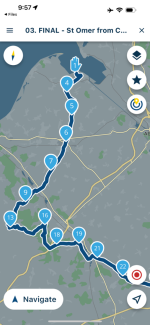
When you create bespoke route that you have made yourself, you’ll see something like this, displayed;

IMG_0022.png

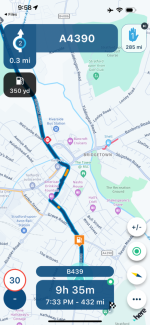
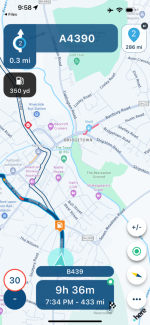
When you run the route, up in the top right corner, you should see the upcoming shaping point (inverted teardrop) or the hand, via point:

IMG_0023.png

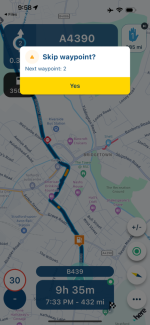
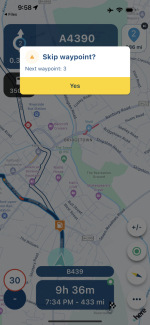
If you tap on it, you get the option to skip it:

IMG_0024.png

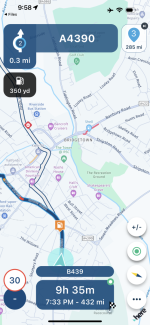
Tap on yes if you want to skip it or don’t if you don’t want to. I tapped on it and now see that point 2 is my next destination, not point 1;

IMG_0025.png

I tapped on it again and the option to skip point 2 came up:

IMG_0026.png

Again I said, yes:

IMG_0027.png

You can practice this, sitting on a chair at home.

Create a route (any old thing will do) using a mixture of teardrops and hands. Then run it. The position cursor won’t move, as you are not moving, but the skip function will work. You can see this in the screenshots, the podition cursor hasn’t moved but the next point button has changed: Point 1, point 2, point 3 each time I touched it and said, yes.

Have a go. Tell us when you’ve done it, please and we can move onto the next bit.
 
Last edited:
To whet your appetite, the next bit will include all sorts of exciting things. For example….

Why might you want to skip at all?
 
For some reason it doesn't show that on the screen on the bike ( skipping waypoints )and on the phone it does. That was my Samsung. I have a iPhone for the bike to get apple car play on the bike screen.
Other day on Samsung it gave me the choice to skip waypoints and today on bike not.
 
I can’t help you with that problem, I’m afraid. I don’t go in for all the ‘Display my phone on a screen on my bike’ malarkey.
 
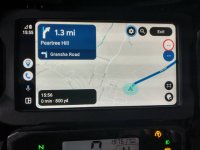
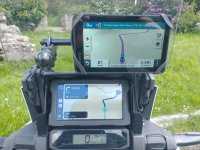
Hi Doc, if you are using an Android Auto device the skip button is bottom right and only appears on the screen on my bike when I hit the screen navigation buttons on my Africa
twin

IMG_20240517_155557477_HDR.jpg

Otherwise the navigation buttons on the screen are invisible.

Like so. Nothing below the speedo. The black button with the square in it toggles the full route on and off.

IMG_20240516_115541199.jpg
 
Sorry just read back through this. I would imagine if you are using Carplay the screen will behave in a similar manner and the skip button will be invisible unless wakened and bottom right.


Back
Top Bottom