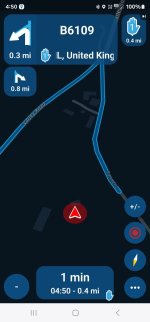
1. Can I get the app to skip the teardrop shaping points automatically?
Yes.
2. How?
App > Top left corner, three horizontal bars, tap > Top right corner, little man, tap > scroll down, Navigation Settings, tap > Functional, tap > Skip waypoints automatically, slide right to turn on (green)
3. Will this skip the ‘hand’ viapoints, too?
No, those are points you have told the dumb (but very clever) device you must go through. To skip these, you must use the manual method described earlier in this thread.
4. What advantages does auto-skip have?
It saves you doing it manually, safe in the knowledge that if you auto-skip say, point 5, the device will still take you to point six and keep you on on route to points seven… eight…. nine and so on…. It will also definitely still take you to any hand points you created.
It saves you remembering where the individual points are. Just ride ‘off route’ without a care in the world.
5. Can I skip from start (always a hand) straight to say point three or seven?
Yes.
6. Will it recalculate the route if I skip a point or two?
Yes, probably / possibly.
7. Why?
Because, you created a route that went start (which is always point 1) to point 2 to point 3 to point 4. You have now asked the device to go from the start point to point three or seven. The roads to take you there might well be different, obviously.
8. Can I reduce the possible effects of a recalculation?
Yes
9. How?
MyRoute recommends placing a shaping point roughly every three miles. If you do this, the gap between each point is quite small, limited often to perhaps just one road connecting them together.
10. What other advantages might there be to skipping points manually?
The key one relates to hands and what we already know about hands. We know that they are points that you must go through, unless you skip them manually. We know that point 1, your start point is always a hand.
Let’s now pretend that you create a route on a Monday and decide to ride along it on Wednesday. On Wednesday, you are not starting exactly where you thought and point one is behind you, about a mile back down the road. Obviously you don’t want to ride backwards, to pass through the point and then turn around. So, skip it manually. Point 1’s hand will now become point 2…. Away you go….
When creating routes I no longer place the first point bang on the start point. Why? It serves no useful purpose to do so. The device will always know where I am, exactly. It will always take me to point one, without fail.