What are these folders?

Gas'd Off

Registered user
Joined
Apr 29, 2004
Messages
3,456
Reaction score
2
Location
here
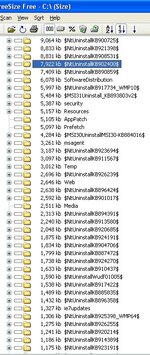
I'm getting very low on disc space now I've ripped my whole music library. I have cleared out all the obvious stuff, internet cache's, recyc, unused programs, temp files etc What else can I get rid of? I've have screen grabbed this from Treesize. Can I delete these uninstall folders? There are loads of them all at 1MB+
Your advice much appreciated :thumb2
 

Attachments

  • grab.jpg
    grab.jpg
    110.4 KB · Views: 124
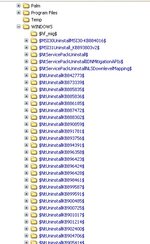
Windows explorer screen grab. They show up blue?
 

Attachments

  • grab2.jpg
    grab2.jpg
    73.5 KB · Views: 122
They are all the backup files replaced by Windoze update. Each folder relates to the update number so if you uninstall an update the system can put all the files back. If your system runs ok then they are safe to delete every now and again.
 
They are all the backup files replaced by Windoze update. Each folder relates to the update number so if you uninstall an update the system can put all the files back. If your system runs ok then they are safe to delete every now and again.

This man is correct, they are indeed microsoft updates and security patches. The only reason to keep them is if you are having problems after you have applied the patches you can then roll back to previous. But if your machine is running fine just delete them


Cheers


Ty
 
Thanks folks, I'm still down to about 50MB free space! :D Ext HDD it is then :)
 
Format your new Hard Drive

Don't be like me, who didn't re format his hard drive, left it as FATs now can only do 4GB files, will have to buy another hard drive copy over these files, then reformat and back up my lapto drive then
best of luck


Back
Top Bottom