What on earth is going on with my Zumo?

markkfletcher

Active member
UKGSer Subscriber
Joined
Jan 1, 2013
Messages
274
Reaction score
0
Location
Switzerland
Hey all, I'm a new Zumo 660 user having bought one 2nd hand off this very forum.
It worked fine at first, but now it is behaving strangely - driving through buildings, ignoring roads and so on.
And it seems to be missing lots of roads too. On the image below I was driving along the A501 - but the satnav thought I was elsewhere. It has been like this for a few days now - both around town and on a long ride out to the coast.
Help appreciated!
tumblr_ocewt2KY0L1rcg5c2o3_540.jpg

tumblr_ocewt2KY0L1rcg5c2o1_400.jpg
 
Thanks - done a factory reset and the problem still seems to be that there are no roads!
tumblr_ocf2shQa7I1rcg5c2o2_1280.jpg

tumblr_ocf2shQa7I1rcg5c2o1_1280.jpg
 
In picture 1 you say you were on the A501 (which is shown on the map) but the device showed you you to be riding well off the main road.

That looks remarkably like the problem the 660 had when they were first released. In short, the device is (possibly) not picking up sufficient data from sufficient satellites to calculate its position correctly.

At the time, the problem was cured via a software / firmware update.

I'd start by making sure all the updates are present. I'd then make sure the simple device wasn't struggling to process music, phone calls, Bluetooth communication and whatever 'must have / must do' thrills today's Adventure motorcyclist demands of their GPS device. Whilst I was at it, I'd make sure that any SD card (which may well be carrying the maps) was brand spanking new and the maps properly installed.

If that lot failed, I'd then hard reset the device.

If that failed, I'd be telling the bikermate who sold you the shonky device that he'd ripped you off and stitched you up like a kipper, demanding immediate satisfaction for your pain and suffering or you'll kill him with fire.

PS Pictures 2 and 3 are different. Picture 3 is the 3D view. Picture 2 looks remarkably like the base map screen, ie you have not selected the detailed map.
 
In picture 1 you say you were on the A501 (which is shown on the map) but the device showed you you to be riding well off the main road.

That looks remarkably like the problem the 660 had when they were first released. In short, the device is (possibly) not picking up sufficient data from sufficient satellites to calculate its position correctly.

At the time, the problem was cured via a software / firmware update.

I'd start by making sure all the updates are present. I'd then make sure the simple device wasn't struggling to process music, phone calls, Bluetooth communication and whatever 'must have / must do' thrills today's Adventure motorcyclist demands of their GPS device. Whilst I was at it, I'd make sure that any SD card (which may well be carrying the maps) was brand spanking new and the maps properly installed.

If that lot failed, I'd then hard reset the device.

If that failed, I'd be telling the bikermate who sold you the shonky device that he'd ripped you off and stitched you up like a kipper, demanding immediate satisfaction for your pain and suffering or you'll kill him with fire.

PS Pictures 2 and 3 are different. Picture 3 is the 3D view. Picture 2 looks remarkably like the base map screen, ie you have not selected the detailed map.

Thanks mate. I'm in the process of reinstalling the maps. I'll check the firmware when that is done.
 
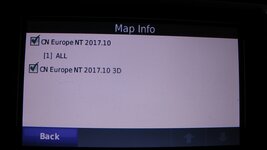
First off check you have the actual map installed and selected, to do this go to tools, settings. map, map info, ensure there is a tick in both boxes, it should read something like cn europe nt 2017.10 and cn europe nt 2017.10 3d, depending on maps installed. if thats ok check software update and also check the sd card for errors.
,
 
In picture 1 you say you were on the A501 (which is shown on the map) but the device showed you you to be riding well off the main road.

That looks remarkably like the problem the 660 had when they were first released. In short, the device is (possibly) not picking up sufficient data from sufficient satellites to calculate its position correctly.

At the time, the problem was cured via a software / firmware update.


I'd start by making sure all the updates are present. I'd then make sure the simple device wasn't struggling to process music, phone calls, Bluetooth communication and whatever 'must have / must do' thrills today's Adventure motorcyclist demands of their GPS device. Whilst I was at it, I'd make sure that any SD card (which may well be carrying the maps) was brand spanking new and the maps properly installed.

If that lot failed, I'd then hard reset the device.

If that failed, I'd be telling the bikermate who sold you the shonky device that he'd ripped you off and stitched you up like a kipper, demanding immediate satisfaction for your pain and suffering or you'll kill him with fire.

PS Pictures 2 and 3 are different. Picture 3 is the 3D view. Picture 2 looks remarkably like the base map screen, ie you have not selected the detailed map.


What Wapping says, with the possible exception of killing with fire :). Its SOOO messy.
 
Right. Maps Reinstalled. It is version cn europe nt 2017.10 3d
Firmware is up to date (Version 5.10)
Done a hard reset by pressing down the bottom right corner while powering up.
Screen STILL looks like this
tumblr_ocf2shQa7I1rcg5c2o2_1280.jpg
 
Alright - here's another thing. When I press the "where to?" icon
And then Address - its says "No data available"

Gratuitously unnecessary screenshots below!

tumblr_ocf75zMLMt1rcg5c2o1_1280.jpg

tumblr_ocf75zMLMt1rcg5c2o2_1280.jpg

tumblr_ocf75zMLMt1rcg5c2o3_1280.jpg
 
did you read my post with reference to both maps and both boxes ticked, should look like this
 

Attachments

  • 2016-08-24 17.31.10.jpg
    2016-08-24 17.31.10.jpg
    106.1 KB · Views: 216
The CN Europe NT 2017.10 3d is not a map its 3d information for certain buildings and landmarks.
 
thats why i said read the above post, because from the pictures you posted it looked to me like there was no map installed. now to your problem, are the maps installed on the pc/mac.
is there an sd card in the nav and is it formatted and visible when connected to the pc/mac
 
thats why i said read the above post, because from the pictures you posted it looked to me like there was no map installed. now to your problem, are the maps installed on the pc/mac.
is there an sd card in the nav and is it formatted and visible when connected to the pc/mac

Yeah, sorry. Slow on the uptake.

Yes, there is an 8 Gig SD card which is visible when connected to the Mac.
 
You do not say what you have or dont have apart from the unit, so this is what you need.


Things you will need to install maps onto unit,


A pc/mac
A internet connection
Mapsurce and or basecamp installed
garmin express
a minimum of a 8gb micro sd card, the quicker the better. formated to fat 32,
A usb lead of the correct type. data and power capable.
Your unit registered with garmin.
and the purchased maps so you can download them from garmin if not done so already.

confirm the above.
 
Okay - progress. I think it is an SD Card program.
I have just reinstalled the map - but UK & Ireland only which fits on the device memory and everything works as it should (see below).
In Map info now have maps CN Europe NT 2017.10 3D and CN Europe NT 2017.10 (1) UK & Ireland.

Now I just need to work out how to get the SD Card to work.

tumblr_ocfay7vojn1rcg5c2o1_1280.jpg


Back
Top Bottom