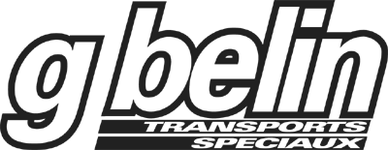
Which FONT please

The font is more than likely Univers Bold Oblique and Extra Black Extended Oblique however as usual the logotype designer has bastardized it with some extra italising etc.

Why do you want to match it?
 
Stoney said:
The font is more than likely Univers Bold Oblique and Extra Black Extended Oblique however as usual the logotype designer has bastardized it with some extra italising etc.

Why do you want to match it?

Yes I want to match it and animate it in Flash....
 
Well if you use Univers you shou;dn't notice any difference.

it definately is NOT Swiss or Helvetica or Gill Sans.
 
Paul G (BHT) said:
THIS should keep you busy Richie ;)

Paul, to save me trawling through all the pages in that link, is there a GS type font there?
 

Attachments

  • screenshot043.jpg
    screenshot043.jpg
    3.3 KB · Views: 106
Whatton said:
Paul, to save me trawling through all the pages in that link, is there a GS type font there?

That came from a scan of the decals off an Adv tank ;) there is one that came close but can't remember the name of it now :(
 
Stoney said:
Well if you use Univers you shou;dn't notice any difference.

it definately is NOT Swiss or Helvetica or Gill Sans.

are you sure :D

i think it's helvetica :eek:

it's like Helvetica Textbook Bold Oblique
with an outline and cramped together :D :D :D :D :D

<iframe src="http://www.myfonts.com/fonts/linotype/helvetica/"height="600" width=" 750" scrolling="yes" frameborder="1"></iframe>
 
Helvetica??

Not in a million years!!

When logos are created it is vary rare for someone to just use an off-the-shelf font. The black outline isn't just an outline version of the font, it is a dupe of the text in front with an added stroke of a couple of mm.

Spotting a swiss style sans serif typeface can be almost impossible but they all have subtle differences, i.e. stroke weight, stroke contrast, counter sizes etc.

Here's one I made earlier with univers - not perfect but close; I couldn't find a font that was as heavily italised as the one in the logo so I susupect that this has also been exagerated by the designed. I have had to condense, add extra italising, reduce character spacing and even then am onlu 98% there. With Helvetica I could only get a 90% match.
 

Attachments

  • logo.gif
    logo.gif
    12.6 KB · Views: 74
Still looks Helvetica Textbook Bold Oblique based to me.
with an outline put on.
 

Attachments

  • 20fac1f588619b0e591d3a65e85761f8.png
    20fac1f588619b0e591d3a65e85761f8.png
    1.8 KB · Views: 72
TUNED IN said:
Still looks Helvetica Textbook Bold Oblique based to me.
with an outline put on.

Ok - try overlaying it on the original sample - no chance!
 
richie said:
I agree Tuned in, but I aint figured out how to put an outline in. Any tips.

I have

Flash
Photoshop
Fireworks
etc etc...

Easy - in Photoshop - Select the font with the magic wand and then 'EDIT/STROKE/ADD STROKE - try 2mm)'

 
Stoney said:
Easy - in Photoshop - Select the font with the magic wand and then 'EDIT/STROKE/ADD STROKE - try 2mm)'


Ahhhh I see.......:D
 

Attachments

  • gbelin.gif
    gbelin.gif
    2.6 KB · Views: 62
I sent you it as Illustrator vector file - is that no good?

In Photoshop you can go to 'FILE - EXPORT PATHS TO ILLUSTRATOR' but first you need to save the paths which you can do by selecting the path with the wand tool and then saving it as a path in the PATHS window 'WINDOW - PATHS'.

You need to first save the selection via "MAKE WORK PATH' then 'SAVE PATH...'

Then you can export it.
 
Stoney, When I try the magic wand on a bit of text in photoshop it does not give me stroke as active in the menu.

Your file I can open in Photoshop but its no longer a vector (of course)

Is it possible to do the same manipulation in Flash. I see your site is made with Flash so maybe you know...

Cheers

Richie


Back
Top Bottom