Windows 8/8.1 is a piece of xxxx

Wrigsby1

Well-known member
UKGSer Subscriber
Joined
Aug 27, 2009
Messages
4,851
Reaction score
688
Location
AB51
I can't remember the last time I looked in this section partly as I don't have too many un-fixable probs with my computer stuff and don't go too wild with what I attempt...

But...

I have just bought a new laptop with Windows 8.1 and what a PIA it is... If you have any nous you can work your way through an OS and find things and it was what Microsoft was famous for... Not being perfect but being user friendly... I have a phone with 8/8.1 on and it's OK and I don't use 3/4 of what it can do... but... As an OS for a PC or laptop it is fecking idiotic... It is so un-intuitive it hurts and where you could piss through processes in Windows 7 or before, this sends you round the houses looking for the gate that some kid hasn't glued up...

I am no ICT god but I am not stupid either and I can't believe MS could kick themselves in the bollocks quite this hard in order to keep up with the kids...

I would appreciate input in to the simplest and cheapest way to retro step back to Win 7... The new laptop is an Acer with AMD quad ore chipset, 64 bit, 8GB ram... It should be absolutely fine without having to do a little dance for the OS...

Alternatively, a way to de function as many of the Win8.1 features and make it function like a normal OS...:rolleyes: It is not Win 8.1 Pro...

PS My router reset itself the other day, something totally unexpected and meaning I had to reconfigure my account/wifi settings... I also reset my wifi password and it took 15 secs to hit the right part of Win7 for a password change and 10 feckin' minutes to find it in Win 8.1...!!
 
Win 7 isn't supposed to be avaliable anymore but you might still find a copy. You will also need to get rid of secure boot and probably best to go back to legacy boot instead of uefi. Before you do anything though check that you can get win 7 drivers.

Best tip I can give anybody about navigating win 8 is forget the gui and use the search.
 
I have a copy of 8.1 but haven't even tried to use it, having looked at the info on it.

I understand though, that there are progs that you can 'skin' 8.1 with to make it at least act like 7.

W7 is easy to get hold of though, in any version :thumb2
 
Cheers for the replies so far... I have the desktop "look" for Win7 but as soon as you dig in you are in tiles and app-speak of 8/8.1... It's the fact that so much that was so accessible in all earlier forms of Windows has fecked off to a dark corner that Microsoft seem to want to keep you away from... Much of it is in there somewhere but hidden behind stupidity...:rolleyes:

Bill Gates said 15 years ish ago that he was always in fear of being history in 10 years time and with designed by lifestyle committee efforts like 8/8.1 you can sympathise... Take the core of what made you globally famous and de-design it... Duh, duh, double duh...
 
I use windows 8.1 all the time, but not the tiles/apps, it works great on my phone and notebook.. can't understand why some folks struggle with it.
 
Just don't use the tiles or apps stuff then. Just use the desktop mode, set it up to boot into that mode. There's no real issue if you do that.
I'm 100% into it and wouldn't go back to 7 despite loving that. I can't get used to the tiles and apps stuff, I don't have a touchscreen and find all the desktop stuff fine to use.

Instead of looking for the old start menu, you will see there is a folder icon in the taskbar, just click that to navigate through the pc. Easy access to control panel there and network settings etc.

It's really not bad at all.
 
I use windows 8.1 all the time, but not the tiles/apps, it works great on my phone and notebook.. can't understand why some folks struggle with it.

I understand... I have it on my phone and its OK to pretty good if you know where to look... It's just after years of easy to use and intuitive Microsoft products they do the opposite and make you heavily modify and find the shortcuts to get over it's lack of PC/laptop usability... The internet feedback seems to be they have lost a lot of loyalty with this and have had a big dent made in their business usage as people try to stay with Win7...
 
Just don't use the tiles or apps stuff then. Just use the desktop mode, set it up to boot into that mode. There's no real issue if you do that.
I'm 100% into it and wouldn't go back to 7 despite loving that. I can't get used to the tiles and apps stuff, I don't have a touchscreen and find all the desktop stuff fine to use.

Instead of looking for the old start menu, you will see there is a folder icon in the taskbar, just click that to navigate through the pc. Easy access to control panel there and network settings etc.


It's really not bad at all.

Good tip and I will give it a try... It is booting to Desktop but the start button takes to tiles hell... I will try the decent sounding workaround... It's so stupid that you cannot obviously go back straight to desktop from other screens as you often only seem to have a "back" button... I will persevere. I am not a Windows Luddite but just want a bit of logical design and the good old intuitive operation... + I understand that underneath all the guff are some good features to work with...
 
I use windows 8.1 all the time, but not the tiles/apps, it works great on my phone and notebook.. can't understand why some folks struggle with it.

purchased a HP Pavillion something mid December, up and running straight away, no problems, my new company laptop ( am MD). Can't see what the fuss is about, transfering files from old laptop did take a while, but changeover did not present any problems.

Am I just lucky or what?
 
Windows 8 has a great search function. In the tiles window just start typing what you are looking for. No need to open a search window. Give it time.
 
Classic powershell brings back the start button and menu as it was in Windows 7, if that's what you're happier with.

Too slow having to type things in the search bar, mouse is way faster, touch screen is ok as well.
 
www.classicshell.net

Just install this if you want a start menu. Takes about 23 seconds from start to finish to go to, download and install. Easy. Enjoy!

Followed some of your earlier advice and thanks... Some sanity has resumed:) If all else fails will follow above...:) Now to find a DVD player that works... Win8.1 doesn't come with one apparently and many of the apps in the app shop are crap looking... Oddly Win7 came with a perfectly good one...
 
I am on the point of buying my son a laptop with touch screen and Win 8.1 for his studies. He has "borrowed" SWMBO's laptop and she wants it back.

There is certainly no problem buying Win7 in the computer shops in Hamburg at present, but I have no experience with Win 8.1. My own laptop is sickly at present so may be doing some open heart surgery on it soon and may be forced to buy a new copy of Win 7 or Win 8.1 if I make a pig's ear of things!

Grey Beard
 
I've just bought a Surface Pro 3 with Windows 8. Spent the whole of yesterday afternoon on the phone to MS support, after stupidly thinking that 2-stage verification might be a good idea. It might be, if MS actually responded to my requests to send a code by text! Sorted problem this morning and am gradually finding my feet - having adopted a 'classic' view in Windows Explorer and unhidden all the system files I'm used to seeing.

So far, so good. Now it's just a question of finding out how to install/replace familiar programs without a DVD drive ...
 
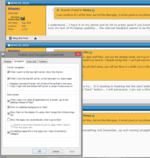
I don't get why people struggle with it so much, I've been using it since I got my mitt's on the beta and been really happy with it. I don't like Metro, the tiled interface, so just don't use it. I boot directly to desktop, just set the setting's from the screen shot by going to the taskbar and right clicking and selecting properties, no meed for additional software. 8.1 the start button is back, just right click the start button, everything you need is there, and it takes you to the windows 7 style tools for it all. Most peoples ill's can be banished by using the right click start button, and booting to desktop.

The Corner navigation you don't need, I use that as I have a touch screen laptop and it's handy.
 

Attachments

  • 81.PNG
    81.PNG
    75.1 KB · Views: 78
I've just bought a Surface Pro 3 with Windows 8. Spent the whole of yesterday afternoon on the phone to MS support, after stupidly thinking that 2-stage verification might be a good idea. It might be, if MS actually responded to my requests to send a code by text! Sorted problem this morning and am gradually finding my feet - having adopted a 'classic' view in Windows Explorer and unhidden all the system files I'm used to seeing.

So far, so good. Now it's just a question of finding out how to install/replace familiar programs without a DVD drive ...

ISO's are a good way, you can then mount them natively in Windows as a virtual DVD, that's why MS now push most of their software as an ISO, I keep a bunch of ISO's on a USB 3 drive for common app's I may need to use (7 did this to), another option is use a VHD as there's native support for this in 8.1 (Has been since 7)

http://www.freeisocreator.com/ will allow you to save any files / folder as an ISO
 
ISO's are a good way, you can then mount them natively in Windows as a virtual DVD ...
That sounds good but ... err ... what's an ISO? :D (ETA - ignore question, I've just looked at the self-explanatory link. Thanks for the suggestion. Will definitely try.)

Luckily we have a home network, so I've managed to share the DVD on our media pc and install an old version of CorelDRAW from that. Whether it will work properly in Windows 8, is another matter entirely. Fingers crossed.


Back
Top Bottom