Wireless conection. Help, before I go mad....

Deleted account 211025001

Registered user
Joined
Feb 3, 2005
Messages
8
Reaction score
10
I've recently bought one of those wireless router thingies advertised on the PC World telly adds.

After two days of getting nowhere with it (the ADL light and 'internet' connected' light were never on) it connected to the net when today I reset it to default settings and reloaded all info onto it.

For about 10 mins I was able to use my email (Outlook Express) but everytime I tried to open up IE7 it asked me to connect to my 'dial up' connection and would not connect to any web sites (email still worked at this stage).

Now the ADL and internet connected lights on the router thingy have gone out and I can't get sweet bugger all through it :spitfire

I know the above is pretty incoherent (it's how I feel at the mo!) but are there any obvious things I should be looking at. Off to bed now as I've had enough now but intend attacking it over the w/e.

Cheers
Andres
 
Outto, this isnt a perminant solution, but does the router have any lan ports?

one thing you could do is connect direct to the lan port and get the wireless part of it out of the solution.

We resell draytek routers, so I'm used to these kind of questions, please feel free to pm me, happy to try and help you work through it
 
I'm no expert but..

I've just changed my router because it kept crashing. I was using a Netgear router and Blueyonder provider, apparently the two don't mix. I've since got a Belkin router and it is fine. If you are using a desktop PC it should be connected to the router via a LAN cable and the set-up done initally on that PC.

Once you've got it up and running on that PC other devices such as laptops should be able to connect via the wireless capabiity. You should power up the modem first for about 30 seconds, then the router and then any PC.

Hope this helps, probably not!
 
hops said:
I was using a Netgear router and Blueyonder provider, apparently the two don't mix.

Hmmm...I've been on Blueyonder cable for about five years and have used a Netgear wireless router for the past three. All going tickettyboo. :thumb

Outtomuch - it's a good idea to have one PC connected to the router by wire. You can then always log on to it and do the config for additional PC, changed MAC addresses etc
 
Wireless fingy

I installed a LINKSYS ADSL2 modem and a Linksys wireless Broadband router all by myself last month, I've got modem going to router[wired] then router port 1 to LAN on PC. got linksys wireless USB adaptor on Wifes PC downstairs.
Only problem was I had to set the ISP on both router and modem to diff ones, not mentioned in instructions[ both gave same ISP] LINKSYS FREE!!! helpline sorted me in 5 minutes flat :eek:
A very nice man in Mumbai, speaking perfect english :eek: went through it step by step, as I said 5 mins later, Perfect, not missed a beat since :thumb


Not bad for someone who still thinks Electricity is Devils Magic :spitfire :eek:
 
There is a lot of variation out there with routers, they should all do the same basic job. I wouldn’t suggest swapping the router at this stage as you don’t know exactly what the problem is.

The trouble is that you have too many individual bits (ADSL line, router, wireless) and a failure in any one with stop your internet connection.

From what you have described it sounds like it is the internet side that is failing, but before you can log a call with you’re ISP you would be better off connecting over the LAN port and proving that doesn’t work… your ISP will only ask you to do the same thing.

Also, did you get a router supplied with the ISP connection? I have seen with the Draytek routers that some of the cheap BT routers can drive a signal further and better in remote exchanges… Draytek have brought out firmware updates that have helped resolve this, if you have an ISP supplied router, try it, if it works look for firmware updates on the router you bought.

Wild stab in the dark, but if its a Linksys router, it would probably be worth calling their tech support, they are fairly good routers, but I've found them a beeach to set up initially.
 
Thanks very much for all the replies so far guys :beerjug:

I'm at work now and won't be home 'till Sunday evening when I'll have another play with it.

It's a Linskys wireless router and receiver just like yours Proff. I'll give the help line a buzz as it seems well reccomended. IREALLY am a numpty when it comes to 'puters so am sure I am doing something wrong :o

The thing that is confusing me is that when I connect the phone socket to the router the ADL light does not come on on the router (I'm assuming this should come on to tell you it can 'see' the phone line) therefore it seems unable to connect to the internet.

For the 10 mins that it did work (on email only) I had reset the unit and plugged it into the phone line. The ADL light came on and the instalation seemed to work with eventually the internet light coming on. Subsequent repeats of this procedure have not had the same result :(

Do I need a modem then (from what Proff says). The only modem I have is a USB dial up one supplied by my ISP (was Wanadoo, now Orange)???? I thought the 'router' thingy did all that the modem did???????

God I'm confused :confused: :o :confused:

Andres

PS I'm certain it's not the wireless link, this seems to be work fine.
 
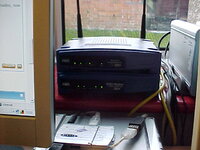
my set up

bought off ebay via 3 seperate sellers inc USB connection on downstairs 'pooter
total cost £30 inc post :)
 

Attachments

  • MVC-018F.JPG
    MVC-018F.JPG
    57.9 KB · Views: 119
Outtomunch said:
For about 10 mins I was able to use my email (Outlook Express) but everytime I tried to open up IE7 it asked me to connect to my 'dial up' connection and would not connect to any web sites (email still worked at this stage).

Cheers
Andres

Presumably you were using a BB modem previously ?

That being the case, you need to go into 'Internet Options' 'Connections' and check the 'never dial a connection' option....you don't need it with a router.

Otherwise, you normally setup a router via a LAN cable from one of its ports to your PC initially, since some routers are only wireless enabled during the setup....which has to be done via a LAN cable.

Is the router a USB type, or does it have it's own transformer power supply? if a choice, always go for the independent power supply.

What sort of wireless adapter is in your PC ?
 
centaur said:
Presumably you were using a BB modem previously ?

That being the case, you need to go into 'Internet Options' 'Connections' and check the 'never dial a connection' option....you don't need it with a router.

Otherwise, you normally setup a router via a LAN cable from one of its ports to your PC initially, since some routers are only wireless enabled during the setup....which has to be done via a LAN cable.

Is the router a USB type, or does it have it's own transformer power supply? if a choice, always go for the independent power supply.

What sort of wireless adapter is in your PC ?

Ahhh................the never dial a connection bit makes sens as, every time IE loads up the screen prompts me to connect my (old) BB modem.

Yes, I use a cable to set up the router and it has an independant power supply.

The wireless adaptor is a matching Linskys one, sold to me with the router.

Cheers
Andres
 
Outto, if you still have the original modem shipped by you ISP and you are using the same ISP, I'd plug that back in breifly and prove that the problem isnt with the ADSL line itself. As I said previously you've got three separate parts to prove, all makes of router work differently, but I would have thought that the ADSL light should have come on when connected as this would show that the line was enabled for ADSL.

Another thing to try would be connecting the router to the first phone socket as it is presented to your house, that will eliminate any problems you might have with internal phone extentions.

Centaur has a point about the dial setting, but I'm surprised it would have worked at all if that was the problem.

My best advice is to try and break it down into small bits and prove each bit as you go along. ADSL > Cabled PC > Wireless PC

What you have should work its just a question of working the problem through logically
 
Some routers go through a sort of internal checking procedure when powered up, this often means that not all the lights come on together, the ADSL light may take a few minutes.

Generally speaking there is a software CD supplied with a router with all the basic setup/configuration options, quite often there will be defaults set which will be ok for initial use.

Normally, you get into the router via your browser (IE usually) and type 192.168.1.1 or a similar IP number into the address box to get in. The instructions should give you a username/password to find the screen to input your ISP username and password.
Normally, that's it...you should be away.

As LiquidLan says though, it would pay to connect to the master BT socket (the bit under the half-faceplate on the main socket) to rule out internal wiring probs.
 
LLAn and Centaur

I am using the master socket and, yes, my BB USB modem works fine in the same socket.

I've tried the 'go through the web browser' route but, as the router does not seem to recognise the telephone line that won't work :(

It really does seem like the router is not 'seeing' the phone line where as my modem does :nenau
It's the second router as I thought there was a fault with the first one and got it replaced so I doubt there is a fault there.

I just can't help thinking I am making a VERY fundamental error somewhere along the line :o

I'll have a more 'logical' work through on Sunday and see what I can suss out.

Thanks again for all the help guys :beerjug:

Andres
 
Outtomunch said:
LLAn and Centaur

I am using the master socket and, yes, my BB USB modem works fine in the same socket.

I've tried the 'go through the web browser' route but, as the router does not seem to recognise the telephone line that won't work :(

It really does seem like the router is not 'seeing' the phone line where as my modem does :nenau
It's the second router as I thought there was a fault with the first one and got it replaced so I doubt there is a fault there.

I just can't help thinking I am making a VERY fundamental error somewhere along the line :o

I'll have a more 'logical' work through on Sunday and see what I can suss out.

Thanks again for all the help guys :beerjug:

Andres

Andres (sorry just noticed your name d'oh),

I have seen this with the Draytek routers, basically you tend to find that the ISP shipped stuff is pretty bullet proof and will carry over longer/noiser lines. Draytek got around the problem by releasing firmware that handled it better. Have a look on the Linksys website and see if there is either newer firmware or firmware designed for longer distances to the exchange or noiser lines.

I've not used them for over 5 years now, but as Proff said, Linksys support are pretty good. Unfortunately if the BB router works, you wont get any joy out of your ISP (well it's very unlikely).

Good news is you aren't going mad, sounds like you've work most of the problem out already.
 
Probably a stupid question Andres, but are you plugging the router's phoneline connector into the same filter the modem was in ?

The router shouldn't need the phoneline connected to be setup, it just needs power and a LAN (ethernet) connection to your 'puter. If you then open up the browser and type in the router's IP address.(as previously noted) it ought to let you in to set it up with the ISP username and password.

Exactly which model Linksys router do you have, and are you using a Mac 'puter ?
 
Hi Centaur

It's a Linskys Wireless-G ADSL Gateway (WAG54GS) and running on a PC Laptop.

I have been connecting it to the phone socket when trying to set it up so will give your soln. a go (along with all the other collected advice here :thumb ).

Was going to do it this afternoon but, after a days trial riding in some of the muddiest conditions ever down on the south coast yesterday and a ride back up to Nottingham this afternoon (mostly in torrential rain :( ) I'm shattered so it's Rioja this afternoon and 'puters tomorrow evening after work :beerjug:

Andres
 
Just a quickie to say THANKS for all your help guys :beerjug:

I'm not sure what I did different tonight :nenau but I disabled the auto connect (as per Centaurs suggestion) and then did everything VERY slowly to give the router a chance to keep up (as per others suggestions).

The end result is I'm typing this wirelessly :thumb

Thanks again for the time and trouble you took to post !

Andres


Back
Top Bottom