XT steep learning curve

adventuredon

Well-known member
UKGSer Subscriber
Joined
May 13, 2010
Messages
7,430
Reaction score
854
Location
Wandsworth, London
After joining and ready through the Zumo forums it seems the xt will be a steep learning curve. Don’t remember all that many trials when I got the 590. Primary reasons for upgrading is colour screen and ability to get routes from mra to device easily. And to use on ride with gloves. No wonder wheel on my bike. Just been revisiting the mirror devices as they do this but are just a dumb emulator of the phone. Not pulled the buying trigger on anything yet.

=====

Moved and given a fresh title.

Richard
 
Last edited by a moderator:
After joining and ready through the Zumo forums it seems the xt will be a steep learning curve.

Don’t believe half of what you read.

Create your bespoke routes neatly and properly in MyRoute. Export them easily to your Garmin XT (type 1) using export version 1.1

Use and enjoy the XT with confidence, as I have for several thousand miles. I shall be using my XT when I (hopefully) ride the four 2,000 mile legs of the German Motorcycle Route. I would not be taking it if I had any doubts that it will work properly. I shall also be taking my sacrificial phone, running MyRoute’s Navigation app. Why both?

A. Because I can.

B. Because the XT does some things better than the Navigation app alone can do. Likewise, my sacrificial phone will do some things better, too.

I will not be running my sacrificial phone through a mirroring device. Why?

A. Because I don’t need to.

B. Because I don’t want to. Why? Several reasons:

I. I don’t need nor want the larger screen; my sacrificial iPhone’s screen is quite large enough.

II. I don’t want to power another device, just for the sake of it. Albeit, the powering of the device is not in itself difficult.

III. I want to avoid having an extra connection between what is running on my phone and that what is being displayed on a mirroring device.

IV. I don’t listen to music, need to look at texts or emails, deal with phone calls or know what the weather is like, all whilst I ride along. Having a device displaying these and other app’s is of no interest to me. I removed all but a very few app’s from my sacrificial phone. It does have a cheap SIM card in it but, most of the time I run it (and MyRoute’s Navigation app) in off-line ‘aeroplane’ mode.

 
Last edited:
After joining and ready through the Zumo forums it seems the xt will be a steep learning curve. Don’t remember all that many trials when I got the 590. Primary reasons for upgrading is colour screen and ability to get routes from mra to device easily. And to use on ride with gloves. No wonder wheel on my bike. Just been revisiting the mirror devices as they do this but are just a dumb emulator of the phone. Not pulled the buying trigger on anything yet.

=====

Moved.

Richard
The XT does seem much more difficult and much less user friendly than the Zumo. I’m hoping there will be a newer Zumo style device soon.
With the Zumo plotting routes in Basecamp and sending to the Zumo is very straightforward. Literally send to device, job done.
I don’t understand what 1.1 even means. None of that needs doing if you stick with your Zumo. The Zumo fits in the cradle that came with my bike too. Which I believe the XT wouldn’t so a new cradle would need to be purchased and wired in.
One of my brothers sold his XT and went back to a Zumo. The BMW versions come up for sale pretty often, both on here and on EBay. As do the Garmin versions. My Garmin Zumo 660 doesn’t work with the wonder wheel but it does everything I need. I believe it’s not going to be updated any more. Which is a tad annoying after buying lifetime map upgrades.
 
I don’t understand what 1.1 even means.

It has to do with the easy export of bespoke routes from MyRoute Routeplanner into a Garmin GPS device. As OP tells us he is using My`Route and (possibly) an XT in the future, he might find the news useful.

As you don’t or won’t use MyRoute and still like your 660, it is of very little concern to you. The 660, used alongside MapSource and / or BaseCamp was (and very possibly remains) a very good device.

:beerjug:
 
Last edited:
The simple truth is, the XT (version 1) and a very long line of Garmin and / or BMW branded Garmin devices that came before, are all pretty good in their own way. Has one been ‘better’ than all the rest or even its immediate predecessor? That (as much as anything else) is a matter of taste or, in some cases bias, let alone stubbornness.

Have some devices required some learning? Yes. A clear example was the jump from BMW’s Nav IV to V, the V working very differently from its immediate predecessor. Have some (later proving to be very good devices) had problems? Yes, the 660 did on its first launch. Likewise the BMW Nav VI, too. The 660’s problems were resolved pretty quickly; the VI’s much more slowly.

I haven’t used the XT2, as I have no need to. I am though put off, simply as it seems to have lost the ability to accept route transfer via Bluetooth and / or is more reliant on staying within the Garmin world.

Do phone based GPS navigation and / or simple ‘Take me from A to B’ app’s have a place in all of this? Yes and it’s growing still. Do mirroring devices have a place, too? Yes, of course….. but they - so far at least - are wholly reliant on a phone.

Does the ability to relay music, texts, phone calls, start up screen pictures of your cat, emails, how often you have applied the brakes, the bike’s tyre pressures or engine temperature and your mum’s birthday (and much more besides) have their places, too? Yes, in some quarters, but not mine.
 
Last edited:
The fundamental issue with the XT is that the faster time option now means faster roads. The old Garmin units had a logic which would send you down a goat track to save a few seconds off a planned route. I suspect that folk (esp in cars) complained about this and now you have to put a waypoint or shaping point on every road you want to be on. This is good as it means that if you share a route with others its more robust. On old units the routing logic of the units was shared with basecamp (if the settings matched) but for the XT this is not quite the case. This means if you are doing point to point routing and want to stay off main roads you have to experiment with "adventurous routing". I've never used that option.

This is an invaluable source if you are navigating with an XT.

https://zumouserforums.co.uk/viewtopic.php?t=1464

for a successful outcome using the XT I always do the following.

  1. Don't initialise "explore" when you set up the XT its the work of the devil :D
  2. In trip planner make all trips "Saved" rather than imported....you can do this in trip planner by starting the route and going back into trip planner and saving active route. This gives it a new name that you can change to something similar(but not the same as the original). Avoids routing issues Repeated U Turn behaviour if the route recalculates. Some have experienced this others haven't but its annoying if it does.
  3. Switch off auto recalculation or to prompted....see above and try as much as possible to navigate yourself back to the line
  4. Make the track visible as well as route if you have to re-calculate you can see how different the new route might be. It shouldn't be if you put in enough shaping points. BUT
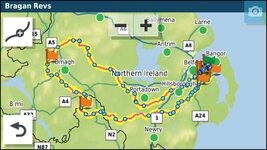
  5. If you are doing a long out and back route with different but close together roads make sure that you have at least a Waypoint at the farthest end of the route. This will stop the unit short cutting the route if you have to recalculate. In the old units they tried to get you to the NEXT shaping point in the direction of travel...if another shaping point is CLOSER to the XT it will just cut off a big lump of the route if you recalculate.
For example, in this route if you recalculated Just before where the 1 is on the map it would cut off the rest of the route and take you to Hillsborough if it was all shaping points and no way points/via points which have to be gone through. The waypoint (flag just beyond Omagh) stops this from happening.

1766923988461.jpg

I use a custom theme so that the track of the route is always visible under the magenta line. On the XT this requires a custom theme. But the above is probably enough to be getting on with.

Don't be afraid to ask questions about the XT on here or on the Zumo forums people are very helpful.

All that said, I predominantly use MRA for navigation now via my Africa Twin AA screen. The XT is for backup/ track and POI handling which it does better than MRA IMHO at the moment. However, I was in Scotland during storm Amy and was glad to have the XT for navigation when my phone USB socket got wet and it would not connect to the AA screen. I had no issues with the XT despite horrendous rain.
 
I find the XT , to be a very useful device , quite a bit different from the older 660 , and there is a bit of a learning curve , but once done it’s a useful “ stand alone “ device . I never go anywhere really without paper maps regardless of which countries i am visiting as they don’t take up much room .
They give me an “Overview “ that you simply don’t get on any small screen device .
Its quite easy to build up your own routing on the machine with a bit of practice - then transfer it over to your riding bud 👍 .
 
By the way, it’s pretty easy to export routes and tracks to a Zumo XT from Basecamp. It’s exactly the same as for any other Garmin device.
1) Connect the XT to the Mac or PC. I find it’s more reliable if a genuine Garmin cable is used and the connection is directly to the pc, not via a hub. Also, if using a Mac, make sure that Express is completely quit, same with commander 1 if you are using it.

2) wait till the XT appears in the side bar, this can take 2-3 minutes

3) select the routes, tracks and waypoints you want to send

4) at the top menu, select Send to Device, find the XT send.

That’s it.
 
I can list the problems I have had with my XT on two fingers of one hand:

1. Once the device suddenly thought I was off the coast of west Africa at Null Island. Google it. I have no idea why. It has never done it since.

2. Running a route, given to me by a third party, which I had stupidly (and lazily) not checked before using. In short, it was created badly originally. I mended it whilst out.
 
By the way, it’s pretty easy to export routes and tracks to a Zumo XT from Basecamp. It’s exactly the same as for any other Garmin device.
1) Connect the XT to the Mac or PC. I find it’s more reliable if a genuine Garmin cable is used and the connection is directly to the pc, not via a hub. Also, if using a Mac, make sure that Express is completely quit, same with commander 1 if you are using it.

2) wait till the XT appears in the side bar, this can take 2-3 minutes

3) select the routes, tracks and waypoints you want to send

4) at the top menu, select Send to Device, find the XT send.

That’s it.

Yep. Garmin to Garmin works well. Nobody doubts that.

MyRoute Routeplanner to Garmin (and to MyRoute’s Navigation app) works well, too. It has the added advantage that it will run outside of a Mac / PC, too.

Lots of other app’s will now transfer well, either to a GPS device or a phone.

That said, lots of bods here swear at BaseCamp. There again, they swear a lot anyway, usually at dumb devices, that can’t hear them. Most often, it’s because the swearing bod just expects the dumb device to work, conditioned as they are by ‘plug and play’…. That and a “Can’t be arsed, mate” mentality, often driven by laziness.

:beerjug:
 
By the way, it’s pretty easy to export routes and tracks to a Zumo XT from Basecamp. It’s exactly the same as for any other Garmin device.
1) Connect the XT to the Mac or PC. I find it’s more reliable if a genuine Garmin cable is used and the connection is directly to the pc, not via a hub. Also, if using a Mac, make sure that Express is completely quit, same with commander 1 if you are using it.

2) wait till the XT appears in the side bar, this can take 2-3 minutes

3) select the routes, tracks and waypoints you want to send

4) at the top menu, select Send to Device, find the XT send.

That’s it.
That’s very good to hear as I fear my old 660 is approaching the end of its life. The XT sounds to be the next device. The only part I’m not liking is having to cut into the cabling for the mount and change it to fit the XT. I like things original on my vehicles and it came with the 660 mount. It doesn’t appear to be a massive job to change it though. I do have electronic/ electrician type people that can do it.
Looking on line the XT seems actually cheaper than my 660 was around 15 years ago.
Is the XT or the XT2 the one to buy though?
 
The only part I’m not liking is having to cut into the cabling for the mount and change it to fit the XT.

Why not simply remove, rather than cut, the existing cable / mount and replace it with what comes ‘free’ with the XT? It’s an easy job.
 
Why not simply remove, rather than cut, the existing cable / mount and replace it with what comes ‘free’ with the XT? It’s an easy job.
Does the XT come with a cable including connector into the wiring loom on the R1250GSA? I was reading an online article about changing from the 660 to the XT it recommended cutting/splicing into the existing 660 cable. Your idea sounds much simpler.
 
As he says above, XT.
I'm always loading routes to it from my phone, when I'm away. The BT feature works really well from phone to XT.
 
XT2 , with no regrets . Bigger , faster , awesome route planning on your mobile ( with the Tread app ) , awesome important and export of routes ( with the Tread app ) . A bonus is the ability to store routes in collections ( like filing cabinets ) .
Both XT and XT2 can be used in portrait mode , but XT cannot use the fabulous Tread app . Just saying.

Some don’t like the Tread app , just like they don’t like Basecamp . Some cannot understand it .
 
Does the XT come with a cable including connector into the wiring loom on the R1250GSA? I was reading an online article about changing from the 660 to the XT it recommended cutting/splicing into the existing 660 cable. Your idea sounds much simpler.
The easiest way to install the new mount and loom it is straight to the battery. That works fine, as the mount only powers up when the XT is installed.

Otherwise, it’s also easy to connect any device into the canbus socket, usually in the headstock. Probably your 660 is connected this way, if it comes on and off with the ignition.

You’ll need one of these:


Connect power and earth wires from the Garmin mount to the canbus connector and plug it in.
 
XT2 , with no regrets . Bigger , faster , awesome route planning on your mobile ( with the Tread app ) , awesome important and export of routes ( with the Tread app ) . A bonus is the ability to store routes in collections ( like filing cabinets ) .
Both XT and XT2 can be used in portrait mode , but XT cannot use the fabulous Tread app . Just saying.

Some don’t like the Tread app , just like they don’t like Basecamp . Some cannot understand it .
In this case, I believe that Glenn is a basecamp fan, and I also believe the XT2 dos not support connection to basecamp, relying on the Garmin ecosystem and Tread for route planning and transfer.

That would make the XT a better choice, in this case.
 
Does the XT come with a cable including connector into the wiring loom on the R1250GSA? I was reading an online article about changing from the 660 to the XT it recommended cutting/splicing into the existing 660 cable. Your idea sounds much simpler.

you can get a lead that plugs into the BMW connector for the satnav. Nippy Norma sells it. You simply join this lead to the end of the XT's power cable. Unplug the 660 cradle, plug in the XT and away you go.

I am assuming you are using the BMW OE satnav cradle for the 660 as it uses the same connector as the BMW devices, just to clarify what @Berin says.


Back
Top Bottom