No, put the plug is cheap enough to get from your dealer. (I’m assuming the 1250 cabling is similar to the 1200 TC).Does the XT come with a cable including connector into the wiring loom on the R1250GSA? I was reading an online article about changing from the 660 to the XT it recommended cutting/splicing into the existing 660 cable. Your idea sounds much simpler.


You are using an out of date browser. It may not display this or other websites correctly.
You should upgrade or use an alternative browser.
You should upgrade or use an alternative browser.
XT steep learning curve
- Thread starter adventuredon
- Start date
Bought my plug and lead from motor worksNo, put the plug is cheap enough to get from your dealer. (I’m assuming the 1250 cabling is similar to the 1200 TC).

I put a link to it above, from Nippy NormanNo, put the plug is cheap enough to get from your dealer. (I’m assuming the 1250 cabling is similar to the 1200 TC).

Ok I will try again after being hoofed off this thread.
I was trying to point out that you can create very good routes on the fly using Adventurous routing.
As a part of XT's steep learning curve this function appears to be overlooked.
This is probably the best thing Garmin has brought out in years if you have never used it, it's worth a punt and trying out.
About a year ago a group of us were in Orleans needing to get back to St Malo we were deciding which way to get back as we hadn't direct route amongst us.
My friend created a route using Adventurous routing that took him less than 2 minutes then shared it with everyone via Bluetooth.
It turned out to be the best ride of the weekend full of sweeping D roads all the way. Since then the majority of our trips away are now done this way.
Especially if plans change or the weather isn't favourable where you aiming to go.
Here's how to set up a route on the device
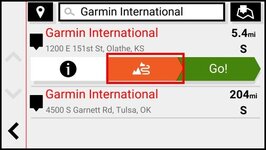
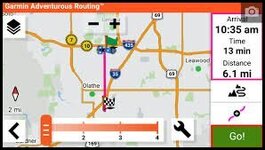
Make sure you turn off motorways/toll roads & Auto recalculate. From Home screen go to Apps --> Trip Planner --> New Trip --> Select Start location ("Where I am now") --> Select Destination (once selected) --> Next --> Adventurous routing --> this brings up the map window with the slide bar which you can adjust for twisties or time to destination --> then select Save.
I was trying to point out that you can create very good routes on the fly using Adventurous routing.
As a part of XT's steep learning curve this function appears to be overlooked.
This is probably the best thing Garmin has brought out in years if you have never used it, it's worth a punt and trying out.
About a year ago a group of us were in Orleans needing to get back to St Malo we were deciding which way to get back as we hadn't direct route amongst us.
My friend created a route using Adventurous routing that took him less than 2 minutes then shared it with everyone via Bluetooth.
It turned out to be the best ride of the weekend full of sweeping D roads all the way. Since then the majority of our trips away are now done this way.
Especially if plans change or the weather isn't favourable where you aiming to go.
Here's how to set up a route on the device
Make sure you turn off motorways/toll roads & Auto recalculate. From Home screen go to Apps --> Trip Planner --> New Trip --> Select Start location ("Where I am now") --> Select Destination (once selected) --> Next --> Adventurous routing --> this brings up the map window with the slide bar which you can adjust for twisties or time to destination --> then select Save.

Ok I will try again after being hoofed off this thread.
This thread meanders all over the place.
I created you a new thread.

Adventurous Routing.
…… mild edit……
My regular group of bike trip friends have all gone for the XT (and XT2 does it too) for this great feature.
I have also bitten the bullet for the XT. With adventurous routing you can create routes on the fly, you don't need to import GPX files using software applications.
You can also share the created routes with others using Bluetooth.
From experience the XT creates interesting routes using Adv routing as long as you turn off motorways/toll roads, Auto recalculate in settings and there is a reasonable distance to your...
…… mild edit……
My regular group of bike trip friends have all gone for the XT (and XT2 does it too) for this great feature.
I have also bitten the bullet for the XT. With adventurous routing you can create routes on the fly, you don't need to import GPX files using software applications.
You can also share the created routes with others using Bluetooth.
From experience the XT creates interesting routes using Adv routing as long as you turn off motorways/toll roads, Auto recalculate in settings and there is a reasonable distance to your...
- Andy63
- Replies: 17
- Forum: Garmin Zumo XT
It makes it much easier for people to find the news of the XT’s ‘Adventure Routing’ capability and the excellent contribution you made.

Richard

I suppose that’s great if you are ok with the device deciding where you’re riding. I prefer to decide for myself which way I’m going.Ok I will try again after being hoofed off this thread.
I was trying to point out that you can create very good routes on the fly using Adventurous routing.
As a part of XT's steep learning curve this function appears to be overlooked.
This is probably the best thing Garmin has brought out in years if you have never used it, it's worth a punt and trying out.
About a year ago a group of us were in Orleans needing to get back to St Malo we were deciding which way to get back as we hadn't direct route amongst us.
My friend created a route using Adventurous routing that took him less than 2 minutes then shared it with everyone via Bluetooth.
It turned out to be the best ride of the weekend full of sweeping D roads all the way. Since then the majority of our trips away are now done this way.
Especially if plans change or the weather isn't favourable where you aiming to go.
Here's how to set up a route on the device
Make sure you turn off motorways/toll roads & Auto recalculate. From Home screen go to Apps --> Trip Planner --> New Trip --> Select Start location ("Where I am now") --> Select Destination (once selected) --> Next --> Adventurous routing --> this brings up the map window with the slide bar which you can adjust for twisties or time to destination --> then select Save.
I saw that Richard but you removed my comments from this thread instead of copying it to a useful Thread in the XT section.
At the moment this thread is getting good views so wanted to keep my comments in
At the moment this thread is getting good views so wanted to keep my comments in
Last edited:
The opening post itself was cut from another thread.
Somebody looking for news on ‘Adventure Routing’ on the XT, would be hard pushed to find it in a meandering about the steep learning challenges faced by a fellow, in anticipation of him buying an XT. Standing alone, it’s already generated some interest and comment.
In essence, this whole thread needs editing, not least as the OP decided to buy an XT2, which is different to an XT.
He’ll now be embarking on his steep learning curve, I guess.
Somebody looking for news on ‘Adventure Routing’ on the XT, would be hard pushed to find it in a meandering about the steep learning challenges faced by a fellow, in anticipation of him buying an XT. Standing alone, it’s already generated some interest and comment.
In essence, this whole thread needs editing, not least as the OP decided to buy an XT2, which is different to an XT.
He’ll now be embarking on his steep learning curve, I guess.
Last edited:

Similar threads

- Replies
- 5
- Views
- 2,100