XT to display distance to destination?

russ996duke

Well-known member
UKGSer Subscriber
Joined
May 25, 2004
Messages
2,251
Reaction score
166
Location
Cardiff, Wales
Getting to use new XT one feature which was useful on 590 is to see distance left to run on a route
Does this option exist on the XT?
I guess it may only appear when you actually run a route as no check box for it on trip data fields?
Ta
 
yes it does, if you push the box that shows arrival time, you can change it to various options, including distance to destination. But if you mean display as well as arrival time, no idea :) Try the garmin sumo forums, loads of experienced users on there
 
It’s only possible when running a route.

Two methods:

Method one

1. Bottom right hand corner of screen, oblong box.

2. Tap on oblong box.

3. Chose what you’d like to permanently display in the oblong box.

Method two

1. Bottom left hand corner of screen, oblong box. This always displays the speed and cannot be changed.

2. Tap on oblong box.

3. A whole bunch of data is offered up.


On earlier Garmin devices it was possible to display more data permanently. Unfortunately, Garmin dropped this in favour of some useless functions. This is despite the screens becoming ever bigger.
 
Last edited:
I’ve not got my XT in front of me but from memory, while in Navigation mode, you tap the bottom right 3 dots then select trip data, it then shows you lots of info on the right side of the screen.

Or, you can have the data fields on the right-hand side of the screen show it, and two other bits of information.

To get the options, have the map showing and tap on the three vertical dots, and select "trip data" and then select what you'd like to see.
 
Last edited by a moderator:
I’ve not got my XT in front of me but from memory, while in Navigation mode, you tap the bottom right 3 dots then select trip data, it then shows you lots of info on the right side of the screen.

Or, you can have the data fields on the right-hand side of the screen show it, and two other bits of information.

To get the options, have the map showing and tap on the three vertical dots, and select "trip data" and then select what you'd like to see.

Yep, tap the 3 dots, select trip data, select which trip data you want to show, displayed down the right side of the screen


Sent from my iPad using Tapatalk
 
Thanks Gents very helpful!
After running a route the arrival time shows bottom right
Will try tapping that icon and see if it can be switched to distance to arrival and back easily
The three dots as is said gives access to lots of choices most of which I can’t see point of!
But arrival only shows when following a route obvs(now!)
Potes tommorow👍
 
Thanks Gents very helpful!
After running a route the arrival time shows bottom right
Will try tapping that icon and see if it can be switched to distance to arrival and back easily
The three dots as is said gives access to lots of choices most of which I can’t see point of!
But arrival only shows when following a route obvs(now!)
Potes tommorow👍
I’ll be in Potes in just over two weeks time. On the Plymouth to Santander ferry on the 11th June.
 
The above regarding trip data fields is your answer.

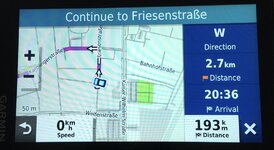
I’m sitting with my feet up on a German hotel bed with my XT in front of me. While running around for 2 weeks I’ve had auto re-calc turned off so used Direction as one field to let me get back on track after diversions.

I usually like destination Arrival time and Distance so I can do my own arithmetic as XT average speed logic is unreal.

When using Waypoints I like to have Distance to Waypoint showing too.
 

Attachments

  • AA3ED765-7770-4086-9B65-B9537077935A.jpeg
    AA3ED765-7770-4086-9B65-B9537077935A.jpeg
    111.3 KB · Views: 10
Ok as hoped time and distance interchangeable quite enjoying the XT!
Re visit in two weeks sorry will have used all the good roads up before you get here!😂😂
 
Bods like all sorts of things displayed or nothing. That is why the older model Garmin devices, where you could chose between more map (less data) or less map (more data) were so good. Why they dropped the ability to chose, I have no idea. Probably in favour of telling bods how many times they have used their brakes between home and Tesco.


Back
Top Bottom