
Zumo 550 memory problems

sola_bristol

Active member
UKGSer Subscriber
Joined
Jun 28, 2008
Messages
101
Reaction score
0
Location
Bristol, England
Just tried to instal the latest Zumo 550 update (2011.20) and the internal memory is not big enough for it. Garmin support indicated obvious file killing but the disparity is huge (needs 1950.2 MB and only 44.8MB available) and their recommendations made no significant diference.
I have an 8GB SD card plugged in with all the music on. It had over 2MB spare so I loaded the update on the PC and then transferred it to the SD card. To avoid conflict I have deselected the unit's use of the out of date edition of mapsource on the unit. It appears to work but I now have (presumably) a largely unused memory on the unit.

Is there a better way of doing it than this? Will it in fact work?
 
Just tried to instal the latest Zumo 550 update (2011.20) and the internal memory is not big enough for it. Garmin support indicated obvious file killing but the disparity is huge (needs 1950.2 MB and only 44.8MB available) and their recommendations made no significant diference.
I have an 8GB SD card plugged in with all the music on. It had over 2MB spare so I loaded the update on the PC and then transferred it to the SD card. To avoid conflict I have deselected the unit's use of the out of date edition of mapsource on the unit. It appears to work but I now have (presumably) a largely unused memory on the unit.

Is there a better way of doing it than this? Will it in fact work?
You're doing the update wrong or you have previously loaded the mapping into the supplementary mapping space which takes up all the memory. Have a look at this thread.

For Garmin users that previously owned SP3s, SP2610 and Quests where you loaded the mapping via Mapsource it takes some getting used to the way that it's done with NT Mapping.
 
Basically the problem is that the latest update won't fit in the 550's internal memory - no matter what you do.

There is no problem whatsoever in putting the latest update on the SD card as you have done. Just disable the previous version with the Map Info tab on the Zumo.

I've done this as I like to have all of Europe in my unit. This is the only way to accommodate the latest maps, and future map updates, as they will only get bigger.

I've not noticed any lowering of performance of the Zumo by having the main mapping on the SD card.

You can still put supplementary maps in the Zumo's main memory (I have WorldMap in mine).

There can be three different map sets; Main and Supp in the Zumo's memory and another Supp (in this case the 2011.2) in the SD card.
 
You're doing the update wrong or you have previously loaded the mapping into the supplementary mapping space which takes up all the memory. Have a look at this thread.

For Garmin users that previously owned SP3s, SP2610 and Quests where you loaded the mapping via Mapsource it takes some getting used to the way that it's done with NT Mapping.

I can't seem to open the thread but have tried the update via the Garmin website managed download direct to the unit and failed every time. This is how I've done it with prior updates and had no problems. Whenever I've put maps on the unit I've used either this method or the "transfer" option in Mapsource which was of course the only option when the updates used to arrive via a CD
 
Basically the problem is that the latest update won't fit in the 550's internal memory - no matter what you do.

There is no problem whatsoever in putting the latest update on the SD card as you have done. Just disable the previous version with the Map Info tab on the Zumo.

I've done this as I like to have all of Europe in my unit. This is the only way to accommodate the latest maps, and future map updates, as they will only get bigger.

I've not noticed any lowering of performance of the Zumo by having the main mapping on the SD card.

You can still put supplementary maps in the Zumo's main memory (I have WorldMap in mine).

There can be three different map sets; Main and Supp in the Zumo's memory and another Supp (in this case the 2011.2) in the SD card.


Thanks. That's very reassuring though what I may do if I can be bothered is to download Western Europe to the unit and just have the rest on the SD card. I ssume they would operate together seamlessly

Cheers
 
I can't seem to open the thread but have tried the update via the Garmin website managed download direct to the unit and failed every time. This is how I've done it with prior updates and had no problems. Whenever I've put maps on the unit I've used either this method or the "transfer" option in Mapsource which was of course the only option when the updates used to arrive via a CD


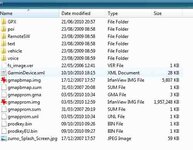
What puzzles me is the Unit's folder info as attached. There is no "map" sub-folder and the 2 files of any size are gmapprom.img one of which is nearly 2GBs in size. I assumed that this is the main (what the gurus are calling "primary") mapping and that the the web update would automtically overwrite this but what seems to be happening is that its being viewed as a block on the update. Should I delete it and then try again for a full download?
 

Attachments

  • Folder Info.jpg
    Folder Info.jpg
    55.7 KB · Views: 1,114
I,m in the same boat with the new mapping, so put it on a 4Gb sd card, problem now on start up it goes to loading maps then just switches of, so I un plug the sd card fire it up and pop it back in, is this a standard problem ?
 
Zumo 550 - Lifetime upgrade issues

Reading the above I have had similar issues. I upgraded from NT v9 to NT 2011.3 as part of Gramins lifetime offer. The initial download installed the new software alongside the old version on the Zumo which confused it. I did a reinstall and thought all was OK until I used it in anger only to find the Zumo maps had reverted back to their default state so I could only see motorways and A roads. The softwra loaded perfectly to my laptop and desktop. To cut a long story short I sent a number of e-mails to garmin which still remain unanswered and in the end called their help desk FOC on 0808 238 0000. In the enmd I needed a 2MB card and lopaded the UK and Ireland onto the Zumo internal memory and the rest of Europe onto the card. They also sent me a step by step PDF with screenshots albeit 27 pages. The helpdesk are very friendly and knowledeable. I did however have to format the Zumo as one of the files had become corrupted and could not be deleted in the normal way. Fortunately I took a copy of all the base files when I bought the unit which I copied back to the device. In short try the helpdesk on the above number during office hours they certainly helped me.


Back
Top Bottom
