Zumo 550 route transfer driving me nuts

diplomaticdanny

Well-known member
UKGSer Subscriber
Joined
May 13, 2006
Messages
2,310
Reaction score
392
Location
Southampton
HELP!

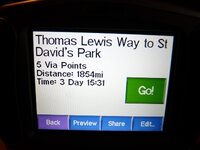
Have done a route in map source from Southampton to Chester 226 miles, every time I transfer it to my zumo it comes out at 1854 miles, what am I doing wrong.

Thanks in advance.

Danny
 
HELP!

Have done a route in map source from Southampton to Chester 226 miles, every time I transfer it to my zumo it comes out at 1854 miles, what am I doing wrong.

Thanks in advance.

Danny

Taking the ferry ??????

Have you updated the maps recently ???
 
You may have maps missing in the Zumo and the unit is routing around the gaps?

:nenau
 
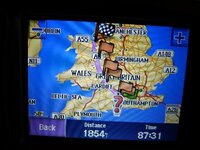
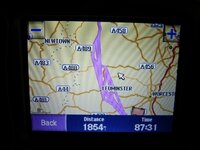
When I preview the route it looks like it is going backwards and forwards a few times, when I zoom in there are several pink lines?
 
Strange - If your clicking waypoints on dual carriageways and motorways, make sure you pick the right direction....apart from that I'm lost, unless you have any unusual "avoids" programmed in or have selected pedestrian/HGV mode or something...

DAMHIK

:D
 
Madness
 

Attachments

  • P1000194.JPG
    P1000194.JPG
    69.6 KB · Views: 130
  • P1000195.JPG
    P1000195.JPG
    85 KB · Views: 131
  • P1000197.JPG
    P1000197.JPG
    79.6 KB · Views: 129
Looks like it's routing you back to your start point after very waypoint..

Clear the decks and start again.

:nenau
 
Just a bit strange that it comes out at 229 miles on map source but I'll give it another go.
 
HELP!

Have done a route in map source from Southampton to Chester 226 miles, every time I transfer it to my zumo it comes out at 1854 miles, what am I doing wrong.

Thanks in advance.

Danny

Hi Danny,

try to approach the problem from a simple angle - create a new route with only 2 waypoints: start and destination.
Let Mapsource calculate the route, and then you transfer it to your Zumo. So we can eliminate wrong waypoints on motorways.

Does this work?

Bearloe
 
+!:thumb

Had the same thing a number of times. Go back to Mapsource. Zoom right in and follow your route and I'm pretty sure you'll find it is a problem you've created from inception.

Whenever you modify a route that consists of anything more than a start and a finish, zoom right into it to check it hasn't done something odd.

Good luck!
 
I feel a bit stupid now, after trying to load another three routes with similar outcomes and then doing a route with 30 waypoints, I went back to the original route on the Zumo and hit the recalculate route button and it came back at 232 miles. now I know why we are called tossers.
 
To reinforce what's been said previously.

When you modify a route (click and drag the route to a different road or set a waypoint) then do it in high magnification. If you accidentally set your route/waypoint on the wrong side of a dual carriageway then Mapsource will take you past the point you set, round the next roundabout/junction and then back to that point then take you down to the next roundabout/junction and back up to the next destination.

tom


Back
Top Bottom