Problems with the wife!

beacon

Registered user
Joined
Dec 13, 2002
Messages
322
Reaction score
0
Location
Leeds w.yorks
She was playing with the new 2610 (first gps we ever had and spent nearly a £1000 on it, what with mounting it on the bike etc. I’ve been spouting off how fantastic it is etc), so she types (better typer than me!) in 1/2 dozen addresses and the unit only manages to find ONE. And 1 of them was in the middle of Leeds with address postcode the lot! Just a small street 8 houses and a club, 2 were address’s that didn’t have No’s just house names 1 was a farm which had no street, and the other was in Lampeter in Wales, But all were real addresses that we may visit this year, and part of my sales pitch to buy it was “we’ll NEVER get lost again!” She of course could find all of them on maps in minutes, so she says. How do I get over these problems apart from the obvious? Are these just not on the Mapsource databanks, The 1 in Lampeter we could find the Street on their map (Bridge Street) but the unit just said "NOT FOUND" I remember reading on another thread try selecting 0 for street No, but that didnt work either. Am I doing something wrong or is the 2610 just not up to it? :confused: Chris
 
No doubt someone will be along soon to tell you the correct way to use it, but when I can't find the address, I locate the street on the PC & mark a waypoint somewhere in the middle (not much good if it's miles long, but usually OK in towns) and then hope to find it once I get close. Biy 'Heath Robinson' but it works for me. I'm using the SP111, but I think the mapping is pretty similar.

Regards,

Charles
 
Women are always right. Fact. Sell the gadget immediately and let her map read. Make sure you moan and whine like only men know how when she gets you lost.

This will result in a heated argument at the side of an unknown road in a town you never wanted to be in.

This is the way it was meant to be. My Mum and Dad did this every year while travelling to our family holiday destinations and my wife and I seem to be upholding the tradition.

My teenage children still remember their Mum storming off on foot down a slip road of the Paris equivalent of the M25 while we were parked on the hard shoulder. I think my comment that sparked this show of stupidity had something to do about us having better luck navigating if we’d left at a different “time of the month”

God you live and learn.
:rolleyes:
 
Nothing anyone can say could match the eloquence and accuracy of Whatton's answer above. And to tell you the truth, most of the time I do exactly what Charles suggests, which is to look the place up using MapSource, create a waypoint, then transfer the waypoint to the GPSR.

However - here are a few suggestions:

1) Don't travel with the wife. That is mistake number 1. I am just leaving this weekend for a summer in Europe, my wife is staying at home in Canada. This is how we have remained happily married for over 20 years... Buy her a plane ticket to go visit an old girlfriend, tell her you are sure she would enjoy that more than a cold, wet, noisy, tiring motorcycle ride.

2) Make sure you have the latest firmware in your GPSR. For a SP 26xx, that will be version 3.40.

3) When entering street names, don't enter suffixes (such as 'street', 'avenue', 'lane', etc.) and try to avoid entering modifiers such as 'North', 'Upper', 'Old', etc. Don't type in the city name either, if you are within 200 miles of the destination and the street name is not so common (e.g. High Street) that you will have hundreds of streets with the same name around you.

So, if you simply type in (for example) 'Cheetham' for the street, you will get a list presented to you containing 'Cheetham Road', 'Cheetham Street', 'Great Cheetham Way', 'Cheethamming Avenue', etc., and you can then arbitrate (choose) which of the results is the one you want. The list that is presented to you will contain the city names as well, even though you didn't specify one.

Once you have nailed down the street you want, go back to the find dialog and put in the house number. The street name will still be active on the find dialog.

The trick, it seems, is the same as doing Google searches - start with a fairly loose criteria (street name only), allow the GPSR to return multiple results (which will be listed beginning with the closest matches to your present location), then refine the search by picking from the list presented, rather than trying to nail the exact combination of street number, prefix, street name, and suffix right off the bat.

Good luck.

PanEuropean
 
whatton63 said:
Women are always right. Fact. Sell the gadget immediately and let her map read. Make sure you moan and whine like only men know how when she gets you lost.

This will result in a heated argument at the side of an unknown road in a town you never wanted to be in.

This is the way it was meant to be. My Mum and Dad did this every year while travelling to our family holiday destinations and my wife and I seem to be upholding the tradition.

My teenage children still remember their Mum storming off on foot down a slip road of the Paris equivalent of the M25 while we were parked on the hard shoulder. I think my comment that sparked this show of stupidity had something to do about us having better luck navigating if we’d left at a different “time of the month”

God you live and learn.


:rolleyes:


whatton

You must be my long lost twin brother :D This exemplifies me, family, wife and even losing it in Paris at 5pm on a summer Friday with car and caravan in tow.

:hapybnce: :hapybnce: :hapybnce:

Regards

Tim
 
Pan E.......

Thanks again for the Info.

You have cleared a few problems I've encountered in the past with your points covered here..........;)

:beerjug:

CC

:cool:
 
PanEuropean said:
Uh, you talking about problems with the wife, or with the navigation gizmo?

:hapybnce:

Oops..........The Gizmo, no problems with the Other........;)

CC

:cool:
 
coolcarbon said:
:hapybnce:

Oops..........The Gizmo, no problems with the Other........;)

CC

:cool:

no problems with the Other Didn't know that was possible, well not in my, sorry I mean Her house.
:D :D :D :D

Regards

Tim
 
... just to add to PanEuropean's answer, it's also worth remembering that the City attributed to a road may not be the one that you think it is.

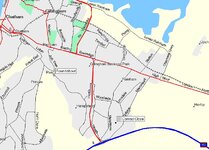
For example, I went to an address in Kent this morning. I was told to go to Conrad Close, Rainham, Kent, so I duly searched the address in MapSource. Nothing came up, so I did a check on Streetfinder.co.uk and saw that, despite it actually being in Rainham, was listed as Gillingham. Did the MapSource search on Conrad Close, Gillingham and, hey presto, up it came!

Greg
 

Attachments

  • untitled2.jpg
    untitled2.jpg
    112.1 KB · Views: 291
But surely having the first 4 digits of the post code means mapsouce must know wher it is?
 
panEuropean

Thanks for your guidance here.

By sheer coincidence I too had just discovered why I was having problems finding 'existing' addresses on search. For example, typing in 'Hill Road' brought up a list of Hill ***** - but on it there was no Hill Road - only Hill Road West. However, by just typing in Hill it brought up a list that did have Hill Road:confused:
 
beacon said:
I remember reading on another thread try selecting 0 for street No, but that didnt work either.

I was looking for an address yesterday, and I didn't know the house number. So I left that at 0 first: nothing found.

Then I tried 1, and bingo, it was found...

It seems like they have a hard time at Garmin getting the house number thing right.

Cheers,
Michel
 
Addresses

Just to add to what Pan European has said:

I've just started using a Garmin and have found that the data lists are quite sensitive when searching - as with any basic database. So what I do is put in the first few letters of the address in a find field and then hit the find to pull up the drop down list and then select the right format according to Garmin (case, spelling etc).

So for example if I'm looking for a county i.e. Hampshire. I'll just type in ham and then hit find and it gives me the drop down list to select hampshire. That way you save time typing in the whole name but you also select the correct format and spelling according to Garmin - which is what you need for this kind of database.

What I inititally did was try and fill in every field by typing everything in - don't need to do this as Pan European has said. If it doesn't find it on the map where you think it should be then just go back and add in another field till you get there. If you want a High Street then just select the City under city find rather than address - it's likely to take you to the centre. If not then zoom in on the map once you've found the city and mark a way point on the map.

My wife has wondered why I've been glued to this little gizmo all weekend learning about it. It is great though - but I'm going to make damn sure I know what it does before she gets a demo!!

:P
 
Am I right in saying that the GPS V wont find a road name unless you have loaded in the relevent maps from mapsource first?
 
SVK makes a very good point in his post above.

When searching, type in as little as you can possibly get away with... then pick from the list that then appears.

Keep in mind that with the SP 26xx series, there are several ways you can conduct a FIND - and it is important that you know how the thing works, because this will make a big difference to how quickly you get the result you want. The default system behaviour is to find 'near here' - meaning, to start looking from the present position of the GPSR, and to list the qualifying results (results that meet your criteria) in order, beginning with the closest result to 'near here' - your present position.

If you look carefully near the top of the page that appears when you initiate the find (meaning, the page where you start typing), you will find a drop-down menu that allows you to change 'near here' to some other possibilities, such as 'near destination', or 'show on map'. So, if you have a route active to, for example, Manchester, and you are presently in Paris, and you want to find a street in Manchester, be sure to select 'near destination', instead of accepting the default 'near here'. That will ensure your results are ordered such that they are closest to Manchester, not closest to Paris. If you know what village the street you are searching for is, point to the village on the map, then use that as your starting point for the search. Chances are, the first result returned will be the one you want.

Be aware that the FIND command is limited to finding places that are no more than 200 miles (straight line) away from the starting point you specify (near here, near destination, near other, etc.). That probably won't create problems in the UK, but I remember trying to find a user waypoint once when I was riding in the American midwest, and nothing came up at all on my list of user waypoints, even though I knew I had about 100 in memory. Problem was, I wasn't within 200 miles of any of them, so none were displayed, because I did the search using the default 'near here' filter, without even thinking about it.

Lastly - Garmin doesn't make maps. Garmin licences maps from mapping companies, such as Navteq (formerly known as NavTech), Etak, and others. Most of the current products come from Navteq. If there is an error on a Garmin map product that comes from Navteq, that same error will be present on any other GPSR that uses Navteq data, for example, BMW OEM navigation, Ford OEM navigation, Panasonic and VDO aftermarket navigation, etc. Shit on the map supplier for cartographic problems, not on Garmin. Here's a direct link to allow you to take a dump when you find an error: Navteq Contacts

PanEuropean



Back
Top Bottom