2610 mapping problem

kevingrahambutler

Registered user
Joined
May 12, 2012
Messages
1,262
Reaction score
-2
Location
sunderland, england
I update the maps on open street maps to my 2610 all works fine switch it on pluged into car for test run all works fine the black marker sticks to the road as it shoulda round the street, program a route into the unit and the pink line that should lead round the streets to your designation only goes in a straight line, so it will not navigate what have I done,,,, any help would be greatfull
 
I update the maps on open street maps to my 2610 all works fine switch it on pluged into car for test run all works fine the black marker sticks to the road as it shoulda round the street, program a route into the unit and the pink line that should lead round the streets to your designation only goes in a straight line, so it will not navigate what have I done,,,, any help would be greatfull

Sounds like the device has not calculated the route, try getting it to recalculate and see what happens.

John
 
When you say programmed a route do you mean in Mapsource or on the device itself? I'm assuming the latter.

If it's anything like my 2720, which is the next generation on, there is an option in the Navigation setting for 'off road' that results in exactly as you describe. This is in there with 'Faster Time' and 'Shorter Distance' as navigation preference options. Hopefully the 2610 is similar.
 
Sounds awfully like the map on your PC (where I assume you did your 'programming') do not match the map on your device.

If the device does not 'know' where the electronic pinpricks are in relation to its 'view' of the road, it will draw straight lines between them.

Check also that you haven't inadvertently selected navigation by most direct route or some sort of off-road setting. I forget if this is even possible on a 2610 but maybe worth a gander. If it isn't possible, you'll rule that out at least.
 
Last edited:
Sure you've loaded the maps onto the memory card in the device? I had a similar issue and discovered that the device was navigating on the base maps loaded onto the device rather than the maps I thought I had loaded. When you switch the device on, what does the screen say about the maps it is loading?
 
I do the routing on the device, I'll check just to make sure it's not on off road, I looked yesterday I'm sure it's not, the maps were down loaded to map source then I pluged the garmin 2610 into the computer found the device then transferred the maps to the unit, do I need to drag and drop the maps to the memory card rather transferring to the unit
 
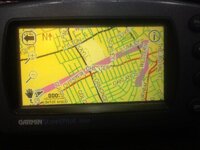
This the photo of the problem,,,,,as you can see the pink line is not following any roads just heads in a direction so when I start off it tell me I'm off the route recalculating, even if I cross the route it still tells me the same,,,,any advice
 

Attachments

  • image.jpg
    image.jpg
    48.1 KB · Views: 172
I think you have a different set of maps on yer computer to whats in yer garmin
or has someone sent you the route
Or it is set for offroad
If you are using Openstreetmap on Garmin I dont think that works
I have had a similar problem as I had 2 x 2610s on different versions
I now have changed the all to Openstreetmap and jobs a goodun unless I dig up an old route and try and run it on the newer software
I now open them up on new software - sometimes getting the3 straight lines as you do then click on the route and drag it to the new road and it sorts it out
HTHY :thumby:
 
This the photo of the problem,,,,,as you can see the pink line is not following any roads just heads in a direction so when I start off it tell me I'm off the route recalculating, even if I cross the route it still tells me the same,,,,any advice

Is that route just from point A to point B? It looks like it's pretty well straight for the first bit but there's a dog-leg after the right turn. This crudely echoes the main road but displaced by a fair margin. That smacks of routing on the basemap to me.

The fact that mapping is displaying indicates that you do have detailed mapping on the unit but for some reason it's not using that for routing.

I would go back to your OSM download, or do it again. This time grab both the Mapsource installer and the GMAPSUPP.IMG file. Put the latter on the memory card. Not sure on the 2610 but on later models this needs to be in a directory named Garmin.

If you're getting routing in Mapsource, with the correct mapping selected in the drop down menu at the top, then maybe try writing the mapping directly to the card in a card reader, again writing to the appropriate Garmin folder.

You might need to select the mapping by checking a box in the menus, probably in a section relating to Mapping. However, ISTR that the 2610 doesn't use both the GMAPPROM.IMG and GMAPSUPP.IMG of the later NT based units, just the GMAPSUPP.IMG that is overwritten every time you update.

All a bit fuzzy as my memory and knowledge of the 2610 is a bit faded. The Gray One/John should be able to help as he runs a 2610 with OSM but he's away from home at the NEC this week.
 
I would indeed like to help but my 2610 is in Austria and I am running our stand at the NEC this week, we return to base a week on Monday so if you still have the problem then I will have a look and see if I can replicate the problem. Shame really as I find that the 2610 with up to date OSM mapping works very well.

John
 
John thank you,, hopefully I'll have it sorted if not I will be in touch,,,,,, I've used 2610 for two years on 2009 mapping, I thought I would try to update maps as I have three 2610 units as I like using them, I'll keep two as spares, in 2015 planing a trip across Russia so I would like it very much to Carry on using the 2610 if I can get the mapping sorted.".."....
 
Kevin - I'm not sure if this is relevant to your issue but .gpx files have various iterations and Garmin (Mapsource/Basecamp) ones carry data that is not recognised by OSM

I use OSM mapping on iOS devices with the excellent PocketEarth app. Importing a .gpx file created in MS/BC causes the route on my device to straight-line between waypoints (PocketEarth have a workaround that strips out the extra data such as heights, turn information etc etc)

As I understand it the actual routing is done on the GPS itself by looking at the Garmin coding contained between tags. This I guess means that the OSM mapping is at a loss as to what to display when presented with a route in Garmin .gpx format and so just displays waypoints it recognises and joins them with straight lines

Basically GPX format is designed to store GPS Tracks and not routes with driving instructions, which are contained between Garmin specific marker tags

Perhaps if you imported a route as a .gdb file you might find it will then follow the roads on your 2610 OSM mapping

As I said, this may have nothing to do with your setup
 
Kevin - I'm not sure if this is relevant to your issue but .gpx files have various iterations and Garmin (Mapsource/Basecamp) ones carry data that is not recognised by OSM

I use OSM mapping on iOS devices with the excellent PocketEarth app. Importing a .gpx file created in MS/BC causes the route on my device to straight-line between waypoints (PocketEarth have a workaround that strips out the extra data such as heights, turn information etc etc)

As I understand it the actual routing is done on the GPS itself by looking at the Garmin coding contained between tags. This I guess means that the OSM mapping is at a loss as to what to display when presented with a route in Garmin .gpx format and so just displays waypoints it recognises and joins them with straight lines

Basically GPX format is designed to store GPS Tracks and not routes with driving instructions, which are contained between Garmin specific marker tags

Perhaps if you imported a route as a .gdb file you might find it will then follow the roads on your 2610 OSM mapping

As I said, this may have nothing to do with your setup

My 2610 will deal with .gpx files no problem. It will, as will most Garmin devices, cope with routes made on other versions of the Garmin maps too. I don't think the problem here is incompatibility between maps. The units usually recognise such problems and simply recalculate the route to suite the maps on the device.

John
 
I've tried to up load to another of my 2610 units but still the same, so I think I'm becoming lost with it.......
I don't no if this would be possible, if I could send my unit with a 4gb compact flash card then have a look to see what I'm doing wrong, I'll cover the cost
 
I've tried to up load to another of my 2610 units but still the same, so I think I'm becoming lost with it.......
I don't no if this would be possible, if I could send my unit with a 4gb compact flash card then have a look to see what I'm doing wrong, I'll cover the cost

The 4 gig card might just be the problem, try a smaller card, mine works fine with 1 gig.

John
 
Kev
I have a 4GB card in me slot but it only has under 2gb of info on it
Want me to post yer a card off my unit and see if it works on yours
It will be a 1 gb 0r 512mb


Back
Top Bottom