
Basecamp beginner.

*as fine as it can ever work on any platform, which is not great TBH.

Yep.

Also, the Garmin units "non connecting" to Macs, this is a classic on Apple Silicon Macs.
I recently discovered (apologies if this was common knowledge! :) but might be worth repeating ) that this is due to an incompatibility with the USB controller chipset used in recent Macs.

This is easily fixed using a USB-C dongle to connect the Garmin to the Mac, as the dongle will have its own chipset.

This explains why I was able to see the Garmin only on my M1 laptop (I use a dongle there) and not on the M1 Mac Studio at my desk... as I use a USB-A to C adaptor on that one. Switched to a dongle to connect the Garming and works perfectly.

USB-C dongle being this:
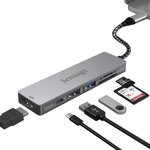
61h1dAUVLYL.jpg

Everyone with a Mac laptop has a few :D
 
I don't really use Basecamp or plug Garmins into my Mac much anymore, as I generally use a phone these days, but I do plug my mate's ancient Montana 600 occasionally and that goes into an old USB hub connected the USB A port on the back of the mini.
 
Garmin have only ever offered token support for Macs. It's a bit of a faff even to connect the device sometimes.

The optimist in me is hoping that the reason for abandoning Basecamp (which let's face it looks like something from Windows XP :D) is that they've re-written it from the ground up and have made a beautiful and fully featured multi-platform program.

The realist in me thinks they'll possibly be moving it to the cloud and making it subscription based.
Nope :D they have 3 apps for the XT and XT2 the XT works with Explore which you can use as a repository for all your routes and tracks in "collections" you can plot a route on the Explore Website........but you don't know what you are getting until it calculates in the unit. Explore is is also the route/track repository for the XT2 but it also gets the tread app that allows route planning and synchronisation with your device. The XT gets "Drive" which is very good to be fair to transfer routes and tracks to you device from your phone and to supply live traffic weather data etc to your device. (the live traffic data is not very live so I don't use it.) The confusingly named Explore phone app has a route plotting function but does not work with the XT because it won't route along motorways :D.....but does sync with your explore library so that if you've disconnected your device from Explore (strongly advised) you can still download routes from your library and send them to your device using Drive. Basecamp is still good and works grand with either device though the XT2 will claim that it does not when you plug it in and the latest versions of Express will not let you down load your mapping to a PC if you plug in an XT2. Both devices have a weird routing algorithm which takes a bit of extra planning and design if you are using Basecamp or MRA to make routes. Tread seems to do its own thing with routing (according to the forums no personal experience) with the XT2 and you may or may not get the route you were planning :D So all of that is a bit of a shitshow on its own.

I have a few old Garmins which are actually better for navigation IMHO as when their settings are matched with basecamp they are WYSIWYG with it.

MRA takes away all the pain of dealing with Garmins online offerings. I sync my phone with my MRA route library and can send routes from my phone to my Garmin or use the routing app on the phone which is now very good in its own right. I mostly use MRA for routing now and Basecamp for tracks and POI's which it does much better than MRA at the moment.

Thankfully I use PC's at home one Win 10 and 2 Win 11 and they play nicely with express and Basecamp. I have my basecamp database on onedrive so all of the PC's machines have access to the same route/track database.
 
I was asked this by a friend recently - how do you transfer routes from MRA to a NAV 6, or to rephrase the question, can you transfer said routes without using a computer (he’s having difficulty getting his MacBook to connect to the Nav 6)
Take a look at the YT video.
 
Just use mra and save yourself a lot of grief

Sent from my SM-A236E using Tapatalk
There is the answer. I would not waste precious time with basecamp when MRA does it all and better. Routes will work across all devices, or with tomtom go app on phone..

Worked best on macbook though. I had a quick look at using it on my ipad and just too difficult.
 
There is the answer. I would not waste precious time with basecamp when MRA does it all and better. Routes will work across all devices, or with tomtom go app on phone..

Worked best on macbook though. I had a quick look at using it on my ipad and just too difficult.
There is an answer but it’s the wrong answer. Basecamp is far, far superior to MRA in every respect. Much, much more user friendly, far easier to plot routes and very easy to share with others.
 
Weird isn’t it. I’ve been using Basecamp for many years and find it much more user friendly than the MRA and far easier to send routes to my Zumo 660. I find plotting routes on MRA much more of a faff. On Basecamp I just put the start point in then drag the route to whichever route I want it to follow. On MRA and calimoto I seem to have to put start and end points in, the app then picks its own preferred route and to change it I need to put in points I want it to follow.
I’ve not heard of Tom Tom planner as I wasn’t aware that Tom Tom had any form of route planning.
I tried base camp long ago and watched loads of tutorials but never got the thing to work. My routes on the nav never matched what I thought I plotted.

TomTom is really easy. Not too many options to make it difficult. I have the account from when I bought a TomTom. Plot your route, drag the route where you want it or add twisty and highest, download as GPX, email it to yourself, download to phone and share with Garmin app, then it loads on Zumo and you convert it to a route. I have a video link somewhere and will share it.
 
I tried base camp long ago and watched loads of tutorials but never got the thing to work. My routes on the nav never matched what I thought I plotted.

TomTom is really easy. Not too many options to make it difficult. I have the account from when I bought a TomTom. Plot your route, drag the route where you want it or add twisty and highest, download as GPX, email it to yourself, download to phone and share with Garmin app, then it loads on Zumo and you convert it to a route. I have a video link somewhere and will share it.
Used Tom Tom many years ago on a fire engine, by the time it said take the next turn we were passed it. Far, far too slow and no Basecamp type plotting system. We only have one of our group of riders that uses Tom Tom and he cannot share any of our Basecamp routes. He just puts the hotel in his and it takes him the shortest route which is usually a pretty boring route.
 
For a new user to Basecamp it can be a bit daunting and if you have used more modern interfaces like Google MyMaps or MRA for that matter it will not work the way you expect it too. I started using Mapsource many years ago and even moving from that to Basecamp was a pain. The big oddity of Basecamp is that its uni-modal you can only carry out one function at a time so if you are using the route drawing tool with the mouse you can't use the mouse at the same time to move the map you have to select the hand tool or use keyboard shortcuts. Modern interfaces like MRA are multimoda so you can create a waypoint, create a route and move the map all at once in basecamp three tools would have to be selected to do this or a combination of the mouse and keyboard shortcuts.

For learning Basecamp download the documents here.


And follow this blokes video Tutorials.

 
I have used Basecamp for 10 years on a Mac, both intel and apple silicon Macs. Both have worked fine with Express and Basecamp, though sometimes the device takes a while to connect, it connects quicker the less stuff it has on it.

However, Garmin do not appear to support Basecamp anymore. The last update in the App Store for Mac was 4 years ago. Though there is a slightly later version available on the Garmin website which was last updated 2 years ago today! Happy 2nd Birthday Basecamp v4.8.13.

If Garmin's app ecosystem wasn't such a mess, I would be recommending not to bother now with Basecamp, I have been finding issues transferring routes to my device of late from Basecamp. You would have thought they would develop one unified cloud base mapping and routing system, but no, there is Drive, Explore, Tread etc. I tested a route yesterday transferred from MRA, and that transferred with no issues, but I would prefer to use Basecamp, it's the most versatile route planner so if I can get Basecamp to interface properly with the maps on my device (nav V) I will probably still continue using it, but it may just get more and more buggy.
 
I always got on very well with MapSource (on a PC) and then BaseCamp on a Mac, right up until the moment that:

A. I had to jump through some hoops to get BaseCamp to see my XT (thank you er-minio for helping there at the time).

B. BaseCamp became increasingly flakey on my powerful Mac, around about the time of lockdown.

In brief, I dumped BaseCamp and moved to MyRoute. I haven’t gone back, nor have I dabbled with Garmin’s other applications.

If Garmin had released a reliable Cloud based version of BaseCamp, usable on my iPad / iPhone, I’d definitely have given it a go. But they didn’t. That was their loss and MyRoute’s gain.

Yes, you have to pay for a ‘Gold’ subscription to MyRoute’s Routeplanner app and its separate Navigation app but, with time, both have become better and better. I read that MyRoute are planning on a shake up of Routeplanner, I guess to mirror the very successful shake up of the Navigation app; I hope it goes well!
 
Last edited:
Garmin's (lack of) software strategy seems to be dictated by internal issues within their org.

They did put a lot of money in wearable/fitness software, while the consumer GPS was clearly lacking. And this could be (my very wild guess) due to internal budget or resources allocation.

It's been years now, I don't see them solving this problem or expecting/wanting to solve it. I wouldn't be surprised if they somehow fold the division.

My assumption is that to save money, Garmin might end up dumbing down even further their consumer/automotive GPS offering, so that you won't even need any dedicated software to do some proper planning, but a shitty web editor on OSM maps (Explore) will do.
In reality, the share of the market that does complex planning or uses these device to do combined on/off road mapping is extremely small, and probably not that profitable.

I hope I'm wrong.

As I wrote above, I'm using MRA (and paying for it). Not a big fan of it to be fair and tons (for me) of things still missing, but compared to what Garmin provides as planning software today... a spray of diarrhea on a computer screen would still be better than anything from Garmin, so MRA has an easy win - more power to them. :)
 
Another advantage associated with MRA as opposed to Basecamp/Garmin is that with the proliferation of CarPlay type devices now available for motorbiking (in some cases much less expensive than dedicated bike satnavs), it’s so streamlined to create a route and then display it via the Navigation Next app whilst keeping your much more expensive phone safely tucked away, not to mention the other facilities the devices offer
 
I don’t know for fact but I agree that Garmin see thier future in wearables rather than GPS units which maybe you can understand considering stand alone devices let alone thier software seem to be a thing of the past.
MRA in my mind have taken a very proactive approach and are well on the way to becoming market leader in this field leaving the other apps behind.
I joined several years ago when they were offering a lifetime Gold membership for about €150 which I signed up to. Have to say I use the MRA programs as I can do this at work when I have a spare 1/2 hour or at lunch time. Our company won’t allow any non company registered software on thier equipment but accessing the MRA programme is fine. I also then have to admit once I have designed a route in MRA I also create the same route in basecamp on my PC and upload it to my NAV 6. Silly really as I could easily do the same with MRA

I did reach out to the 2 guys that started the whole MRA thing just to ask them some questions. They were constantly on the Q&A forum and also because one of them lives about 10 mins up the road from me. He was very interested in the early comments on UKGSer particularly from Wappers who at the time was promoting MRA quite passionately. I was also asking if I could use some of thier content for my own website which they agreed to.

They are 2 really bright young guys who if they play it right will make thier product only become bigger

A bit off track, apologies….
 
Last edited:
They definitely saw the opportunity in the market and went for it. Very, very smart.
 
Used Tom Tom many years ago on a fire engine, by the time it said take the next turn we were passed it. Far, far too slow and no Basecamp type plotting system. We only have one of our group of riders that uses Tom Tom and he cannot share any of our Basecamp routes. He just puts the hotel in his and it takes him the shortest route which is usually a pretty boring route.
Like ALL systems/methods…waypoints are required.
Tomtom app is not bad tbh, and the plotting app is also ok. No comaprison with tomtom units of years ago, and tested side by sidewith Garmin, makes better choices.
Tomtom go (on Android phone) works very well.
Like any nav (used as a unit) if you just select ‘go to’ then that is exactly what they do. Within the selected parameters such as toll/no tolls etc.

A few of us have plotted and shared routes on mra, downloaded to Garmin(s) and my Android with tomtom app.
All routes worked 100% accurate.
Only issue * was tomtom app refusing one of the routes in Germany a few years back.

* this was because the road was actually shut for road works, tomtom go being live knew this, we were puzzled until we worked out what was happening. This only happened after we blindly followed the ‘working’ Garmin…to be confronted with a barrier!


Back
Top Bottom
