Basecamp weirdness

(RIP) trickytree

Well-known member
UKGSer Subscriber
Joined
Nov 15, 2015
Messages
1,454
Reaction score
1
Location
Lincolnshire, England
Pretty new to Basecamp and to be honest I'm finding it a bit difficult, but, I've managed to put a few routes together and managed to get myself from A to B.
Tonight I've done the same as I've done before but the following is happening.

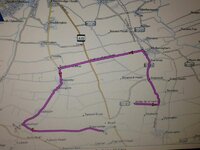
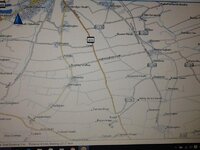
Start off from Ashby and go to Brauncewell.......done the route loads of times, onto the 1191 and down the A15 then onto Brauncewell road. But not tonight, it takes me on a mystery tour.

It does the same at random points on the map. Removed and reinstalled Basecamp and reset the Garmin 390 to factory settings but still the same.

WTF has happened?
 

Attachments

  • image.jpg
    image.jpg
    55.4 KB · Views: 233
  • image.jpg
    image.jpg
    53.9 KB · Views: 230
If you have motorcycle as your preferred route setting then it tries to take you on a 'curvy' route. Try using the car setting for a more conventional direct route.
Alan R
 
As Alan said, it's more than likely down to the settings.

As to why it has not done it before? I can only guess that it's the first time that you have selected two points that, between which, the software was able to work its magic.

One tip: Whilst learning BaseCamp, turn all the settings and preferences to 'Off' that way it at least removes the possible confusion of software induced features. It's easy enough to turn them on again.

Why do Garmin have these choices, preferences and avoidances built into the software? It's their attempt to help bods who just want to be told how to get from A to E via B, C and D via say windy roads and at the same time by avoiding motorways, as they as shIt.
 
Don't think I can on my 590. I agree with you to a point but sometimes I just want it to guide me down the route I've taken the trouble to plan.

If you have planned the route properly it should do that. Obviously if you select preferences that conflict with the route you might have problems but otherwise your device should follow a planned route. My 390 follows my routes without problems ( as long as I don't use the motorcycling set up!) If you want it to use specific roads you do need to place via points to tell the device this.

John
 
If you have planned the route properly it should do that. Obviously if you select preferences that conflict with the route you might have problems but otherwise your device should follow a planned route. My 390 follows my routes without problems ( as long as I don't use the motorcycling set up!) If you want it to use specific roads you do need to place via points to tell the device this.

John

... Or in Basecamp convert the route to a track, send the track to the zumo, then convert the track to a route in the zumo...

Tracks are made up of many automatically added shaping points which retain the accuracy of the planned journey when the zumo converts and calculates the route.


Back
Top Bottom