Basecamp

Tim Cullis

Scotland lover
UKGSer Subscriber
Joined
Oct 10, 2004
Messages
3,580
Reaction score
52
Location
Putney, London and the Altiplano de Granada
According to some reports Basecamp, rather than Mapsource, is supposed to be the way of the future on Windows.

But like Mapsource, info is thin on the ground.

Is anyone using this extensively? What are the advantages/disadvantages?
 
Mapsource is for Windows computers

Basecamp is for Apple OS X computers

Two completely different products for two completely different systems. Can't see either being used on anything but the systems they were designed for.
 
I use Basecamp on the Mac because Garmin were leaving features out of Roadtrip and seemed to have stopped updating that application altogether. Don't know if this has changed or still the case now as I'm happy with Basecamp. It does more than Mapsource did when I had Windows.


Sent from my iPhone using Tapatalk
 
According to some reports Basecamp, rather than Mapsource, is supposed to be the way of the future on Windows.

But like Mapsource, info is thin on the ground.

Is anyone using this extensively? What are the advantages/disadvantages?


Can I use this thread to ask a question about Base Camp.

I've recently gone over to MAC, downloaded Road Trip which when unlocked it using my Zumo online, was still only a basic road map no search or street detail.

Rang Garmin who recommended using Base Camp which they said was the preferred system.

Now with my Zumo connected Base Camp searches and goes down to street level. But ONLY with Zumo plugged in. Is there a way to get all the detail without connecting the Zumo?
 
Can I use this thread to ask a question about Base Camp.

I've recently gone over to MAC, downloaded Road Trip which when unlocked it using my Zumo online, was still only a basic road map no search or street detail.

Rang Garmin who recommended using Base Camp which they said was the preferred system.

Now with my Zumo connected Base Camp searches and goes down to street level. But ONLY with Zumo plugged in. Is there a way to get all the detail without connecting the Zumo?

sounds like you don't have the mapping installed on your mac, only on the zumo.

street level detail should be there on roadtrip and basecamp without a gps unit plugged in.
 
Can I use this thread to ask a question about Base Camp.

I've recently gone over to MAC, downloaded Road Trip which when unlocked it using my Zumo online, was still only a basic road map no search or street detail.

Rang Garmin who recommended using Base Camp which they said was the preferred system.

Now with my Zumo connected Base Camp searches and goes down to street level. But ONLY with Zumo plugged in. Is there a way to get all the detail without connecting the Zumo?
You need to go to the garmin website and download the maps and then install into Basecamp. Had this problem myself when updated to latest maps.
 
You need to go to the garmin website and download the maps and then install into Basecamp. Had this problem myself when updated to latest maps.

Thank you for that information. I have had a look on their site, is my only option to pay for new maps.

I re installed base camp in case I missed an option first time round but when I eject the zumo the street detail disappears.

Also it seems my options as to measurement is US miles or Metric, is there an imperial option that anyone knows of.
 
do you have the map discs that came with your zumo? they should install on the mac.
 
do you have the map discs that came with your zumo? they should install on the mac.

Yes I do have the disks and have now given them a try, but they will not operate on the MAC.

When I try and run a .exe file it say it wont run under DOS.

Any further suggestions would be welcome.
 
  • sell the mac - get windows pc
  • buy the maps
  • go back to what you were able to do before
  • install mapsource on a usb stick but you'll still need to buy the maps
  • from the top of me head:blast as nothing inside it:D
p.s basecamp is a pile of poo:censor:
 
Yes I do have the disks and have now given them a try, but they will not operate on the MAC.

When I try and run a .exe file it say it wont run under DOS.

Any further suggestions would be welcome.

you can't run a .exe file on a mac, that's a windows file.

if you put the City Navigator dvd in, you should get this on your desktop

7.png


double click it, and you get this

8.png


double click that, and you get this

9.png


click Continue...
 
you can't run a .exe file on a mac, that's a windows file. If you put the City Navigator dvd in, you should get this on your desktop

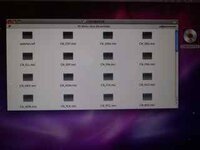
Thank you, a really great reply, tried as you say but all I get is window listing the files of the CD. I note you have 2010 version mine is 2006 that may be why I am getting a different out come.

Roger
 

Attachments

  • P1000793.jpg
    P1000793.jpg
    9 KB · Views: 91
Last edited:
Thank you, a really great reply, tried as you say but all I get is window listing the files of the CD. I note you have 2010 version mine is 2006 that may be why I am getting a different out come.

Roger

garmin mapping is only mac compatible since 2010 (maybe 09) so that is your problem.

wasn't expecting you to have 06 mapping with a zumo. didn't they come out later than that? :confused:
 
it occurs to me that you can still get your 06 maps onto your mac.

you'll need a full install of them, in mapsource, on a pc, then transfer them to the mac using garmins map transfer software.

all in all, i'd be inclined to buy new maps as red1 suggested :D


Back
Top Bottom