Beeline Moto navigation

Whilst the device is charging, I am wondering about the factory fit USB C socket on my 450 Himalayan.

Whilst the Beeline seems to have a pretty good internal battery longevity, I do like using ‘bike power’ which is free and otherwise wasted.

The factory fit USB C socket is not powerful enough to run my Peak Design wireless ‘MagSafe’ mount. But it should kick out enough to charge a humble Beeline, surely?

Time will tell….

the PD thing has to generate a 15 watt output to work with greedy devices like an iphone. I believe it takes in 12V from the bike to do that. The process of converting the 12v to wireless charging is not very efficient so it will use more than 15 watts from the alternator.

The battery from your Beeline is happy to charge from a 1A phone charger at 5 volts and will draw a max of 5 watts. It is very unlikely it will draw 5W from the battery when used on the bike.

The battery that will take the hit is the one sending instructions to the Beeline but you have 15A for that.
 
All good, so far.

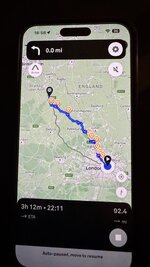
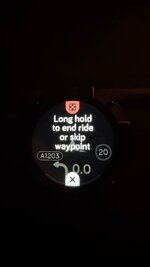
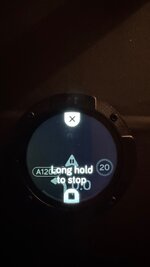
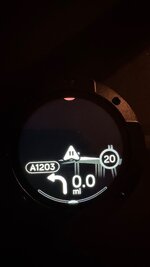
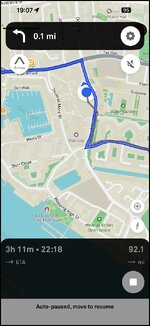
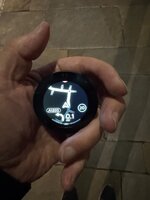
The device is charged and displaying a trial route, which I just made up:

IMG_5816.jpeg

IMG_5813.jpegIMG_5814.jpegIMG_5815.jpeg

I’m now going to walk with the device for a bit, just to see what it does.
 
Happy to report that my little experiment went well.

1. My sacrificial iPhone has no SIM card and is set, by default, in aeroplane mode. Stepping out of the front door, my phone lost its connection with my house’s WiFi within about thirty metres. The phone simply switched to GPS alone. None of that fazed the Beeline II. Similarly, it performed well in the black hole, just outside Waitrose, where my Garmin device regularly loses its signal.

2. It is pretty dark outside, even in central London. Held at arm’s length, the screen is very clear.

3. Walking along, it made each turn accurately.

4. It does give a ‘beep’ by way of warning that a manoeuvre is coming up, but whether you’d necessarily hear it over the bike’s engine / with ear plugs I can’t say.

5. I deliberately went ‘off route’, which it coped with. However, I am not sure that it recalculates without data.

6. The ‘map’ by necessity is basic, especially compared with what the app showed, when displayed on my large iPhone. I think it just gets a bit of getting used to, spoilt as we have become by ‘big colourful’ screens.

7. I think the map display might become confusing on big junctions, in big towns or cities or on some fast complicated motorway slip roads. But that is not surprising in itself. There again, I am sure most people ride ‘in the country’ so it’s probably not a huge issue.

8. I turned the app off and restarted it, without a problem. Likewise the device itself.

9. I did subscribe to the annual ‘extras’, which seem to work. Are they are must? Probably not, but each to their own.

10. I haven’t yet tried intermediate waypoints. Those I’ll probably try to use tomorrow,


IMG_0802.jpgIMG_0804.jpeg


Summary:

A. It is simple and it works. It is very intuitive, unlike some modern GPS devices and some navigation apps, which are not quite as ‘plug and play’ as their older siblings were.

B. It is not cheap but it’s cheaper than most other modern devices.

C. I think it would work well on a bicycle or, as er-minio says, just walking about; arguably ‘safer’ than clutching a perhaps a grand’s worth of phone in your mitts.

D. It is not independent, so it lives off (ie. is dependent on) your phone. A fully functional GPS device is better in this regard. I have a sacrificial spare phone, so that is not so great a potential issue for me. I don’t travel with one phone alone.

E. Its (14 hour) battery life is good enough for most things. If you are really worried, carry a power brick. I’ll probably power it from the bike, simply because I can.

More tomorrow, assuming I give it a fuller shakedown.
 
Last edited:
The beeps and directions to your headset through the connected phone are pretty good too


Sent from my iPad using Tapatalk
 
One thing I haven’t discovered yet, is how to do the equivalent of ‘Navigate to highlighted route’.

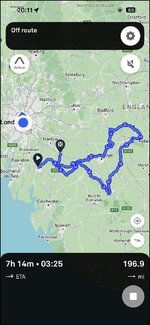
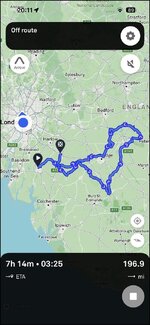
The route I hope to use to tomorrow is about 200 miles, starting in Chelmsford and ending in near enough Bishops Stortford. I am in central London. What I see on phone app is:

Screenshot 2025-10-04 at 20.11.00.jpg

With the obvious warning that I am ‘off route’.

Is there a way for the app to navigate me to Chelmsford and then run from there? Or do I have to create a separate route to take me from home to the start point?
 
Screenshot 2025-10-04 at 20.11.00.jpg

According to the Beeline II’s instruction page, the method is this:

If you have already planned your journey but want to start it somewhere else, just tap on the play button 'starting point' marker and then press and hold the black tab to move it around, or type your starting point into the 'start' box at the bottom of the screen.

Otherwise, just tap on the 'starting point' marker and move it around or type a new starting point in before you plan your journey. This is the easier way of doing things if you are planning a route that starts far away from where you are right now!

I cannot get this method to work on my iPhone.

Anyone with more experience with Beeline II with any advice, please?
 
Don’t believe it does just display an arrow mine is gen 1, and it does much more - the arrow sets direction, the dot tells you left or right turn coming up, the dash’ count down the distance till the turn
I know, but maybe a casual user (person who rents the bike) might not get it straight away.
 
Anyone with more experience with Beeline II with any advice, please?

I have found the answer and it’s different to the words on Beeline’s Help Page:

Unfortunately, you cannot change the starting point of an imported GPX route. The ability to move the starting point marker only works for routes planned within the Beeline app, not for imported GPX files.
For your imported GPX route from Chelmsford to Bishops Stortford, you'll need to create a separate route to get from your current location in London to the GPX route's starting point.
 
I have played around, creating a ‘one way’ route from home to Chelmsford, that finishes just short of where my 200 mile route starts. In other words, done what Beeline’s AI help line tells me to do. Similarly, I mucked about, moving the end point in Chelmsford about, all on my iPhone. It works.

Naturally enough, I don’t need an app to tell me how to get to Chelmsford or indeed, back again. It’s just to find out how the Beeline works.
 
Don’t believe it does just display an arrow mine is gen 1, and it does much more - the arrow sets direction, the dot tells you left or right turn coming up, the dash’ count down the distance till the turn….

You have to Interpret the Beeline symbols.
100% I suspect tge OP’s beeline might have been set to ‘beline’ mode rather than the more useful navigation mode.

Beeline mode - it just points to your destination, irrespective of the road layout. Useful in a forest, or if you just want to ‘follow your nose’.
 
So…. With generation 1, we talked about the need to understand what it is telling you and as a new user it’s not immediately apparent.

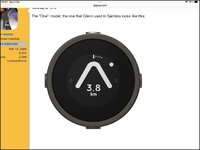
In the screen shot below there doesn’t appear to be much information but:

  • The arrow gives the current direction you should travel in. If you approach a tight bend, it will swivel in that direction.
  • The arrow is solid white, rather than just an outline. This means you are on track. If you deviate, it will appear hollow.
  • 3.8 km is the distance to the next junction. This is accurate, and helpful when for instance there is a choice of side roads, to know that the correct one is 58 metres away, or whatever.
  • The dot that is at 2 o clock compared to the arrow tells me that that’s the orientation of the next junction, ie my new direction of travel will be at 2 o clock from my direction as I reach the junction.
  • There is nothing in the space directly above the 3.8 km. If the next junction is a roundabout, a roundabout symbol would show, with say a 2 in the middle telling me it’s the 2nd exit. For roundabouts, the dot is often more useful than the 2, because if you know that your exit is at 2 o clock as you approach you can sight that and manoeuvre appropriately - easier than counting exits esp if it’s a big roundabout with lots of options. As you go around the roundabout, the needle will swing dramatically left just before the correct exit.
  • An alternative to the roundabout symbol is one showing a fork junction.
  • Lastly the long and four short dashes at the top give an indication of the overall length of the journey and how far you are along it. In this case, we have just started.


IMG_0362.jpg
 
260 miles in and the Beeline II works reasonably (arguably, very) well, within its limitations.

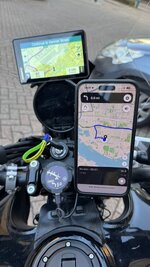
I ran it alongside my XT and my iPhone, which ran the Beeline app in the background and the MyRoute Navigation app up front. All three were running the same 200 mile, figure of eight (sort of) loop, created originally in MyRoute’s Cloud based Routeplanner.

IMG_5817.jpeg

I accept that a better test would have been to run the Beeline II on its own. In my and its defence, the intention was to find out how the device worked and how it differed from the other devices. I’ll maybe do another test, with just the Beeline II on its own, but that probably requires me taking the bike to somewhere unknown or I’ll know where I’m going, without the Beeline’s help.

First off the negatives:

Let’s be clear, anyone who expects crystal clear routing on detailed coloured maps, displayed on a ‘large screen’ is going to be very disappointed.

Whilst the device will function without the phone providing data, it will not reroute (ie recalculate from ‘off route’) if the phone is in ‘flight’ mode or does not have a SIM card.

The device can struggle in large cities (I live in London) and on large complicated junctions and at some motorways with long or complex slip roads. In part, I’ll confess this might in part be down to my inexperience with the device.

The lack of downloadable maps (see comment about data) is a downside.

Now the positives:

To be continued….
 
This will be very useful to read before I convince myself what I need/want (if I haven’t already)
 
Now the positives:

To be continued….

1. The device is small(ish) and doesn’t clutter the bike, especially if there is not a lot of room. It took me about five minutes to put it onto the bike, three minutes spent deciding which rubber bands to use.

2. It’s relatively cheap and has a good battery life. I powered mine from a spare USB C lead I had run from a Thunderbox. I also powered my phone. The Beeline showed 100% charge level at the end of the day, my phone, too.

3. The basic voice instructions, channeled through my BlueTooth in-ear monitors, were good enough to act as a prompt. They are not as regular as the voice prompts given by My`Route and / or my XT. The voice is a bit ‘AI robot’ but no big deal.

4. The screen and the route display are both clear. I rode in bright autumn sun, under dark clouds and early evening conditions. The image displayed was always clear.

4. The device performed very well in the countryside and small towns, where its small screen (and maybe the rider) is not too overwhelmed.

5. It does take a bit of getting used to, spoilt as I am with the big colourful screens we’ve got used to. After a while, you sort of gel with the device, realising that the basic instruction is straight on, unless told otherwise.

6. I had the device on my handlebar, down by the ignition key. This is OK, as you don’t need to look at it (or any screen) every waking moment. Just take in that the next significant manoeuvre is in three miles or whatever. Next time I test it it, I’ll probably mount it up a bit, nearer to my XT. Why? Whilst bright, the LED alert flashes were out of my eyeline, down by the ignition.

7. Recalculation was quick. But, it requires a data feed from a phone. That said, if I went off-route deliberately, with no data feed, the device did create a sort of trail of “Go this way” dots, indicating where I sort of needed to be heading.

8. The device offers a lot of other stuff, speed, time elapsed etc etc. These are just simple clicks away, if you want them.

9. The device enters sleep mode if you don’t move about for a while. This if fine, as it saves on battery usage, There is a decent pause before it snoozes and restart is all but instantaneous, better in fact than my XT.

10. It’s quirky but reasonably simple to use. Its limitations are there but, in a word, it’s fun. I think a bit more use, will see me attuning to it more.

11. Good for? Basic (and more advanced) bikes, out in the countryside where the owner doesn’t care too much if they go wrong….. and those bods who can’t be doing with all that Garmin techi stuff.

Overall, a pleasant experience of a nicely made device and better than I thought it might be.

PS The basic routing algorithm ’Take me from here to there, via the fastest route’, seems to match MyRoute’s own algorithm. That though might be just a coincidence, from the two times I tried it.

 
Last edited:
6. I had the device on my handlebar, down by the ignition key. This is OK, as you don’t need to look at it (or any screen) every waking moment. Just take in that the next significant manoeuvre is in three miles or whatever. Next time I test it it, ’ll probably mount it up a bit, nearer to my XT. Why? Whilst bright, the LED alert flashes were out of my eyeline, down by the ignition.

I think this is a matter of habit.
I always intentionally kept my GPS low on the bars (out of normal view) as I have the habit of glancing down at it, sort of like a paper map, when I am approaching a junction to see where I go... and ignore it otherwise :D

Said that, I mounted the Beeline, on the GS, just above the clocks as it is smaller and less intrusive. I do not use the audio (no subscription) and there you can see the blue flashing most times... but I'm used to "reference" it just before junctions as I do with the XT.
 
I think this is a matter of habit.
I always intentionally kept my GPS low on the bars (out of normal view) as I have the habit of glancing down at it, sort of like a paper map, when I am approaching a junction to see where I go... and ignore it otherwise :D

Said that, I mounted the Beeline, on the GS, just above the clocks as it is smaller and less intrusive. I do not use the audio (no subscription) and there you can see the blue flashing most times... but I'm used to "reference" it just before junctions as I do with the XT.

for me, the optimum position for a satnav is left side of the bars. I use a RAM U bolt mount on the V85 and on the R1200RS I used the RAM mount that replaces the clutch lever clamp. As I am left handed it is ideally placed should I need to prod the screen. It is also easy to take a quick glance when moving my gaze from looking ahead to checking the left mirror. As my gaze moves back and forth I can pick up info about the prevailing speed limit, distance to the next turn, approaching fuel station, cafe etc.
 
1. The device is small(ish) and doesn’t clutter the bike, especially if there is not a lot of room. It took me about five minutes to put it onto the bike, three minutes spent deciding which rubber bands to use.

2. It’s relatively cheap and has a good battery life. I powered mine from a spare USB C lead I had run from a Thunderbox. I also powered my phone. The Beeline showed 100% charge level at the end of the day, my phone, too.

3. The basic voice instructions, channeled through my BlueTooth in-ear monitors, were good enough to act as a prompt. They are not as regular as the voice prompts given by My`Route and / or my XT. The voice is a bit ‘AI robot’ but no big deal.

4. The screen and the route display are both clear. I rode in bright autumn sun, under dark clouds and early evening conditions. The image displayed was always clear.

4. The device performed very well in the countryside and small towns, where its small screen (and maybe the rider) is not too overwhelmed.

5. It does take a bit of getting used to, spoilt as I am with the big colourful screens we’ve got used to. After a while, you sort of gel with the device, realising that the basic instruction is straight on, unless told otherwise.

6. I had the device on my handlebar, down by the ignition key. This is OK, as you don’t need to look at it (or any screen) every waking moment. Just take in that the next significant manoeuvre is in three miles or whatever. Next time I test it it, I’ll probably mount it up a bit, nearer to my XT. Why? Whilst bright, the LED alert flashes were out of my eyeline, down by the ignition.

7. Recalculation was quick. But, it requires a data feed from a phone. That said, if I went off-route deliberately, with no data feed, the device did create a sort of trail of “Go this way” dots, indicating where I sort of needed to be heading.

8. The device offers a lot of other stuff, speed, time elapsed etc etc. These are just simple clicks away, if you want them.

9. The device enters sleep mode if you don’t move about for a while. This if fine, as it saves on battery usage, There is a decent pause before it snoozes and restart is all but instantaneous, better in fact than my XT.

10. It’s quirky but reasonably simple to use. Its limitations are there but, in a word, it’s fun. I think a bit more use, will see me attuning to it more.

11. Good for? Basic (and more advanced) bikes, out in the countryside where the owner doesn’t care too much if they go wrong….. and those bods who can’t be doing with all that Garmin techi stuff.

Overall, a pleasant experience of a nicely made device and better than I thought it might be.

PS The basic routing algorithm ’Take me from here to there, via the fastest route’, seems to match MyRoute’s own algorithm. That though might be just a coincidence, from the two times I tried it.
Thanks, interesting. Not put me off yet, it sounds like the halfway house I need between paper maps and a handwritten note of junctions, and a full on, bright and busy sat nav.


Back
Top Bottom