Bladdy slow Bittorrent

Fanum

Toubab
Joined
Apr 26, 2003
Messages
48,939
Reaction score
7
Location
Secure unit 2
Anyone got any tips on how to speed up a B.T d/load???

My 'complete series one of lost' 8.something gig d/load has been chugging away at 10-14kbs max for a couple of days......5 more to go :eek:

I get high d/load speeds from Kazaa etc and I'm on a 2mb line, so why the feck is it so poxy slow???

:spitfire :spitfire :spitfire :spitfire
 
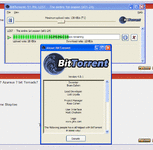
Er, no idea on the client...I just looked for the seed, clicked it and it started d/loading...

No client name on the boxes;
 

Attachments

  • Untitled-1.gif
    Untitled-1.gif
    38.2 KB · Views: 132
Download speeds vary quite a bit depending on how many people are seeding/downloading.

Most, if not all, of the BT clients will run faster if you've got the relevant ports forwarded through your firewall.
 
try installing this...it has loads of features

Multiple torrent downloads
Upload and download speed limiting, both globally and per torrent
Advanced seeding rules
Adjustable disk cache
Only uses one port for all the torrents
UPnP sets the forward on your router
Can use a proxy, for both tracker and peer communications
Fast resume
Can set a default download dir and move completed files
Can import torrents automatically from a set dir
Highly customizable interface
IRC plugin included for quick help

http://azureus.sourceforge.net/
if you want i can burn you a copy of lost
 
Cheers....I'll give that a go tonight.

Don't worry about burning a copy...I'm in no rush and it's still coming ;)

Cheers


B
 
Steve said:
Download speeds vary quite a bit depending on how many people are seeding/downloading.

Most, if not all, of the BT clients will run faster if you've got the relevant ports forwarded through your firewall.

both points very relevant. i've not used that bt client and it's not obvious from the interface if you're connected fully ie. with relevant ports open on your router firewall.
if you have a modem, ignore steve's second point :)

if all is well, on a popular torrent, i'd expect to get about 80Kbps

bittornado has a useful status indicator on it.

some useful info here

edit: just noticed. unless you are on SDSL or similar, your upload is maxed out, that will slow you down too. set it for less than 20Kbps.
 
Azureus :thumb

The thing which makes the biggest difference is where you got your torrent file from i.e. which tracker. Those trackers which you need to register for have the fastest transfer speeds. This is because they throw people out who dont keep seeding for other people once their download is complete. The completely public trackers are usually slow.
 
Thank you ladies, I've got Azureus on the go now and that torrent is coming down at between 65 and 70 kbs...still dissapointingly low on a fast cable con but it'll do :thumb
 
Hmmmm..it's all gone pete tong again :rolleyes:

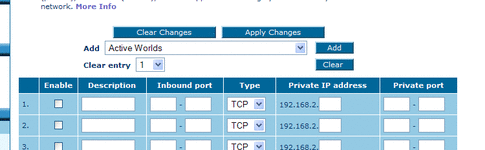
I've sewn my PC up so tight that all the port scans come back saying I'm invisible.....I know I need to open up a port (default 6881 for azureus but they say don't use that) and I know how to change that on Azureus but then I have to add it to my Belkin router virtual server list as open.......

I've followed the portfollower.com instructions but what private port number should be entered on the belkin virtual server screen??

??

:nenau
 
Let's say I enter port 50000 as the one being listened to by Azureus under tools>options.connection.

I then enter 50000 in the inbound port boxes with a range difference of zero (ie 50000 in both boxes)

The 'type' should be TCP? (other option is UDP)

I know the private ip address from my con status screen or ipconfig, but what's the 'private port' ???


Where's that bloody steptoe when you need him :rolleyes: :rolleyes:
 
Fanum said:
The 'type' should be TCP? (other option is UDP)

I know the private ip address from my con status screen or ipconfig, but what's the 'private port' ???

If you haven't got an option for BOTH (TCP and UDP) then you may need to set up two entries - one for TCP and one for UDP - it depends on the application. UDP connections are often used for such things as "Search results" - there is no guarantee the packet will be received by the client end.

Usually the Private Port (used by the application on the Client) will be the same as the External Port i.e. 50000 in your example. Port remapping does exactly that - allow you to map (or change) an Internet side connection port to an internal network side connection port. For most applications you generally don't make them different - since they themselves have an Option where you define the port they will use and the application "joins" the external network and "broadcasts" what Port the other clients ought to use to connect to you.
 
Fanum. Check if your router supports "uPnP" or Universal Plug and Play. If it does, turn it on in your router settings.

Azureus is uPnP compatible and will open the ports on your router automagically. When you shut down Azureus it will also tell your router to close them ports down again.

If not, then you will have to do it manually as your already attempting.


Back
Top Bottom