Can someone explain please ...

At least we seem to be branching out now. We might get to the root of the problem soon.
 
I am wondering if his device has a bad case of Neonectria ditissima canker as it seems to have infected this mouldy old thread
 
The OP is looking like a bit of a gooseberry. It’s only time before a fool becomes him.
 
Well that's odd. the first notification to me of activity on this thread was just this morning!

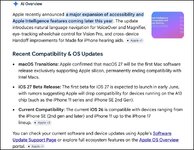
I can't find the notification I received, not sure even how it was received! but it was something to do with this ...

Screenshot 2026-05-21 at 12.05.46.jpg

Reading it in this form, it looks to me like some/all "older" Apple devices using intel inside :D will not be upgradeable to iOS 27. Not sure what happens if one has both newer devices, my Mac has M4 chip and my phone is a 17 Pro, for example but I also user an old Mac and have numerous old iPhones stored away in their boxes.

Anne has an older iPad 11" Pro and a 17 phone.

Thanks for the entertainment, by the way! :beerjug::D
 
Nothing happens.
Just end of OS updates for Intel based Macs. They will keep working, but no software updates (apart from some patch). This is normal procedure.


Apple generally doesn't send emails to customers about these things though.


this is actually serious and important!

I was trying to avoid a future "BANK ACCOUNT HAS BEEN EMPTIED AND THE DOG RAN AWAY WITH MY NEW CAR!!1" type of thread :D :D :D :D
 
Nothing happens.
Just end of OS updates for Intel based Macs. They will keep working, but no software updates (apart from some patch). This is normal procedure.


Apple generally doesn't send emails to customers about these things though.


I was trying to avoid a future "BANK ACCOUNT HAS BEEN EMPTIED AND THE DOG RAN AWAY WITH MY NEW CAR!!1" type of thread :D :D :D :D
That would be the wife, if that happened!
 
Hmm, and then I get this today. Why can't tech companies explain things for non-techs. I can't be the only one who receives this stuff and can't understand what, if anything, I am supposed to do about it. Grrrrr :mad:

I use 365 on my Mac (M4) , Word, Outlook, Excel, .... are they about to stop working ? What about stuff I already have, such as a shit load of Word docs that I might want to rework, or Excell sheets that I need to adjust?? WTAF . Or, am I okay because I have new Macs and iPhones?? Maybe it's my old MacBook and iPhones that won't work ... maybe that's it???

I guess I could put a call in to MS and get answered by the time I get back from France in mid-July.

Cut from an email received this morning ....

We'd like to inform you about a change to Microsoft 365 on one of your macOS devices.

From the 13th July 2026, a security certificate update is required to keep Microsoft 365 and Office apps up to date. On devices that do not support this update, Word, Excel, PowerPoint, Outlook, and OneNote switch to read-only mode. You can still open and view all your files, but you can't edit and save them on this device. Your files are safe.

According to our records, any of the macOS devices associated with your account cannot run macOS 12 (Monterey) or later. This means that your device will be used from the 13th Microsoft 365 apps can no longer fully support. Your subscription is active, your account remains unchanged, and all content stored in OneDrive is still available.

Use the free Microsoft 365 web apps. Open Word, Excel, and PowerPoint in any browser on any device—such as your current device. Neither a download nor a setup is required. When your files are stored in OneDrive, those files open as usual and continue to work.

Use a supported device. Sign in to Microsoft 365 apps on any supported macOS or other device with your existing account. Your content is immediately available for you. See the system requirements for more information.

Learn more

Any questions? Contact Microsoft Support.

Thank you for choosing Microsoft.
 
I had MS365 for a year included with this device. I did not renew the sub. I installed the free Libre Office, compatible with all MS files. There is an Apple version.

Some apple fanboi will be along shortly to say whether Libre Office will work with your old M4 shit. A cursory google suggests it does
 
I use 365 on my Mac (M4) , Word, Outlook, Excel, .... are they about to stop working ? What about stuff I already have, such as a shit load of Word docs that I might want to rework, or Excell sheets that I need to adjust?? WTAF . Or, am I okay because I have new Macs and iPhones?? Maybe it's my old MacBook and iPhones that won't work ... maybe that's it???

Based on the email I think it's because of some notarisation issue on older version of MacOS.
Based on what you said earlier, all your Apple devices are new or relatively new and should not be an issue.

What exactly happened (if anything) on you Apple devices? Still working as intended as of today?

What you need to do is just to keep the apps updated on your devices. (App Store > Updates). This is probably already the case, by the way.
If you have any device that is pre-2015 (or around that date) you might have issues on that specific device. Otherwise: everything keeps working as intended.

And - yes - the email is poorly worded.
 
Last edited:
Based on the email I think it's because of some notarisation issue on older version of MacOS.
Based on what you said earlier, all your Apple devices are new or relatively new and should not be an issue.

What exactly happened (if anything) on you Apple devices? Still working as intended as of today?

What you need to do is just to keep the apps updated on your devices. (App Store > Updates). This is probably already the case, by the way.
If you have any device that is pre-2015 (or around that date) you might have issues on that specific device. Otherwise: everything keeps working as intended.

And - yes - the email is poorly worded.

Thanks and to Wessie too. It’s what I thought and yes, phone and MacBook are new this year/ last year. I do keep devices updated so shouldn’t be a problem.
Might take a look at the apps @wessie suggested as 365 family is not used really, apart from Outlook by me.
🙏🏻


Back
Top Bottom