
I MIGHT have done headset to the 702 via the 2nd pairing option on the CardoLooking above, I think you are number 3. Phone to 702 then headset to phone.
I'll have a check on the Carpuride when I next go for a ride.


I MIGHT have done headset to the 702 via the 2nd pairing option on the CardoLooking above, I think you are number 3. Phone to 702 then headset to phone.


Hi. I'm based in UK and really struggling with sena schuberth helmet comms plus connection to my android phone and carpuride. So many opinions and carpuride have not been great. Please could you send the video they made?Gents, I am now connected and have sound in the microphone to make and receive calls.
For the record, I am connected via option 3, the iPlay/Auto method. I experienced none of the intermittent connection and sound issues that I did trying to use BT Trans. I did try option 3 a few days ago but for whatever reason, it wouldn't/didn't connect.
Thank you for all your information, assistance and patience. Carpuride themselves were also very helpful. I ended up emailing the same person (I think) and he sent me a video that he had made in his workspace desk to assist me (Clearly not a corporate one).
Hi, I am away from home but can do that tomorrow. I've created a step by step guide from the video which a few people have found helpful, so I'll send that as well.Hi. I'm based in UK and really struggling with sena schuberth helmet comms plus connection to my android phone and carpuride. So many opinions and carpuride have not been great. Please could you send the video they made?
That would be really kind. Thank you.Hi, I am away from home but can do that tomorrow. I've created a step by step guide from the video which a few people have found helpful, so I'll send that as well.
Sorry to resurrect this oldish thread - but what setting did you actually change to get the microphone to work? I think I've got the same setup as you (headset to phone, phone to 702, audio output to iplay/auto, android auto) but the microphone in the headset doesn't work.Gents, I am now connected and have sound in the microphone to make and receive calls.
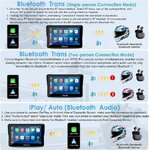
For the record, I am connected via option 3, the iPlay/Auto method. I experienced none of the intermittent connection and sound issues that I did trying to use BT Trans. I did try option 3 a few days ago but for whatever reason, it wouldn't/didn't connect.
Thank you for all your information, assistance and patience. Carpuride themselves were also very helpful. I ended up emailing the same person (I think) and he sent me a video that he had made in his workspace desk to assist me (Clearly not a corporate one).
IPlay/Auto. I did religiously delete ALL connections on my phone, headset and Carpuride before every new attempt. I also factory reset the Carpuride and my headset. I emptied the Android Auto cache on my phone and then reset it. It's been flawless in relation to connection since.Sorry to resurrect this oldish thread - but what setting did you actually change to get the microphone to work? I think I've got the same setup as you (headset to phone, phone to 702, audio output to iplay/auto, android auto) but the microphone in the headset doesn't work.
Hi there, I have the exact problem. I can hear callers but they can't hear me. Could you please share your setup. Thanks!Hi, I am away from home but can do that tomorrow. I've created a step by step guide from the video which a few people have found helpful, so I'll send that as well.
Hi there, I have the exact problem. I can hear callers but they can't hear me. Could you please share your setup. Thanks!

Thanks, Richard. I always try to be helpful. 6 months later and I have not had a single disconnection or issue whilst navigating with the unit that could not be put down to human error!! Maybe I should add that I took your advice of a cheapo sacrificial iPhone SE (I prefer the CarPlay display on the Carpuride). Also, when I refer to 'Check that the Wi-Fi has auto-connected' I am referring to the network generated by the Carpuride unit, not any external network such as your home one. You would be surprised how many people do not realise this.Thank you for posting the ‘How to do it’.
I really appreciate you responding so quickly and helping me out after six months!Cut and paste from the document I referred to:
Connecting for audio with iPlay/Auto
Update headset and phone with latest software/firmware
Check that the headset works correctly paired to the phone before involving the Carpuride unit
Take a methodical approach
Before each pairing attempt, ensure that you do the following:
Delete and forget all pairings on phone/headset/unit
Empty AA/Apple CarPlay cache on app on phone and restart. Factory reset headset.
Start unit and disconnect and delete headset from BT Trans in Audio Output of Carpuride unit
Factory reset Carpuride unit
Connect phone to unit via bluetooth (check that wi-fi has auto connected)
Wait for AA to come up onto screen
Exit AA and select Audio Output controls
Select iPlay/Auto
Prompt appears on screen ‘Android Auto is connected – it will be temporarily disconnected – Do you want to switch? Select yes
Prompt on screen ‘User selected to exit Android Auto – Please wait’
Android Auto connects again
Connect headset to phone unless already connected
Test audio and phone calls
During an active phone call – Short press on/off switch to get volume controls – check decent levels
iPlay does not refer to Apple iPhone. iPlay/Auto is just the name of an alternative connection method to BT Trans. So where I've put AA (Android Auto) you can read Apple CarPlay. I have connected both Android and Apple phones using iPlay/Auto. Follow my instructions to delete all previous connections to your phone, headset and Carpuride unit. You should see the Carpuride unit in both your Bluetooth and Wi-Fi settings of your phone.I really appreciate you responding so quickly and helping me out after six months!
I have an iPhone — does that make any difference? Is iPlay mainly for Android, or should I use it with my iPhone as well instead of BT Trans? Right now my Cardo Freecom X4 appears under BT Trans in Capuride, should I delete that and switch to iPlay/Auto?
Also, when you say “Connect phone to unit via Bluetooth (check that Wi-Fi has auto-connected),” does that mean I need to have both Bluetooth and the Capuride’s Wi-Fi connected to my iPhone at the same time?
Thanks again!
I have an iPhone — does that make any difference?
Everything works nowiPlay does not refer to Apple iPhone. iPlay/Auto is just the name of an alternative connection method to BT Trans. So where I've put AA (Android Auto) you can read Apple CarPlay. I have connected both Android and Apple phones using iPlay/Auto. Follow my instructions to delete all previous connections to your phone, headset and Carpuride unit. You should see the Carpuride unit in both your Bluetooth and Wi-Fi settings of your phone.
View attachment 455484
 Thank you so much for your help.


