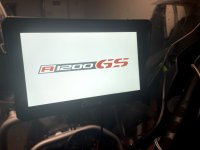
Just done this and at first it didn't work.
So thought i would explain were i went wrong to help others.
You need to format your SD card to Fat or Fat32
On windows 11 you only get options of NTFS or exFAT.
I tried these and the Carpuride unit won't load the image, it will do all the same actions but you wont get your new logo on.
After messing about for 20 mins i decided to download a free 3rd party software called "Rufus".
This let me format my SD card to FAT32 and it then worked first time

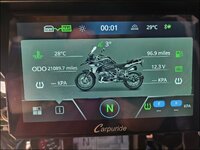
I also created an image of my bike with a transparent background for on the information screen
So now it looks like my own bike instead of the random white icon it has by default
if you doing this make sure the image is 437 x 280 pixels and it HAS to have a transparent background
file must be saved as "motoicon.png"
Boot device push in the SD Card (without the boot screen file or it will start that again!)
Goto info screen and tap the bike icon 6 times
This should load your bike image
If you get anything else and you want to remove it, just tap 6 times again to reset back to normal