
The TFT dash and the wheel functionality are no different to those found on earlier (pre TFT) bikes, as u would use the menu button to switch between the two on TFT equipped bikes. I would say that your 2017 should be fine for use with CHIGEE.



You can possibly buy a screen protector with mat finish.

Not all nav apps do this but MRA has just introduced it as a feature.So stupid question (asking for a friend obviously) if you download maps onto your phone of a particular area you think may have dodgy phone signal does the phone automatically switch to the offline maps?
Sent from my SM-A226B using Tapatalk

I'd say, turn airplaine mode on and got for quick a ride, then report back with your findings.Thank you, so I have synched routes,does that mean it will navigate on and offline automatically?
I'm struggling with this tbh,do I need airplane mode still?
Sent from my SM-A226B using Tapatalk


Just turn off mobile data......Bluetooth and WiFi is needed to connect android auto.When ive tried airplane mode android auto wont connect to phone?
Sent from my SM-A226B using Tapatalk


Thank you, so I have synched routes,does that mean it will navigate on and offline automatically?
I'm struggling with this tbh,do I need airplane mode still?
Sent from my SM-A226B using Tapatalk
So just turn off data as suggested above and it should work?Synchronising the routes is not enough to be able to navigate offline.
In order to navigate offline there’s 2 things that are needed - the routes, but more importantly the map data. MRA has had the offline maps feature for years - it’s the offline route synchronisation that’s the new feature (before you had to manually make routes available offline).
If you synchronise just the routes offline you will have the route on your device but no map data to be able to navigate them.
Before going offline, you need to go into the app settings and download the offline maps for the regions where you will be navigating.
Running in airplane mode won’t work for CarPlay or Android Auto. They both use the bluetooth to bootstrap the connection to the phone, then flick over to communicating between the phone and the CarPlay display via WiFi.

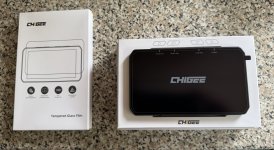
mine is due for delivery next Monday, so its good to know that there shouldn't be any tax/vat charges.So…..mine finally arrived today Sept 3rd, I ordered it on 20th July in the pre launch campaign, direct from chigee in Hong Kong the price at the time of ordering was £379 inc shipping but i had a trick up my sleeve in the name of a 20% off link so I paid 316 inc shipping.
I was expecting to be hit with import tax & VAT but no charges were levied & as a plus was not expecting the screen protector either as not even charged extra for that either.View attachment 348917
mine is due for delivery next Monday, so its good to know that there shouldn't be any tax/vat charges.
I have just started to use one of these units and so far my experience is very similar in that it is very power hungry on your phone. So if you don’t power your phone it won’t last very long. I have an S1000XR that has already destroyed one phone so I don’t want to mount the phone on the bike, so the next issue is where to put the phone and power it. More clutterI used my unit for the first time yesterday to go to the Netley Marsh autojumble, via Loomies. This was a distance of around 75 miles and navigated via the MRA App.
The iPhone lost some two thirds of its charge on that relatively short trip.
The other minus point was that the screen didn’t respond to my gloved hand.
The ease of planning a route on the MRA website and just navigating using the app was a breeze.
If you use the BMW Connected app to record journeys, then there is a potential conflict where CarPlay connects to.
Overall, I like the quality of the unit but will need to use it further before binning the Nav 6.
 pack......and use that to power the phone (when needed)


