Deleting routes

Wapping

Well-known member
Moderator
Joined
Oct 21, 2005
Messages
91,132
Reaction score
16,297
Location
Wapping, London
In common with many Garmin devices, when you delete a route from the Trip Planner, it lives on within the device itself. This is good in that a route can be re-imported, if (for instance) you deleted a route by error or want to amend it. The trouble then comes in that the device then fills with lots and lots of deleted routes. This is not a problem per-se, as stored routes take up very little space. It is simply a problem in as as much as, I don’t want to be confronted with an every growing list of old deleted routes.

The only method I know to clear them out is to connect the XT to home computer and delete them from there. My question though is, has anyone had any success (short of a hard re-set) in deleting them any other way?

For example, if I buy a USB mini-B to USB C lead, will my iPad or iPhone or Samsung Android phone, see the XT as a drive, allow me to access the folder of old routes and delete them?

It seems odd that Garmin goes down the wi-fi connection route for software and map updates and makes route transfer very easy via Garmin Drive, but makes the clearing out of old routes so tricky. Why, on the XT itself, you cannot fully delete old routes, I don’t know. It would be fine if it flashed up a warming, asking if you were sure you wanted to delete the old routes, as the operation could not be undone but, no.

Anyone any ideas or know any method of deleting old routes WITHOUT using a home computer?

Thanks.
 
For example, if I buy a USB mini-B to USB C lead, will my iPad or iPhone or Samsung Android phone, see the XT as a drive, allow me to access the folder of old routes and delete them?
Richard, I am not home until tomorrow afternoon, I have a USB-A to USB-C adaptor that I can tether iPad to Garmin and see if this works. Leave it with me until tomorrow.

:beerjug:

Ev
 
Works fine on Android. Usb c to usb a connector on the android phone. Innards of the XT visible. I use CX file manager on Android.
 
Thank you.
Ok, I am back home now.

Just had the XT connected via the Garmin supplied USB-A to Mini USB cable. Said cable connected to iPad via a USB-A to USB-C adaptor.
XT does recognise that it is connected via USB and prompts via an onscreen message to enter a File Transfer mode. The usual PC tethered to XT image comes up on the XT,, but it does not show on the iPad within files app side menu. Probably not possible to do this would be my guess. Which is annoying.

IMG_0307.jpeg
 
Thanks, EV.

I don’t really understand all the iOS vs Android stuff, but I guess it’s because the XT is Android? It’s the same when a Mac refuses to recognise the XT.
 
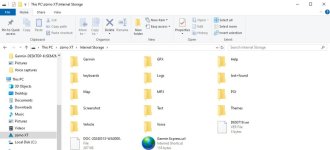
I believe the old routes are stored in the temp.gpx file in internal storage, and the Zumo may also store routes on an sd card if fitted, so take that out first.

Also if the Zumo is linked to Explore then it will just reimport them as soon as the Zumo is switched back on and it syncs.


Sent from my iPhone using Tapatalk
 
I tried it with the iPad, and it doesn't show up - I think I knew this already, having tried before. The Montana does show up.

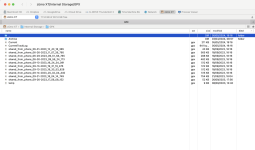
Here's the XT using Commander1. I think I read somewhere not to delete currenttracklog as it will lose where you are, but I also read it only stores 20 routes - I don't know if this is correct.
Screenshot 2024-05-05 at 19.21.45.png
 
I had a rummage in my XT today as well. Not sure if there where only 20 routes but I got the unit in June 2022 and everything up to May 2023 had disappeared so it must have some sort of time function when deleted routes are actually deleted and cannot be re-imported. Only about 23mb of routes so very little in the grand scheme of things. All things Garmin seem to be made with compatability with Windows in mind. Very easy to get to the file system. That said the Zumo's mount on Linux as well as Android. Weird that Mac is more difficult to mount bearing in mind Mac, Linux and Android are all unix type operating systems and Windows is the odd one out??
 
When Garmin switched to users being unable to completely delete routes from the device itself, they made it so that simply reconnecting the device to a home computer, automatically deleted any routes marked for deletion. Then, as I recall, this basis was changed so that the owner had to physically delete the routes themselves, using their home computer.

It is interesting to read:

I got the unit in June 2022 and everything up to May 2023 had disappeared so it must have some sort of time function when deleted routes are actually deleted and cannot be re-imported.
 
If you are stuck and can,t get access to a Windows machine you can erase all user data on the unit. I've just tried it out.

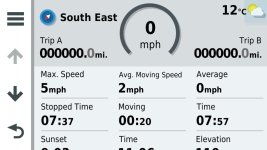
On the map screen press the speedometer.

It brings up this screen.

10977.jpg

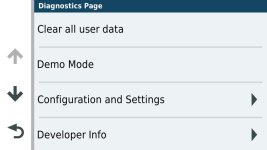
Press the middle of the Speedo again and it brings up this screen.

13319.jpg

Select clear all user data and this removes all Routes Tracks and POI's resets the menu order to default and breaks the link with Garmin Drive. Took me about 10 minutes to set up the menus and garmin Drive again. I had my POI's and tracks/Routes I wanted already backed up on basecamp. Probably safer than messing around in here.

XTfiles.jpg
 
I don’t really understand all the iOS vs Android stuff, but I guess it’s because the XT is Android? It’s the same when a Mac refuses to recognise the XT.

It is.
And it's because of the transport protocol the (MTP) the XT uses that is not natively supported on MacOS/iOS software.
 
It is.
And it's because of the transport protocol the (MTP) the XT uses that is not natively supported on MacOS/iOS software.
I read that when I was messing about, means in Windows the unit does not have to be assigned a Drive letter. If you had an Android phone and a Mac it appears that you couldn't connect the two. Mac OS really doesn't play well with the rest of the Digital world. :D
 
Mac OS really doesn't play well with the rest of the Digital world.

Debatable :D
It's a UNIX system after all.

MTP is less friendly because of its origin, that's all. Same way as some proprietary protocols Apple uses on their own devices. They all protect their own ecosystems in a way.

But – yes – you can communicate normally between Android devices and Macs.
I regularly use CommanderOne to edit stuff on the Zumo XT and works perfectly.

Dunno about iOS because, apart from my iPhone, I have no other iOS devices as I don't like it that much. I travel with a MacBook rather than an iPad in tow.
 
This explains why I used my PC to upload daily GPX routes from emails for a group tour of Euroland this week, yet found a group of previous routes I had already deleted on the XT that needed deleting again.
 
How big is a really big route file ? Are y’all worrying unnecessarily?
 
How big is a really big route file ? Are y’all worrying unnecessarily?
IIRC about 100Mb so not massive, but they all add up.

More to the point, they confuse the issue once they are irrelevant to the tour you are on so I prefer to “unload” anything unnecessary and keep it all tidy and simple.
 
IIRC about 100Mb so not massive, but they all add up.

More to the point, they confuse the issue once they are irrelevant to the tour you are on so I prefer to “unload” anything unnecessary and keep it all tidy and simple.

Yeah, it’s this, really. I prefer to only have the routes I need for the current trip on the device


Sent from my iPhone using Tapatalk


Back
Top Bottom