Disk Space

Deleted account 210609001

Registered user
Joined
Mar 19, 2003
Messages
29
Reaction score
7
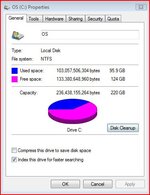
My son's laptop is fast running out of disk space. It has a 42.5 gb Hard disk (C drive). We are not running any major or unusual programmes, and not storing massive amounts of movies/photos/documents.

Any suggestions as to where I can look and what I can delete to free up some space?

The laptop is a couple of yeas old, running windows Vista, if that makes any difference.

All help gratefully received. :thumb2
 
It's all being used there somewhere, it's just finding it.

Start with the recylce bin on the desktop, most deleted items go there until it is cleared. Right click on the icon and either explore to have a look first or empty if you prefer.

Next in internet explorer --> tools --> internet options --> browsing history -- delete --> temporary internet files.

If this has failed to clear space, next you have to dig.

Explore the drive and right click on folders to see the files / space used, you should be able to work out where it went after that. Unfortunately the space doesn't go far these days and things like music and photos take up so much more space.

Have a look in the documents and settings folder lots of files get saved by default into a login profile.

Good luck, and don't worry you should be able to sort it out yourself, even if it is to get to the point where you decide you have just got too much stuff.

If you find it is a program like an old game or application, then you could uninstall it uninstall via 'control panel' --> add/remove programs, it is easy and cleaner to do it there.

:blagblah
 
Robin did the laptop come with Vista pre-installed or did you install it, it takes up a huge amount of space relatively speaking on a 40gig drive, the best option would be a new drive. You can get a 250gig for less than 35 quid and a 400gig for about 45 quid.
 
My son's laptop is fast running out of disk space. It has a 42.5 gb Hard disk (C drive). We are not running any major or unusual programmes, and not storing massive amounts of movies/photos/documents.

Any suggestions as to where I can look and what I can delete to free up some space?

The laptop is a couple of yeas old, running windows Vista, if that makes any difference.

All help gratefully received. :thumb2

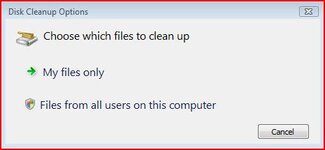
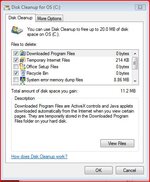
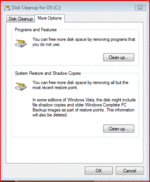
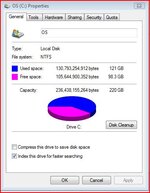
I had the same thing on my laptop running vista, untill I discovered a tab on disk cleanup, which removes all but the most recent restore points. go to :computer: right click on your :hard drive: select :properties: select :disk cleanup: select :files from all users on this computer: select the Tab :more options: click system restore and shadow copies: on my system it recovered nearly 26 GB :eek: H T H :thumb
 

Attachments

  • 1.JPG
    1.JPG
    21.7 KB · Views: 113
  • 2.JPG
    2.JPG
    50.7 KB · Views: 112
  • 3.GIF
    3.GIF
    19 KB · Views: 118
  • 4.JPG
    4.JPG
    41.5 KB · Views: 135
  • 5.JPG
    5.JPG
    42.3 KB · Views: 120
Thanks for your help - will give it a go. I've done the documents thing and recycle bin. I suspect it's programmes Joe has downloaded. There's always the option of buying a bigger disk. I didn't think it would be that cheap -is it just a straight swap by the nice men at PC World or somewhere?

Next question, this time my slightly older laptop, running Windows XP. I just loaded software from DVD for my BlackBerry, and I think I ticked the box that starts the BlackBerry desktop Manager when I start up the computer. How do I stop this, please? There must be a way of choosing what programmes start automatically.

Thanks again.
 
Thanks for your help - will give it a go. I've done the documents thing and recycle bin. I suspect it's programmes Joe has downloaded. There's always the option of buying a bigger disk. I didn't think it would be that cheap -is it just a straight swap by the nice men at PC World or somewhere?

Next question, this time my slightly older laptop, running Windows XP. I just loaded software from DVD for my BlackBerry, and I think I ticked the box that starts the BlackBerry desktop Manager when I start up the computer. How do I stop this, please? There must be a way of choosing what programmes start automatically.

Thanks again.

Laptops are not the easiest things to work on, so asking PC World to do it will probably end up either with you shelling out more money than it's worth or they'll sell you another laptop. If you are happy with the laptop, then, as the others have said, used CCleaner to tidy things up and Auslogistics defragger to keep things tidy. The Auslogistics tool also has an option for you to move system files to the start of the drive for quicker access.

For your second question, CCleaner is again the answer for you, it enables you to decide what programs you want to run on start-up.
 
Replacement hard disk

Yes, you shoud replace the hard disk, but first you need to know several things.
The first item is: what type of hard disk is installed.
There are two types: SATA (Serial interface)
PATA (Parallel interface)
All laptops under 2 years old are SATA
All laptops over 5 years old are PATA
If you turn off the laptop, shut lid, & look along the sides you shoud see a removeable compartment held in by one or two small screws underneath the laptop.
If so, remove the 2 screws, and slide out the compartment.
The hard disk should be mounted in this casette.
Look up internet to see what PATA & SATA pinouts look like.
If it does not look like the SATA socket on the end, but does not look like the PATA one either, there may be an adaptor plugged into the PATA interface to suit the particular laptop you have. Pull it off, & look again.
Hard Disks.
One can get (Pata) up to 250 GB, SATA up to 1 terabyte (1000GB)
However: Most of the large disks to either size mentioned are made by Western Digital (Caviar).
Maybe I have just been unlucky, but 5 failures with Master boot record dailure & 1 seizure have put me off them completely. It is not the cost or inconvenience, it is the loss of data.
Suggest a 160 gb Samsung PATA or 500 GB SATA.
Buy new on either Ebay or Amazon or otherwise, but new.
When you put in a new hard disk, the system has to be reinstalled from a CD.
To do this It must be changed to boot from CD first.
Enter Bios & change boot order to CD first & save.
You must have a both an operatiing system disk, and, ideally, a drivers disk for your computer. ( If Dell, easily optained for your model on Ebay)
After that, just load operating system & go, picking custom installation & changing to UK english & UK keyboard etc.
After system installation do same with drivers. (If not dell you will probably have to download off iternet onto a memory stick & transfer to your new computer.
Entire operation takes around 4 hours, most of it waiting time.
Myke
 
Or you can leave things as they are and buy yourself an external hard drive for storage and back-up.
 
Hi

It all depends on what you are using the laptop for. 40Gbyte is perfectly adequate if you are doing email, writing documents, browsing the web etc. As others have said using ccleaner and defragging will remove a lot of unwanted data and enable you to continue within this storage for many years.

What takes up space is storing videos and installing games. You can very easily fill your 40GByte this way. To find out where your storage is being used download easycleaner (http://personal.inet.fi/business/toniarts/ecleane.htm and use its space usage facility. A neat little tool that will quickly pinpoint what is using up your disk.

Upgrading to 256GByte would be cheap enough but you will have to reinstall your operating system and programs then transfer all your data. You will then need to work out how to back it all up.


Steve
 
disk space

there are so many nooks and crannies that use up space it is handy to see
where the space is being used

I use treesize to isolate where the problem directories are, sometimes it can be caused by software executables left behind after an install in a temp directory. they dont get removed sometimes..

you can try the software for free for 30 days, should be long enough for you to sort out your problems :)


http://www.jam-software.com/treesize/

this is the type of screen it will show you
DriveScan_en.jpg


Back
Top Bottom