


You are using an out of date browser. It may not display this or other websites correctly.
You should upgrade or use an alternative browser.
You should upgrade or use an alternative browser.
firefox & ukgser
- Thread starter cookie
- Start date


Fanum
Toubab
It's not your end Cookie......
There's a new and very very whizzy fancy new thing coming for us....but BHT had to update the software to make the new and very very whizzy new thing work..the update didn't work with Firefox so he's uninstalled it......
You need to refresh your bookmarks in Firefox.....type the url in manually and then re-bookmark it and it should be fine from there onwards.
It does mean that we'll have to wait a bit longer for the whizzy new thing, but heck, at least we can get on again
There's a new and very very whizzy fancy new thing coming for us....but BHT had to update the software to make the new and very very whizzy new thing work..the update didn't work with Firefox so he's uninstalled it......
You need to refresh your bookmarks in Firefox.....type the url in manually and then re-bookmark it and it should be fine from there onwards.
It does mean that we'll have to wait a bit longer for the whizzy new thing, but heck, at least we can get on again
how odd.
when i tried the direct link from ukgser home page, i got the same problem. if i do it manually as you say i can access the forums. but using Get Latest Posts or User CP, it still screws up with same window.
all works AOK on firefox on my linux pc just as before & i've not touched a thing or updated any bookmarks
when i tried the direct link from ukgser home page, i got the same problem. if i do it manually as you say i can access the forums. but using Get Latest Posts or User CP, it still screws up with same window.
all works AOK on firefox on my linux pc just as before & i've not touched a thing or updated any bookmarks

Cookie, the links you clicked on while it was down were cached in your browser that you were using at the time.
Even now it's fixed your browser thinks it's broke, but it isn't.
I'll be breaking it again at midnight'ish so go to bed and all will be fine in the morrow
Even now it's fixed your browser thinks it's broke, but it isn't.
I'll be breaking it again at midnight'ish so go to bed and all will be fine in the morrow
Deleted account 220427002
Registered user
- Joined
- Dec 27, 2003
- Messages
- 20,425
- Reaction score
- 4
I'll be breaking it again at midnight'ish so go to bed and all will be fine in the morrow
you promise it will be fixed


There's a new and very very whizzy fancy new thing coming for us....but BHT had to update the software to make the new and very very whizzy new thing work..the update didn't work with Firefox so he's uninstalled it......
It didn't work with IE7 either.....or maybe it did...

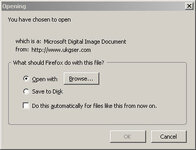
For a while I got a dialogue box asking if I wanted to download a MIME file.
Deleted account 220427002
Registered user
- Joined
- Dec 27, 2003
- Messages
- 20,425
- Reaction score
- 4
yip it was all Pauls fault... 
but if he gets the new stuff working it will improve the site quite a bit
but if he gets the new stuff working it will improve the site quite a bit
Fanum
Toubab
yip it was all Pauls fault...
but if he gets the new stuff working it will improve the site quite a bit
 You'll never make a salesman will you Toooned
 You meant to say it will make it even better, or it will enhance an already great place even more!

You meant to say it will make it even better, or it will enhance an already great place even more!
Actually....it depends on who you're trying to sell to. Gary's open, honest and straightforward approach works much better for me than any weasel-worded salesman-speak.
Deleted account 220427002
Registered user
- Joined
- Dec 27, 2003
- Messages
- 20,425
- Reaction score
- 4
Actually....it depends on who you're trying to sell to. Gary's open, honest and straightforward approach works much better for me than any weasel-worded salesman-speak.
there you go.... what would Bill (the Weasel) Oates know anyway

I've got the same problem using AOL, the only way I can get into the site is by using FireFox, which I don't normally use. So how do you clear the cache?

I've got the same problem using AOL, the only way I can get into the site is by using FireFox, which I don't normally use. So how do you clear the cache?
CTRL F5

Foto John
Registered user
I've got the same problem using AOL, the only way I can get into the site is by using FireFox, which I don't normally use. So how do you clear the cache?
That's strange, I always use Firefox, although I can only log in through IE 7, which I don't normally use!
I hope it gets sorted soon, especially as I dont have a spell checker on IE 7!
Attachments


MasterDabber
Registered user
I've got the same problem using AOL, the only way I can get into the site is by using FireFox, which I don't normally use. So how do you clear the cache?
Tools >> Options >> Privacy >> Cache >> Click on "Clear cache Now"
Worked for me.
Foto John
Registered user
Tools >> Options >> Privacy >> Cache >> Click on "Clear cache Now"
Worked for me.
Superb, that worked for me too!
Thanks, Derek! 

Similar threads

- Replies
- 11
- Views
- 1,826


