


You are using an out of date browser. It may not display this or other websites correctly.
You should upgrade or use an alternative browser.
You should upgrade or use an alternative browser.
FREE topographical maps for your Garmin (almost!)
- Thread starter Mouse
- Start date

Schwarz Baron
Registered user
Cheers I'll have a look for the missing file...I think it's because I didn't overload the trig point overlay, I was having a lot of difficulty, to the point I downloaded all the maps again. 
st247
Registered user
Followed Mouse's instructions, works a treat
Schwarz Baron
Registered user
DodgyGeeSer said:Hey SB, you seem to be missing some of the summits and hills information..
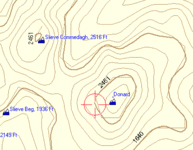
It should look a little more like this:
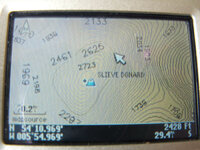
Anyone know what ya call the summit files(waypoint pics of Mt Peaks), its on my Mapsource but doesn't seem to transfer to the unit..
Schwarz Baron
Registered user
Deleted account W
Guest
Are these maps of any real use to a hill walker?
Schwarz Baron
Registered user
Whatton said:Are these maps of any real use to a hill walker?
From a little experience, they certainly have the essential basics. But like you should anyway, always carry the paper version. I remember reading something about, the guys, wanting feedback, because of the way they were produced.
I think the beauty about them is, in my IMHO, that think of the fun you could have with adding and customising, with your own waypoints. certainly I think this is where the tracking tool will come into its own. I will be giving it a try as soon as I'm well enough. Watch this space

iangough
Registered user
- Joined
- Oct 11, 2004
- Messages
- 598
- Reaction score
- 2
This is fantastic...
Are there any contour maps for mainland europe...?
Are there any contour maps for mainland europe...?

Schwarz Baron
Registered user
iangough said:This is fantastic...
Are there any contour maps for mainland europe...?
Ask NASA

Jimb
Guest
Mr Mouse
A big thank you for this info, the photographers will find it very handy, If only it was available for the Alps.
Cheers Jim
A big thank you for this info, the photographers will find it very handy, If only it was available for the Alps.
Cheers Jim

beacon
Registered user
Got mine up and working dead simple in the end, Thanks.
Chris
Chris
DodgyGeeSer
Registered user
Definitely, if you want to know where a peak is (particularly if you can't see it!) or want to traverse between peaks. Of course, as SB mentioned, there's no excuse for not carrying a paper map. Your GPS is dead weight when the batteries run out.Whatton said:Are these maps of any real use to a hill walker?

Mouse
Registered user
There's been an update to the free topological maps! 
See this page: http://www.smc.org.uk/contour_maps2.htm
I haven't had chance to try the new version myself yet. Will report back when I do.
See this page: http://www.smc.org.uk/contour_maps2.htm
I haven't had chance to try the new version myself yet. Will report back when I do.
DodgyGeeSer
Registered user
Nice one Mouse... Just installed the updated maps... A lot more detailed.. Well worth the install.

I think you're being a bit 'country-ist' here.
Nowhere does it mention Any other country apart from UK.
This is the internet you know.
Looks like i'm going to have calm down from the initial post heading excitement and prepeare myself for non topographical GPS-ing

Nowhere does it mention Any other country apart from UK.
This is the internet you know.
Looks like i'm going to have calm down from the initial post heading excitement and prepeare myself for non topographical GPS-ing
DodgyGeeSer
Registered user
You mean apart from rep. of Ireland, right?motomartin said:Nowhere does it mention Any other country apart from UK.


Frank Warner
Registered user
motomartin said:I think you're being a bit 'country-ist' here.
Nowhere does it mention Any other country apart from UK.
This is the internet you know.
Looks like i'm going to have calm down from the initial post heading excitement and prepeare myself for non topographical GPS-ing
Buy 'em from gpsoz mate? Besides we have Tracks4Australia .... they don't.

damn
I followed the instructions and I'm getting the
'please reinstall mapsource' splash.
I did what Whatton said and edited the registry but it hasn't made any difference.
Any ideas ? Do I have to reinstall mapsource ?
EDIT:
Oof, sorted it:
the UPDATED zip files write registry entries pointing to C:\Program Files\Garmin\Contours v2\ rather than C:\Program Files\Garmin\Contours\
so you have to create this directory to unzip the files into, rather than the one Mouse says in his first post.
Hey it works - hallelujah. Good job guys !!
I followed the instructions and I'm getting the
'please reinstall mapsource' splash.
I did what Whatton said and edited the registry but it hasn't made any difference.
Any ideas ? Do I have to reinstall mapsource ?
EDIT:
Oof, sorted it:
the UPDATED zip files write registry entries pointing to C:\Program Files\Garmin\Contours v2\ rather than C:\Program Files\Garmin\Contours\
so you have to create this directory to unzip the files into, rather than the one Mouse says in his first post.
Hey it works - hallelujah. Good job guys !!


Similar threads

- Replies
- 3
- Views
- 1,438

- Replies
- 4
- Views
- 1,362