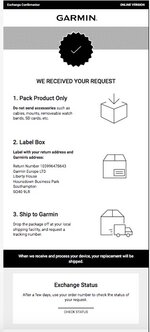
Correct I was directed to the Garmin site where I paid for the repair. I don't recall seeing a prompt to print a label.
This was part of the second email:
We have also requested a UPS pre-paid shipping label, this is only available via the email confirmation and cannot be retrieved from the website. Please be sure to disregard the address details on the website and go straight to your confirmation email to take advantage of the pre-paid label.
I have also included some instructions which will assist you in completing the required steps:
1/Please enter your email address to complete the checkout as a guest or sign into your existing Garmin account
2/Fill in your shipping and billing information, then click "Proceed to Payment"
3/If there is a charge, select a payment option and enter the required details, then click "Place Order"
4/Upon completion, you will receive a confirmation email with the details of your transaction and shipping instructions
Click Download Label, Select Print Label and then select Schedule a Collection or Find a Location
Please note: if you select Schedule a Collection you will need to enter your tracking number, found on the printed label, into Section 1 to benefit from the free collection.
This is the final confirmation email. No link for a label download. There was a bit more on the bottom basically giving decription of unit I was submitting and the unit they were dispatching.
This was part of the second email:
We have also requested a UPS pre-paid shipping label, this is only available via the email confirmation and cannot be retrieved from the website. Please be sure to disregard the address details on the website and go straight to your confirmation email to take advantage of the pre-paid label.
I have also included some instructions which will assist you in completing the required steps:
1/Please enter your email address to complete the checkout as a guest or sign into your existing Garmin account
2/Fill in your shipping and billing information, then click "Proceed to Payment"
3/If there is a charge, select a payment option and enter the required details, then click "Place Order"
4/Upon completion, you will receive a confirmation email with the details of your transaction and shipping instructions
Click Download Label, Select Print Label and then select Schedule a Collection or Find a Location
Please note: if you select Schedule a Collection you will need to enter your tracking number, found on the printed label, into Section 1 to benefit from the free collection.
This is the final confirmation email. No link for a label download. There was a bit more on the bottom basically giving decription of unit I was submitting and the unit they were dispatching.