

Jimb
Guest
If you have downloaded the Windows spy programme do this and then turn auto update off.
Removing this is easy. Click on the start menu and select run and type this:
%windir%\system32\wgatray.exe /u
Click on the start menu again and select run and type: regedit
Navigate to the following key and delete the key
HKEY_LOCAL_MACHINE\SOFTWARE\Microsoft\Windows NT\CurrentVersion\Winlogon\Notify\WgaLogon
Reboot and enjoy
Then Delete WgaLogon.dll from \windows\system32\
You can’t do it before because its in use but as soon as the H_Key entry is deleted from the registry its redundant and can be deleted.
Job Done
Removing this is easy. Click on the start menu and select run and type this:
%windir%\system32\wgatray.exe /u
Click on the start menu again and select run and type: regedit
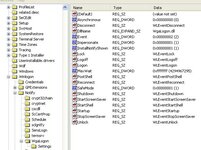
Navigate to the following key and delete the key
HKEY_LOCAL_MACHINE\SOFTWARE\Microsoft\Windows NT\CurrentVersion\Winlogon\Notify\WgaLogon
Reboot and enjoy
Then Delete WgaLogon.dll from \windows\system32\
You can’t do it before because its in use but as soon as the H_Key entry is deleted from the registry its redundant and can be deleted.
Job Done



 The other fix seems to have sorted it tho.
