Genuine Windows advantage delete

  • Thread starter Thread starter Jimb
  • Start date Start date

Jimb

Guest
If you have downloaded the Windows spy programme do this and then turn auto update off.

Removing this is easy. Click on the start menu and select run and type this:

%windir%\system32\wgatray.exe /u

Click on the start menu again and select run and type: regedit
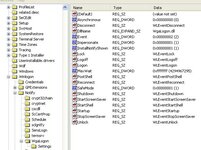
Navigate to the following key and delete the key

HKEY_LOCAL_MACHINE\SOFTWARE\Microsoft\Windows NT\CurrentVersion\Winlogon\Notify\WgaLogon

Reboot and enjoy

Then Delete WgaLogon.dll from \windows\system32\

You can’t do it before because its in use but as soon as the H_Key entry is deleted from the registry its redundant and can be deleted.

Job Done
 
does this stop the "not genuine windows" message then?
 
cookie said:
usually XP Pro "Corporate" Edition.

Works on Home OEM as well.......I just talked my 15 yr old daughter through it step by step and it's done the job :)

Nice one Jimb :thumb
 
DaveGSCymro said:
What exactly does this do?

It's a case of 'if you're asking, you don't need to know' :D

Microsoft released an update called 'Windows Genuine Advantage'.....it checks the XP on your machine and pops up balloons all over the place if it thinks yours is dodgy.

Some people have had the messages pop up even though their XP is pukka.....the chances are though, if you haven't seen the messsages (and they are very very obvious) your XP is genuine, or you don't have automatic updates turned on, and you don't need Jimb's fix ;)
 
Fanum said:
It's a case of 'if you're asking, you don't need to know' :D

Microsoft released an update called 'Windows Genuine Advantage'.....it checks the XP on your machine and pops up balloons all over the place if it thinks yours is dodgy.

Some people have had the messages pop up even though their XP is pukka.....the chances are though, if you haven't seen the messsages (and they are very very obvious) your XP is genuine, or you don't have automatic updates turned on, and you don't need Jimb's fix ;)

Looks like I need Jimb's fix :eek
 
Jimb said:
Click on the start menu again and select run and type: regedit
Navigate to the following key and delete the key

HKEY_LOCAL_MACHINE\SOFTWARE\Microsoft\Windows NT\CurrentVersion\Winlogon\Notify\WgaLogon

Reboot and enjoy

Which bit do you delete?

Ta!
 

Attachments

  • ScreenShot002jpeg.jpg
    ScreenShot002jpeg.jpg
    67.4 KB · Views: 186
Mates just put me onto this. Have a look here;

www.9down.com/downloads.php?fileid=340

You go to your system32 folder and delete the "legitcontrol.dll" file and replace it with theirs.

Just done it on mine and all nasty microsoft messages have gone and it works fine.

You'll need WinRar to download it tho.
 
Jon said:
Which bit do you delete?

Ta!

The whole Wgalogon folder.......al those different files inside it are the various bubbles and popups etc.....you don't want any of them ;)
 
Fanum said:
The whole Wgalogon folder.......al those different files inside it are the various bubbles and popups etc.....you don't want any of them ;)

:beerjug: The other fix seems to have sorted it tho.



Back
Top Bottom