Help needed with importing routes basecamp/zumo 390

Deleted account 180524001

Registered user
Joined
Nov 10, 2011
Messages
93
Reaction score
1
Location
uk
I have been tearing my hair out with this problem, maybe someone can solve it

I have a Garmin 390 and Basecamp v 4.6.3. running on a Mac

I can "draw" routes in Basecamp ok and send them to my Garmin, they appear as "trips" and i can use them - no problem

But basecamp is a bit crap and fiddly to use

I want to draw a route in googlemaps or ridewithgps

i can draw a route fine in ridewithgps, but when i import the gpx file into basecamp, it appears as a grey line, not a pink one. and in order for the route to be imported into the garmin gps as a "trip" it needs to be a pink line

apart from drawing over the entire route (ie creating a new one) in basecamp, i cannot find a way to "convert" the grey line route into the correct pink one

can anyone help?
 
use the basecamp function, convert track to route, that converts your grey colour line to a pink line hopefully, this is asuming its a track from ridewith, i dont use it so just guessing.
. if you wish to use google maps to make a route and then transfer it to your nav, you will need to use one of the many online or stand alone convertors as google maps is not compatible without a conversion, google, google maps to garmin gps conversion.

or do as many are doing and use motogoloco, google that also.
 
The 'grey line' is maybe a track of some sort or it's simply the colour 'RidewithGPS' (whatever that is) gives to the route it creates when displayed in BaseCamp.

If it's a track, then BaseCamp (that really crap software) is fully capable of converting it to a route, in stunning magenta.

If it's simply a colour issue, BaseCamp (that really crap software) is fully capable of changing the colour.

If it's a track, BaseCamp (that really crap software) is fully capable of exporting it to your Garmin device, which is fully capable of running it and / or converting it into a route.

In what format does the wonderous 'RidewithGPS' create and then export its routes? Is it a .gpx file?

PS When asking questions like this, it really helps if you can share the file with us. That way we can (hopefully) see what it is you are having a problem with and maybe even solve it for you quicker.

PPS From the luxury of my German hotel room, I have found out that 'RidewithGPS' can export routes in several formats: https://ridewithgps.com/help/export-file-formats The same website has some hints and tips you might find useful, too.
 
yes, i am creating a GPX file from 'ridewithgps', but the problem is within basecamp. the "grey line" needs to be a "pink line" in order for my garmin 390 to recognise it as a proper "trip".
 
ok, i have created a route in ridewithgps (from london to leicester). it is here:

https://ridewithgps.com/routes/16671874?privacy_code=aLLRMHjC5R49hNql

here is the GPX file for this route:

http://anastasiapollard.com/test2.gpx

here is the screengrab of the route in ridewithgps

1.jpg


here is the route when i import it into basecamp (ie its in grey and needs to be in pink)

2.jpg


when i right-click on the route and choose "create route from track".. i get this! ie it has ignored my route and just drawn a straight line from the start point to the end! AAARRGGGHH

3.jpg
 
yes, i am creating a GPX file from 'ridewithgps', but the problem is within basecamp. the "grey line" needs to be a "pink line" in order for my garmin 390 to recognise it as a proper "trip".

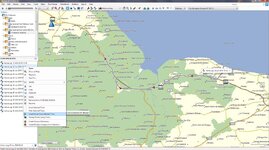
to create a route from a track if it is indeed a track as i have said above. right click on the file in the left window of basecamp and select create route from selected track. first image.
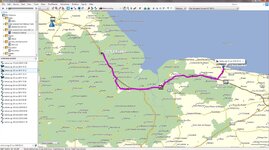
it should the put the route on screen and also in the window on the left. second image
 

Attachments

  • 18-09-2016 18-55-56.jpg
    18-09-2016 18-55-56.jpg
    124.5 KB · Views: 316
  • 18-09-2016 18-59-47.jpg
    18-09-2016 18-59-47.jpg
    123.4 KB · Views: 397
i think i have just solved it. in order for basecamp to be able to "create route from track", the garmin gps unit needs to be plugged in so basecamp can "see" the detailed maps

thanks everyone
 
Just had a thought your mac maybe changing the file extension to .txt if so change it to .gpx look at what it says at the end of the file name.
 
dave thanks for the file i have converted it to a route and it works, but i would say that the amount of time it took for the conversion seemed to be far to long, i can see this being a problem if you were converting a longer route, You may be better off learning to use base camp, you will need to have maps installed on your mac for it to work. or you could use osm maps, if you dont want to buy or dont have life time maps from garmin.
OSM maps will work within basecamp, and on your nav.
 
>Try using Garmin Express with device connected. Click on map options > install to computer.

err, there's no such option in Garmin Express.

I have the following apps installed on my mac

Garmin BaseCamp
Garmin Express
Garmin MapInstall
Garmin MapManager
Garmin WebUpdater

none of them allow me to install maps from my device (Garmin 390) onto my mac

?????
 
i've managed to get an Open Street Map into the Basecamp

but... the map is really cluttered. see below

there doesnt seem to be a way of "turning off" some of the data?

4jpg
 
>Try using Garmin Express with device connected. Click on map options > install to computer.

err, there's no such option in Garmin Express.

I have the following apps installed on my mac

Garmin BaseCamp
Garmin Express
Garmin MapInstall
Garmin MapManager
Garmin WebUpdater

none of them allow me to install maps from my device (Garmin 390) onto my mac

?????

If your nav does not have, either lifetime maps or the ability to re download the map thats on the unit by using garmin express, then unless you purchase the maps from garmin you are stuck. But i would have thought that with the 390 being one of the newer units it would have had lifetime maps, but if express is not giving you any of these options it appears not.
You do have to have the nav connected when using express and you must also be connected to the net, just saying.
 
i've managed to get an Open Street Map into the Basecamp

but... the map is really cluttered. see below

there doesnt seem to be a way of "turning off" some of the data?


4jpg

I do not use the osm maps so i can only suggest using the base camp tools to see if you can zoom in to see more, or out for less, or maybe use the select detail level in basecamp to see if that helps.
 
you maybe better off biting the bullet and purchasing the lifetime maps, or maybe give garmin a ring and see if they can somehow make available the same map on the nav for download to your mac/pc, it may be worth a try, they are usually helpfull. how old is the maping on the nav (what version).
 
ok, i can't seem to get the maps from the device, into basecamp.

the only map i can get into basecamp is the OSM one (unless I buy a map from garmin of course), and i can't change the level of detail on the OSM map

but this is progress, so thanks everyone

i am amazed all this is so complicated, I mean, five separate pieces of Garmin mac software are now on my mac - that's insane
 
You have an old map on your nav, if you do not wish to purchase a newer version from garmin, your only options are osm maps, use one of the online sites like myrides or motogoloco, or connect your nav to basecamp and use the onboard map from the unit, like i said you maybe able to get garmin to release you a download for your origional map, you could tell them you had a virus and had to wipe your machine and no longer have the map, as i said it maybe doable.


Back
Top Bottom