How to use a GPS Track

nick

Registered user
Joined
Aug 27, 2004
Messages
739
Reaction score
0
Location
SE London, England
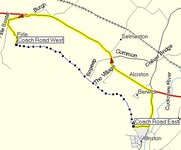
I used the "Track" facility on my Garmin Quest to record a by-way (the Coach Road in East Sussex).

How do I use this for Route planning ?

I created a Waypoint at both ends of the Track, but when I create a "Route" it simply goes around the roads (obviously).

If I create Waypoints all along the Track, when I create a "Route" it goes from Road to Waypoint 1 to Road to Waypoint 2 to Road to Waypoint 3 etc...

And before anyone says Read The Manual. I did. And I cannot see how to do what I want.
 

Attachments

  • coachroad.jpg
    coachroad.jpg
    32.1 KB · Views: 275
Save the active track to one of the saved tracks then 'tracback' along it.

The Quest and GPSmap 276C will trackback but this feature is not available on a SP2610
 
OK .... more questions .....

I transferred the ACTIVE LOG from Quest to my PC.

I cleared the Track memory on the Quest.

On the PC I renamed the ACTIVE LOG and created a copy of this new track and then inverted it (hoping to be able to use the track in either direction). I now have 2 Tracks on my PC ...

Coach Road (E to W)
Coach Road (W to E)

I then downloaded the 2 new Tracks to the Quest and the PC indicated this was successful.

But where are they ?

My 2 Waypoints marking the ends are visible, but there is no Track.

I cannot find a menu option on the Quest for Trackback that offers a choice of Tracks.

As far as I can tell, the Trackback facility on the Quest only allows you to retrace your steps on the current ACTIVE LOG.

Am I expecting too much ?
 
It seems I cannot use Tracks in the way I want to. Which is a shame as this would be the most accurate way of routing off-road.

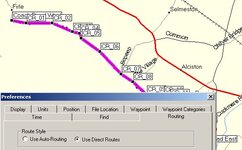
The only solution I can find is to create Waypoints all along the Track, and then use the 'Direc Routing' option so as not to get dragged back to the road between each Waypoint ...
 

Attachments

  • solution.jpg
    solution.jpg
    43.9 KB · Views: 232
KTM520 has a OS software which I believe he can load into his Garmin GPS. Maybe he is the one to ask.

My biggest problem with my Garmin is its inability to show me anything other than Vector maps....

How much is it worth s/h

GPS60C with unlock code and Ram Mount???
 
nick said:

On the PC I renamed the ACTIVE LOG and created a copy of this new track and then inverted it (hoping to be able to use the track in either direction). I now have 2 Tracks on my PC ...

Coach Road (E to W)
Coach Road (W to E)

I then downloaded the 2 new Tracks to the Quest and the PC indicated this was successful.

But where are they ?

My 2 Waypoints marking the ends are visible, but there is no Track.

I cannot find a menu option on the Quest for Trackback that offers a choice of Tracks.

As far as I can tell, the Trackback facility on the Quest only allows you to retrace your steps on the current ACTIVE LOG.


They should be in the saved tracks area (not sure where this is on a Quest).

Select the saved track you want then tell the unit to tracback on it.

Most units should track either way so you should only need one saved track.
 
The Garmin Mapsource will not "autoroute" along a road/track that is not in its database. That's why you have to use the trackback facility.
Trackback lays down "bread crumbs" which, as you've discovered, you can route between using the "direct" setting. The closer together the "crumbs" the more accurate you can log the track. I don't know what the Quest can do, but on my e-trex Vista I can adjust how often a "crumb" is laid either by time or distance. Trackback is designed, primarily, for walkers to find their way off a hill/mountain in bad weather.
 
Re: Re: How to use a GPS Track

Howard Millichap said:
OY! There's a TRO on that lane. Didn't see the signs then?
Howard, There most definitely is NOT a TRO on the Old Coach Road. There was one a couple of years back but that was only when it was being resurfaced. However there is the danger of one in the future, see http://www.ukgser.com/forums/showthread.php?s=&threadid=31341

Nick, I used waypoints and direct route style to create the route I had stored on the 2610. Confusingly, if I ask the 2610 to take me on the route and I am closer to the end than the start, it directs me to the end. Duh.

Tim
 
Tim,

I have been experimenting with the 'Off Road' setting on the Quest. The 'compass' directions between waypoints works well.

The Quest can jump or miss a waypoint if you get closer to the next one on the route.

I can find no way of using the 'breadcrumbs' to create waypoints or a route automatically. I have to create my own waypoints along the track.

I cannot see how to select a track on the Quest for Tracback. It seems to be restricted to the current active track only.

Maybe this is a limitation of the Quest (or my knowledge of how to use it!!)
 
I wondered if you could turn off 'snap to road' but can't find this setting on the Quest.

How about setting it to calculate routes for 'pedestrian' instead of 'car/motorcycle' and switch route preferences to 'off road'? All under route setup.

Maybe then it will pick up the lane or just make a direct route between the two points?

HTH

Adam :)
 
Adam,

Setting the Quest to "Off Road" definitely solves the snap to road feature. This is not a problem, and I am even quite pleased with the inteligence of the system when if you miss a waypoint off road it will aim for the next waypoint if you are closer to that.

My only real issue is I would like an automatic feature to convert a Track to a Route with waypoints, or the ability to use Trackback on a Track chosen from a menu. Neither of these seem possible.

Regards,
Nick.


Back
Top Bottom