I’ve binned using MyRoute to create routes for the ConnectedRide app

Wapping

Well-known member
Moderator
Joined
Oct 21, 2005
Messages
90,841
Reaction score
15,614
Location
Wapping, London
I’ve binned using MRA for creating routes for the CRN, and just use the Connectedride app. This way, way points show accurately and it is easy to skip one if you go off route and don’t want to be routed back to any missed ones.

That’s interesting. It might explain why waypoints (hands) in routes created in MyRoute, do not appear on my 1600’s TFT screen, when running the ConnectedRide app. It might also explain why the ‘skip function’ (available via the bike’s wonder wheel) is greyed out.

One question, please. When you say you use the ConnectedRide app, are you simply asking the app to take you from A to B to C to D, the app then filling in the roads between the four points, as opposed to creating a bespoke route?

I ask only in as much as I usually create sometimes quite complicated bespoke routes in MyRoute, using my iPad’s big screen; an option that does not seem to be available via the ConnectedRide app, as it only (as far as I know) functions on a smart phone. At least, I have never managed to register my iPad to my K1600, which means the app will not fire up.

=====

I have started a fresh thread.

Richard
 
Last edited:
It’s odd but, for a while, I took part in the beta testing of the ConnectedRide app, via Rainbirds or whatever it was called.

I recall that one of the tests was to create routes in say, BaseCamp and see how they worked. This test included whether waypoints worked / displayed. They never did.

That was I guess, four or more years ago. It seems that the gears of BMW’s app development, grind pretty slowly.
 
Last edited:
Hey Wapping

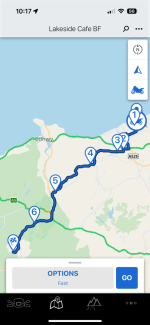
Complicated, bespoke routes can be created easily in the BMW Connectedride App, both on a iPhone or iPad. Not sure about Android devices, as I don’t own any. The process is identical on both devices and I find as accurate as creating in say MRA, just easier. You still have to zoom in on the roads you want to set the waypoint on, so as not to select the wrong carriageway for example.

This is a route I already had saved and created on my iPhoneIMG_4442.png

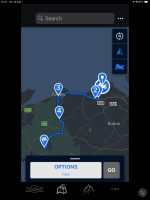
And here is one to the same finish point, which I have just created on my iPad
IMG_0228.png

The good thing about using the Connectedride app (may not be to your liking), is that the waypoints can be set randomly, and then app will work out the order. This means if i want to place a waypoint between say 3 and 4, I don’t have to reorder them like you do in MRA.

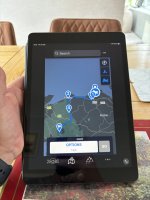
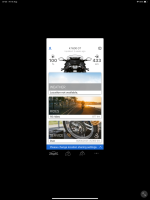
This is what the app looks like on my iPad screen
IMG_4443.jpeg

In respect to registering the iPad to the bike, I simply downloaded the app to my iPad, logged in using my normal BMW id (same for bike and car) and it all syncs.
 

Attachments

  • IMG_0229.png
    IMG_0229.png
    582.2 KB · Views: 7
Thank you, that is really helpful.

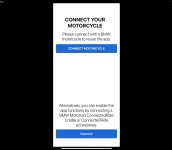
I’ll try it again. The problem I encounter is the the app demanding that I connect the iPad to my 1600; something which it fails to achieve.

IMG_5981.jpeg
 
Aha, bingo!

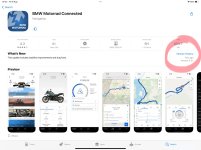
I deleted the app from my iPad and downloaded it again.

IMG_5982.jpeg

I logged on, using my BMW ID…..

And it works….

IMG_5983.png

Many thanks.
 
Two steps forward, one backwards.

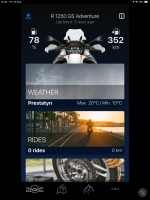
An apparent repeat of the old problem, using my iPad:

IMG_5984.jpeg

I guess that, if I connect my iPhone and the app to my 1600, the app on the iPad will synchronise and come to life?
 
I’ve never had to connect my iPad to my GSA. I just create the routes on it and they sync to my iPhone, so they can be used on my iPhone with the connectedride cradle, or they sync to my connectedride nav when it sees Wi-Fi
 
I guess it depends on how often the phone is connected to the BMW bike? In my case, it’s not that often. I’ll try connecting it and see what happens; I can’t break it.
 
The good thing about using the Connectedride app (may not be to your liking), is that the waypoints can be set randomly, and then app will work out the order. This means if i want to place a waypoint between say 3 and 4, I don’t have to reorder them like you do in MRA.

You don't need to re-order way points in MRA when adding a new one along the route. When you hover your existing route line you get this 'addition' button pop up.

If you click it where it is it'll add a waypoint at that location. Alternatively if you click and drag it to another road/location, it'll create another way point there and also link the route to/from it.


new way point and route change between original waypoint 26 & 27

 
I guess it depends on how often the phone is connected to the BMW bike? In my case, it’s not that often. I’ll try connecting it and see what happens; I can’t break it.

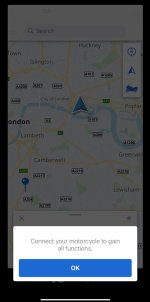
According to BMW you must connect the app to your bike within 14 days of installing to activate all features, otherwise you get a limited trial version.

78b4639287f818a9887f2d0c0e9c9201.png


Back
Top Bottom