I’ve just bought a Garmin XT

glenn2926

Well-known member
UKGSer Subscriber
Joined
Oct 7, 2009
Messages
6,368
Reaction score
7,449
Location
Right Here
Well, I’ve just acquired a Garmin XT. Still trying to fathom out how it works. The person I got it from was never able to get to work for them and basically just stuck it in a drawer and forgot about it.
I’ve had it a few days, charged it up, registered it and updated the maps. I think I’ve got it working just fine now. I’m just looking at getting an adapter to make it fit the BMW mount on my bike. There is one for the XT2 that is very good but I’m not sure it fits the XT.

======

I have started you a fresh thread, to build on your (hopefully) joyous news.

Richard
 
Last edited by a moderator:
Well, I’ve just acquired a Garmin XT. Still trying to fathom out how it works. The person I got it from was never able to get to work for them and basically just stuck it in a drawer and forgot about it.
I’ve had it a few days, charged it up, registered it and updated the maps. I think I’ve got it working just fine now. I’m just looking at getting an adapter to make it fit the BMW mount on my bike. There is one for the XT2 that is very good but I’m not sure it fits the XT.
You will have fun. There is a learning curve with the XT. It does some odd things sometimes, there are workarounds and plenty of experience on here. I'll look forward to reading about your journey :)

I've attached a pdf from the zumo forums to get you started
 

Attachments

I don’t think the xt2 mount fits the XT, though
No it doesn’t. I’m just back from trying it and although it physically fits it doesn't power up the XT. I will need to find a powered adapter for the XT that fits into the BMW cradle.
 
No it doesn’t. I’m just back from trying it and although it physically fits it doesn't power up the XT. I will need to find a powered adapter for the XT that fits into the BMW cradle.
The contact pins for power. XT1 is:
Pin 1 (Bottom): Ground / 0V [1]
Pin 3 (Middle/Center-ish): 5V DC power output from the inline voltage-reduction transformer ("black box") on the Garmin power harness

The XT 2 mount should be:
Top Pin (Pin 6 / Top): +12V Positive (12V DC power feed from the motorcycle system)
Bottom / Lower Pins (Pin 1 & Pin 2): 0V / Ground (Negative)
Middle Pin (Pin 3): +5V DC (used for backwards compatibility if docked into an older zūmo XT1 mount, which steps down 12V to 5V via a regulator

So, on that basis, an XT should work on an XT2 mount... as long the right pins are connected. You can buy a 12v to 5v stepdown cheaply. Just connect it to the correct wire. (chop off the 12v wire)
 
Have a look for a 3DAM mount, it fits the BMW cradle, the XT fits straight on. No control with the wheel though.
Sounds to be just what I need. My very old 660 has never been compatible with the wheel so I won’t miss it. As long as it charges the XT it will be fine.
The old 660 still works as it should but it is very difficult to see in the low sun. The XT is supposed to address this problem. Other than being a bit bigger and better in low sun it doesn’t seem to do much that the old 660 does.
Routes seem to send from Basecamp just as the old device. Which is all I do. It will probably be my new go to device. I will carry the 660 as back up on long, multi day trips just in case the XT lets me down.
 
Last edited:
Sounds to be just what I need. My very old 660 has never been compatible with the wheel so I won’t miss it. As long as it charges the XT it will be fine.
The old 660 still works as it should but it is very difficult to see in the low sun. The XT is supposed to address this problem. Other than being a bit bigger and better in low sun it doesn’t seem to do much that the old 660 does.
Routes seem to send from Basecamp just as the old device. Which is all I do. It will probably be my new go to device. I will carry the 660 as back up on long, multi day trips just in case the XT lets me down.
The XT does have a good sunlight readable screen.
My advice on transferring routes via Basecamp is to make sure to put several strategic waypoints in the route, create track from route in BC, and transfer both the track and the route.

If you then show the track on screen on the Zumo it’s easy to tell if it’s taking you off your intended route.
 
The XT does have a good sunlight readable screen.
My advice on transferring routes via Basecamp is to make sure to put several strategic waypoints in the route, create track from route in BC, and transfer both the track and the route.

If you then show the track on screen on the Zumo it’s easy to tell if it’s taking you off your intended route.
I’ve no idea how to create a track in BC. I’ve been using it for around 12-15 years ish and haven’t needed a track. What is the advantage of a track over just the route?
 
I’ve no idea how to create a track in BC. I’ve been using it for around 12-15 years ish and haven’t needed a track. What is the advantage of a track over just the route?
A track can be made easily enough in bc
Handy to have as a route maybe changed on recalculation but the underlying track remains so you can see if there is any divergence from route
 
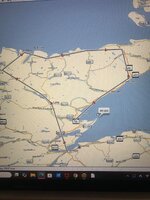
IMG_4512.jpeg
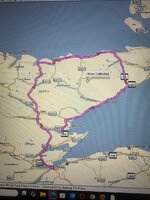
I’ve just tried creating a track in BC. The picture above is it. It’s not much use to me for navigation if it’s just straight lines. I’ll stick with the route plan .IMG_4513.jpeg
The second picture is the route. Much more useful for me.
 
Create the route in Basecamp, as normal, then select the route, it shows drop down options, and select "Create Track from Selected Route" which is often near the bottom of the list. The track will then be listed in the "Show Tracks".
 
Create the route in Basecamp, as normal, then select the route, it shows drop down options, and select "Create Track from Selected Route" which is often near the bottom of the list. The track will then be listed in the "Show Tracks".
Thanks, I’ll have a go.
 
Track created. Is there any way to get the XT to show both route and track? Thanks in advance.
 
Apps>Tracks>Saved Tracks>(Pick track its displayed on map) Spanner top left of map>scroll down> Show on map Tick. In this dialog you can also choose track width and colour. Pick something that isn't the same colour as the route.
 
I’ve no idea how to create a track in BC. I’ve been using it for around 12-15 years ish and haven’t needed a track. What is the advantage of a track over just the route?
It’s easy to create a track. In Mac BC right click on the route and select create track from route.

The advantage of a track is the device doesn’t recalculate it.

For example, if you create a route in BC with just a start point and an end point, the XT recalculates it on import, and it quite possibly will end up different to the route you created in BC. By using a track and showing it on the XT screen you can see the difference.

You could also use the track in the XT Tto create a route, but it won’t give you turn by turn guidance - at least it will be exactly the same as your Basecamp route though.
 
Great, I’m getting there. Is there any way of showing both thr track and the route simultaneously on the XT? Thanks.
 
Great, I’m getting there. Is there any way of showing both thr track and the route simultaneously on the XT? Thanks.
yes just load the route Apps>Trip Planner>(Saved or imported trips)>Map and your route will cover your track. Scroll along the route and you will see the track if it diverges from the route. In the case above it probably won't but if you tried to route via Syrie and Loch Badenloch the result might be different. I lost a bit of CB900F2C fairing up there in 1986.........wonder if its still there :D


Back
Top Bottom