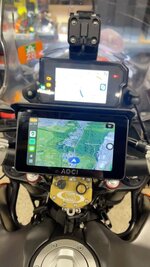
I love MyRoute

Yes, you´re right on that front. However with the MRA app there´s no sending anything to anything. If you´re using your phone or Chigee, the routes Sync themselves and as soon as you open the route in MRA on whatever you want to use as navigation hardware its already there.
I would ask however on sharing. I believe on a Garmin device then its easy to bluetooth the route over whilst on the go. For MRA it s more complex as you have to ´´invite´´ friends to join your profile so sharing basecamp files when on the go with fellow Garmin / NAV users is easier
I just share it with my mates by email and they open it on their devices, they all have different ones, Chigee, Crapuride, TomTom and away we all go.
 
This is a massive winning point that MRA brought home.

This last trip I did, I prepared tracks/routes for the first 7 days for the group (10 people). Packaged it all, uploaded online, everyone dowloaded/installed, and off we went. All (surprisingly) good.

One day where we used a different route/planning, the problem to share the specific route along the road proved hilarious.
10 people, of which most had Garmin XTs of various denominations (a few XT1s a few XT2).

XT1 and 2 cannot send data to each other via bluetooth :D :D :D :D
They use different companion apps as well.
Some people (me) don't use the companion app as it fucks up the way the device works...

Even the people with the Carpuride unit (no idea what software they were using to navigate) didn't have a clue.

As I was observing mayhem across the lunch table as they tried to figure it out... I was thinking of how MRA addressed the user problem there. :D



*as an additional bonus:
I did send the new route to another XT1 device successfully via bluetooth.
My XT kept flashing the "bluetooth security/confirmation code" dialogue window randomly for a split second every once in a while for the following 48 hours :D
 
Last edited:
This is a massive winning point that MRA brought home.

This last trip I did, I prepared tracks/routes for the first 7 days for the group (10 people). Packaged it all, uploaded online, everyone dowloaded/installed, and off we went.

One day where we used a different route/planning, the problem to share the specific route along the road proved hilarious.
10 people, of which most had Garmin XTs of various denominations (a few XT1s a few XT2).

XT1 and 2 cannot send data to each other via bluetooth :D :D :D :D
They use different companion apps as well.
Some people (me) don't use the companion app as it fucks up the way the device works...

Even the people with the Carpuride unit (no idea what software they were using to navigate) didn't have a clue.

As I was observing mayhem across the lunch table as they tried to figure it out... I was thinking of how MRA addressed the user problem there. :D

The XT 1 using Garmin Drive is fine for transferring routes but the dreadful Tread app for the XT 2 just breaks everything.
 
Yes.
Garmin Drive works ok. i use it all the time to send addresses to the XT before I get to the bike.
The companion I was mentioning is the dreadful Explore or whatever it is called.

There is also always the need to have a device to device way of beaming things (you sort of can with Drive in some cases - but still extra step) when you have no internet connection, as it happens more than what people assume. Especially on travel devices.
 
Tried mra and it’s certainly not as easy to use as Basecamp. Also the route created in mra cannot be sent to my garmin. So not much use to me.
You seem to be advocating paying for a mapping system that is not as good as the free one I currently use.
Errr...... and your alternative is advocating paying £360 - £600 for a GPS SATNAV which you will have to replace?

MRA routes can be sent to GARMN, just not bluetoothed. Simple case of downloading to your IT of choice and then uploaded again to BC.
 
One of the huge disadvantages of Basecamp is the updates. If you don’t have the latest update AND you have not updated your GPS device to the same version AND you haven’t recalculated the route if made on a previous version of the map software, all goes horribly wrong.
Also when sharing. If both or all riders don’t work to exactly the same parameters including settings it all goes horribly wrong.

MRA no such issies
 
As mentioned above - with MRA, for an upcoming trip with other bikes to NW Scotland next week, I have done all the route planning and trips.

I sync into a folder that they all have access to and drop the link onto our WhatsApp group.
Could not be easier

They can then do what the fuck they like with the track and route files with what ever device they are running - I know where I’m going
🤣🤣
 
Errr...... and your alternative is advocating paying £360 - £600 for a GPS SATNAV which you will have to replace?

MRA routes can be sent to GARMN, just not bluetoothed. Simple case of downloading to your IT of choice and then uploaded again to BC.
They can.
I send from MRA to Garmin Drive app and it transfers them to XT by BT when I turn the bike on.
You can also share Google maps locations with the Drive app and it BT to the XT which then calculates a route.
 
They can.
I send from MRA to Garmin Drive app and it transfers them to XT by BT when I turn the bike on.
You can also share Google maps locations with the Drive app and it BT to the XT which then calculates a route.
But why use a £400+ sat nav when you could mirror the MRA routes on a £70 CarPlay unit ?
 
But why use a £400+ sat nav when you could mirror the MRA routes on a £70 CarPlay unit ?
Possibly as they still work when there is no mobile coverage. Being an O2 customer, seems to haapen a lot in the car 😎
 
I use both the Zumo and my 'phone with the MRA app. I have a carplay unit but took it off as too cluttered and I charge my phone with a wifi mount.

I know ........ old codger - but it keeps me content. (y) :D

23B42D46-7D7C-4FF0-A48A-383DD814359C_1_105_c.jpeg
 
Possibly as they still work when there is no mobile coverage. Being an O2 customer, seems to haapen a lot in the car 😎
So does MRA if you download the maps for offline use

Edited to add, I see it’s already been mentioned twice 😜
 
So does MRA if you download the maps for offline use

Edited to add, I see it’s already been mentioned twice 😜
But the thing is, I don't own a £70 car play unit to mirror on my bike. I have a Garmin XT and on my TMax it uses Garmin Motorize.

So until something breaks, I'll have to stick with what I have and save myself £70.

I guess the issues with losing coverage is because I've been using Maps or Waze in the car when going point to point, maps especially as it integrates with my other apps on my iPhone.

Don't use MRA much in the car for point to point.
 
My experience is I love MRA for route planning (better than BaseCamp) but cannot get the app to work properly. Last year in preparation for a trip I created a route and exported it to my Garmin XT with the intention to run it alongside the MRA app using Android Auto to see which was best. All fine to start with but as soon as I deviated from the route the MRA app went on strike and refused to even recognise my location. Even closing the app and restarting the route didn't solve the issue. Garmin rerouted back to the planned route seamlessly. I'm sure it's operator error but I just cannot get MRA app to work properly so for me I'll just rely on my Garmin XT which has proven totally reliable for the way I use it.
 
Errr...... and your alternative is advocating paying £360 - £600 for a GPS SATNAV which you will have to replace?

MRA routes can be sent to GARMN, just not bluetoothed. Simple case of downloading to your IT of choice and then uploaded again to BC.
If you look above you’ll see you don’t even need to do that
One of the huge disadvantages of Basecamp is the updates. If you don’t have the latest update AND you have not updated your GPS device to the same version AND you haven’t recalculated the route if made on a previous version of the map software, all goes horribly wrong.
Also when sharing. If both or all riders don’t work to exactly the same parameters including settings it all goes horribly wrong.

MRA no such issies
well, not really. You’re referring to the map version, not the software. If you create a route in MRA using OSM mas and try to run it in Here maps, it won’t translate correctly
 
Yes correct. The map version is what causes the huge issues in Basecamp if not synced. I had so many comments in the past when riding on Nav6 and Basecamp that the other parties on the tour said the route didn’t match what they had. I had sent them the GPX files but the issue was that the parameters and map versions were different resulting in the route being “recalculated” when down loaded onto thier devices
 
Yes correct. The map version is what causes the huge issues in Basecamp if not synced. I had so many comments in the past when riding on Nav6 and Basecamp that the other parties on the tour said the route didn’t match what they had. I had sent them the GPX files but the issue was that the parameters and map versions were different resulting in the route being “recalculated” when down loaded onto thier devices
The same will happen with MRA if the maps are not the same. In both, this can be fixed by using lots of waypoints or shaping points
 
Errr...... and your alternative is advocating paying £360 - £600 for a GPS SATNAV which you will have to replace?

MRA routes can be sent to GARMN, just not bluetoothed. Simple case of downloading to your IT of choice and then uploaded again to BC.
I have no idea what a bc or the it part means. I’m guessing you use your phone. Which cost in the region of £1000, a bit dearer than a dedicated sat nav. Also I’m old school in so far as I like the correct tool for the job. A sat nav for satellite navigation, a phone for phone calls and so on.
I also don’t need to download or upload.
There are many advocates of MRA and other such paid for mapping, routing systems but they all seem to be much more complicated than just draw a route and send to device.
I don’t want to be spending money on a system that isn’t as easy to use. To this end I’ll probably buy a newer Garmin.


Back
Top Bottom