I think if i was going down that road (sorry) I'd just buy a cheapish rugged phone and use it as a screen
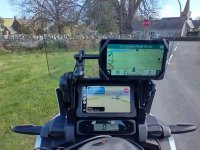
. I have a Honda Africa Twin adventure sports with an Android Auto/Apple carplay enabled screen and have been trying MRA and OSMand and of course Google maps. I keep my phone in an old camera bag secured to the handlebars and you can see in the picture were the phone connects to the screen via usb (keeps the phone charged as well)
MRA is good as it integrates with the route planner to run GPX routes that you can see on the AT screen. But its still an imature product. Two main issues
A. it resourse hungry so heats up your phone.......not as badly now as earlier iterations
B.You have to start the route you want to use on the phone before you connect the phone to the screen for it to work on Android auto.
OSMand is better in that you can launch a navigation route from Android Auto using Favourites from the (many) buttons on the left bar of the Africa Twin. But the info that can be displayed on the OSMand Android auto screen is nowhere near as good as that which can be displayed in the app.
Google maps on Android Auto is great. All the functionality of your phone, its fast and recalculates quickly, and if you have a headset you can navigate by voice command (which works well) using the hey google command. Google maps will not run GPX route files which is its biggest downside.
For MRA and OSMand, which are good navigation applications, running them on Android Auto and i suspect apple carplay introduces an additional level of faffing which would not be necessary if you just used a rugged phone or tablet or as you can see above a dedicated GPS.