Importing a route

karlp

Well-known member
UKGSer Subscriber
Joined
Dec 8, 2007
Messages
4,983
Reaction score
1,714
Location
Southampton, England
I have searched but cannot find anything to advise so hopefully someone can help.

I have a route that has been imported into MRA.

I have then converted it using the TomTom map and the saved as GPX 1.1

Then copied it to the Connected navigator.

I end up with three copies of the route

1. As waypoints. - about 20
2. A support points - about 20

3. Support points - about 2000

Which of these do i actually use and way three route settings.

If I look at the route on MRA is shows the 20 waypoints

Thanks
 
Any good?


I suspect item 3 in post #1 is a track.
 
I have searched but cannot find anything to advise so hopefully someone can help.

I have a route that has been imported into MRA.

I have then converted it using the TomTom map and the saved as GPX 1.1

Then copied it to the Connected navigator.

I end up with three copies of the route

1. As waypoints. - about 20
2. A support points - about 20

3. Support points - about 2000

Which of these do i actually use and way three route settings.

If I look at the route on MRA is shows the 20 waypoints

Thanks
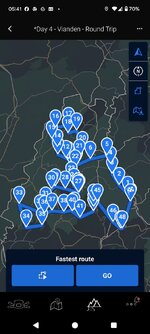
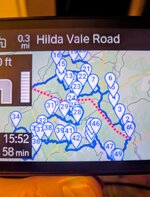
I use the waypoints version. You may see straight lines between the waypoints on the CR App when it arrives from the MRA app, despite you plotting a route curvier than Brands Hatch. Don't worry about this because when you send it to your CRN, they will straighten out in the synch and when you press 'calculate' to start the route . Remember that the CRN won't take routes with more than 50 waypoints.

Don't forget that you can't turn off auto-recalculate when you ride the route. If you stray off route, delete the last waypoint or it will just keep trying to take you back to it.

1745038102115.jpeg

1745038665079.jpeg
 
'ATTENTION! The BMW connected app works with TomTom software/map material. This means that waypoints are not recognized. For this reason, it is advisable to divide your route into sections from break to break. This way you can be sure that these "waypoints" cannot be missed.'

It may be true - although I doubt it - that the CR App does not recognise waypoints as I have never used it with the TFT to get turn-by-turn directions. The CRN does, though.
 
I have searched but cannot find anything to advise so hopefully someone can help.

I have a route that has been imported into MRA.

I have then converted it using the TomTom map and the saved as GPX 1.1

Then copied it to the Connected navigator.

I end up with three copies of the route

1. As waypoints. - about 20
2. A support points - about 20

3. Support points - about 2000

Which of these do i actually use and way three route settings.

If I look at the route on MRA is shows the 20 waypoints

Thanks
Welcome to the world of the ConnectedRide Navigator. It's not a Garmin and has many faults. No-one talks about its good points. Once you get to know its foibles it's a very good navigator. Did I mention that it's not a Garmin?
 
Thanks for all the info

It would be good if the MRA app would export directly to the CRN but I have to connect to my MAc via Commander One Pro

I am sure it will get better and better.

Thanks again
 
Thanks for all the info

It would be good if the MRA app would export directly to the CRN but I have to connect to my MAc via Commander One Pro

I am sure it will get better and better.

Thanks again
I have exported a few routes via a cable from my laptop to the CRN but mainly to see if there was any difference. There isn't. I know some people do this because of terrible problems with the CR App.


Back
Top Bottom