Iphoto on mac

Bryn

Well-known member
Moderator
Moderator
Joined
Sep 20, 2003
Messages
14,040
Reaction score
449
Location
South Leicestershire
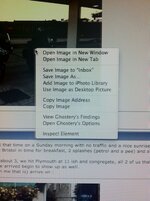
I used to be able to right click on a photo on a web page, and I got the option of saving to my iphoto library or setting as desktop picture....

That's now disappeared with the choice now only being

open image in new window
Download image
Copy image

Any idea of how to get it back how it was appreciated :beerjug:
 
Boxer... that does work but not as easy as I used to have it

Buz... if I do that i only get the options I mentioned in my first post ... It's like my choice of options has diminished :confused:
 
Which browser?

I still get all the options in Safari on 10.8.2. There is an OS update on App store that appeared a day or so ago, but don't know whether that makes a difference.

I don't get the options to save into iPhoto but do to a desktop on Firefox.
 
Mines showing as 10.5 8 and no updates available...

I can't fathom out why I've always had the option but now I don't
 
I'm on 10.8.2 and Safari 6.0.1

I get a huge list of options which includes 'add to iPhoto library' and 'use as desktop picture'
 

Attachments

  • photo-2.jpg
    photo-2.jpg
    91.9 KB · Views: 117
Last edited:
Found THIS, not sure if its any help though?

It mentions disc utility... aint got a clue what that is , but it seems the op has the same issues


I'm on 10.8.2 and Safari 6.0.1

I get a huge list of options which includes 'add to iPhoto library' and 'use as desktop picture'


That's what I used to get :rob
 
From mine its, 'Launchpad', 'Other' (on the 1st page) 'Other' then in there is Disc Utility
 
From mine its, 'Launchpad', 'Other' (on the 1st page) 'Other' then in there is Disc Utility

Nothing on my mac with launchpad on it.....

Thanks for the input... I'll probably end up asking the apple bloke at Curry's next time I'm down and reporting the result here... it's sucking my will to live now :D

:beerjug:
 
Nothing on my mac with launchpad on it.....

Thanks for the input... I'll probably end up asking the apple bloke at Curry's next time I'm down and reporting the result here... it's sucking my will to live now :D

:beerjug:

Probably just as well :thumb


Or the Apple shop :beerjug:
 
have you tried turning it off then back on again? works sometimes.

my next step would be to repair permissions using disk utility. press cmd + spacebar, then type "disk" into the box to find it.
 
have you tried turning it off then back on again? works sometimes.

my next step would be to repair permissions using disk utility. press cmd + spacebar, then type "disk" into the box to find it.

Thanks for the suggestion, but nothing comes up that resembles disk utility when I've typed 'disc' in the box....


Losing interest fast on this one :rolleyes:
 
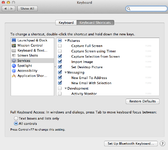
The other actions that you can do when you right click are controlled by the 'services' facility in OSX. Applications register to perform actions on behalf of another when you call them up. Go to Safari->Services-Services Preferences and see if you get something like the pane below, if not you might need to reset it:-
 

Attachments

  • Screen Shot 2012-09-24 at 09.05.55.png
    Screen Shot 2012-09-24 at 09.05.55.png
    106.3 KB · Views: 74
The other actions that you can do when you right click are controlled by the 'services' facility in OSX. Applications register to perform actions on behalf of another when you call them up. Go to Safari->Services-Services Preferences and see if you get something like the pane below, if not you might need to reset it:-

Safari-services.. that's it... no choice with anything further. and nothing saying preferences...

It's disk not disc ;)


Found it and done a repair... no change


Chaps, thanks very much for trying... i'll cope with it for now and ask in the Apple store later this week:beerjug:


Back
Top Bottom