Is the 660 still supported by Garmin ??

Poucher

Active member
UKGSer Subscriber
Joined
Oct 19, 2009
Messages
243
Reaction score
2
Location
Durham
I'm trying to update my 660 to add the Northeast Europe region, but really struggling tbh
I remember getting a mail from Garmin saying that July 2024 will be the last release of City Navigator Europe NT maps
I tried to load in the Northeast Europe region but it said I don't have enough memory, so I bought a 32Gig card today and tried again, nothing seems to be downloading, so I looked on their site to see about purchasing a pre loaded memory card, but from the list of compatible devices it seems like they just don't support the 660 at all anymore?
Any ideas guys?
Anyone able to load European maps onto a card for me if I send one??
I'm bloody stumped and it seems like its gonna cost me another £500 quid or so for a new Garmin :(
 
It is no longer supported.

Load alternative maps and / or assess whether you need the whole of north east Europe.
 
you should still be able to download the most recent maps, it's just that they won't be issuing further updates

maybe check that the SD card is formatted correctly - will it connect to a PC or work in a phone? There are a lot of fake cards about that are dead on arrival.
 
I'm trying to update my 660 to add the Northeast Europe region, but really struggling tbh
I remember getting a mail from Garmin saying that July 2024 will be the last release of City Navigator Europe NT maps
I tried to load in the Northeast Europe region but it said I don't have enough memory, so I bought a 32Gig card today and tried again, nothing seems to be downloading, so I looked on their site to see about purchasing a pre loaded memory card, but from the list of compatible devices it seems like they just don't support the 660 at all anymore?
Any ideas guys?
Anyone able to load European maps onto a card for me if I send one??
I'm bloody stumped and it seems like its gonna cost me another £500 quid or so for a new Garmin :(
The 660 only has 4GB of internal memory. First thing to do is download the latest map for the unit to your computer. The latest map for the unit is 2025.10 NT and was released in July so still up to date. Express used to be able to load the whole region to an SD card but for some reason this has option has been withdrawn and only offers partial region install. I have the NW Europe partial region downloaded on my old BMW Nav iv which is basically a BMW badged Zumo 660. But you might have to clear some unneeded files off your unit to get even a partial region to fit. The operating system takes up space and only leaves about 3gb for the maps. The internal storage left on my unit only has 288MB of free space, with NW Partial region downloaded.

Alternately if you use basecamp you can go to Maps>Install maps> and a wizard opens on basecamp. Open the 2025.10 NT maps that you have downloaded onto your computer and select the map tiles that support your routes. As you select the tiles on the map in the dialog box, a status bar indicates how many gb of space you have used. If you select too many tiles it goes red. This process will be familiar to anyone that started with a Streetpilot 2610 that came with a 256mb CF card. Also on your 32gb you could install Open Street Maps developed for garmin from the

https://www.freizeitkarte-osm.de/garmin/en/index.html Website. These can be installed on an SD card and can be run alongside the garmin maps. (But make sure that only one mapset at a time is ticked)
 
The 660 only has 4GB of internal memory. First thing to do is download the latest map for the unit to your computer. The latest map for the unit is 2025.10 NT and was released in July so still up to date. Express used to be able to load the whole region to an SD card but for some reason this has option has been withdrawn and only offers partial region install. I have the NW Europe partial region downloaded on my old BMW Nav iv which is basically a BMW badged Zumo 660. But you might have to clear some unneeded files off your unit to get even a partial region to fit. The operating system takes up space and only leaves about 3gb for the maps. The internal storage left on my unit only has 288MB of free space, with NW Partial region downloaded.

Alternately if you use basecamp you can go to Maps>Install maps> and a wizard opens on basecamp. Open the 2025.10 NT maps that you have downloaded onto your computer and select the map tiles that support your routes. As you select the tiles on the map in the dialog box, a status bar indicates how many gb of space you have used. If you select too many tiles it goes red. This process will be familiar to anyone that started with a Streetpilot 2610 that came with a 256mb CF card. Also on your 32gb you could install Open Street Maps developed for garmin from the

https://www.freizeitkarte-osm.de/garmin/en/index.html Website. These can be installed on an SD card and can be run alongside the garmin maps. (But make sure that only one mapset at a time is ticked)

Hi @Mzokk thanks for the information, very useful, much appreciated,

I’m downloading the France Northeast region from the website above that you gave me, if I can get it onto my 32Gig memory card without screwing it up ( computer numpty who has just changed over to Mac ! ) that should work okay as I can swap cards in the 660 before I get off the ferry at Zebrugge or Rotterdam.
Thanks again, but I may be back with other questions
 
I'm bloody stumped and it seems like its gonna cost me another £500 quid or so for a new Garmin

The 660 was crap even when brand new.
Shit screen, slow processor, slow redrawing speed, little memory, poor GPS signal. Let it go gracefully.

Get a 396/5 if you want a cheap, but decent, alternative.
 
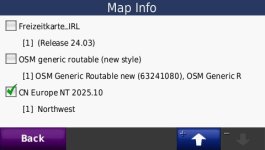
You don't need to swap cards just tick the one that you want to use.

136.jpg

These are the maps I have installed on my Old Nav IV. You just need to tick the one you want to use. I've been experimenting with making my own from scratch. Hence they are on this unit. I also have a Zumo XT but prefer the routing logic of older units.
 
The 660 was crap even when brand new.
Shit screen, slow processor, slow redrawing speed, little memory, poor GPS signal. Let it go gracefully.

Get a 396/5 if you want a cheap, but decent, alternative.
Stop beating about the bush.....say what you mean why don't ya! :D
 
I upgraded to a ZumoXT from a 660 a couple of years ago through a deal on blue light discount for £262.49 delivered, way less than the £500 you suggest. Check out my old thread in the bargains section for more info. If you have a blue light or defence discount card, Garmin offer good deals on their stuff.


I don’t regret it just for the screen alone, but the XT is much more capable, way faster with lots more memory anvailable and is obviously supported by Garmin.
 
Last edited:
not prone to drama

:D :D

I had hemorrhoids that were more useful than the 660.

I still remember being unable to navigate in the City as it would lose the signal immediately in the high rises, that is if it managed to keep with your progress and load the map sections in time, otherwise you’d be presented with a blue arrow on blank screen. When the light conditions were favourable (summer solstice, but only on odd years) for such screen to be seen.

For OP, I wouldn’t waste even two minutes of a JustOil protester life trying to sort out an old 660.
Chuck it out the window (preferably from 10+ floors up) and get another one.

I know I’m being very subtle here, but if it doesn’t transpire: I think it was a bad product.

Much love :)
 
You don't need to swap cards just tick the one that you want to use.

View attachment 342427

These are the maps I have installed on my Old Nav IV. You just need to tick the one you want to use. I've been experimenting with making my own from scratch. Hence they are on this unit. I also have a Zumo XT but prefer the routing logic of older units.

I must be doing something very wrong here , Ive downloaded the Northeast France region from this Freizeitkarte site in gmapsupp for micro sd card, its in my downloads, transferred it onto the micro sd card but it just doesn't show up in map info like yours does above when I put it in the unit?
the download is 1.77gb does that sound about right?
Thought I'd cracked it then but just doesn't seem to work?
 
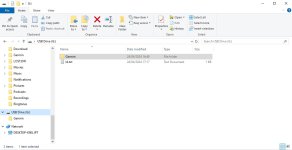
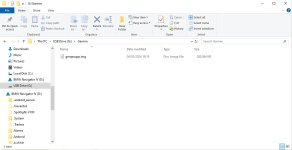
You need to have the .img file in the Garmin folder on the card. So the Garmin folder is created in the root directory of the card and to the.img file of NE France should be put in that. The unit should then be able to see it. (y)
 
I know you are on a mac now but on a PC it looks something like this

Garminm.jpg
Garminm2.jpg
 
After much faffing about and swearing 🤬 I have decided to do the sensible thing and throw this fekkin 660 out of the window as far as I can !
I must have had it over 12 years so it’s time to retire it and get a faster unit with a better screen, I’m thinking of a Zumo XT ?
Comments? Opinions??
Any good deals on atm?, thought I’d cracked it with Bennett’s as they have an offer on through bike social, but even though I’m insured with Bennett’s they won’t give me the deal as my policy was set up through a broker, mingy gits!
Thanks for all your help guys 👍
 
best deal on Garmin stuff is via a Forces or Blue Light card. XT is £266.39 compared to £350 at Sportsbikeshop
 
best deal on Garmin stuff is via a Forces or Blue Light card. XT is £266.39 compared to £350 at Sportsbikeshop

Not eligible for either of those unfortunately, is £350 the best deal for a normal punter??
 
It is no longer supported.

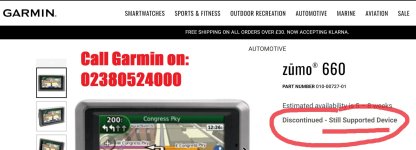
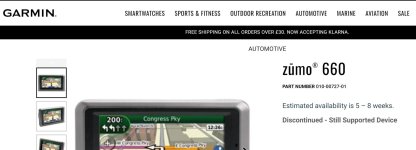
@Wapping ==>Garmin disagrees- @Poucher, one of the possibilities is that you are trying to use two (or more) gmapsupp.img files and ...that will not work- you to need rename it as you can only have one of those.
660.jpg
 

Attachments

  • ScreenShot496.jpg
    ScreenShot496.jpg
    118.2 KB · Views: 10


Back
Top Bottom