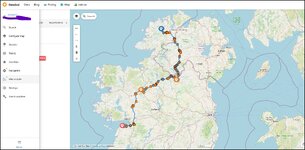
Is there a way to pull a route from MyRoue App and share it as a navigable Google Map

there is a way to to create 1 long route in google and avoid the 10 waypoint limit, its been a long time since i used it but i feel sure if you google it it will come up, from what i remember you you just add the url of the second map route you create onto the first and so on with the next, it then joins them altogether, that is of course they have not changed things as they sometimes do. best of luck with whatever way you go.
 
As Lee says, there’s ways to add more that 10 points to a Google Map’s route. Here’s an example and others will turn up through a Google of: ‘google avoid the 10 waypoint limit’


However, I don’t think this answers the OP’s question. Why?

1. They all seem to require a manual creation of a route. It’s the manual creation part that the OP wishes to avoid.

2. Some require the route to be created in Google’s own Google My Maps. The stumbling block then, is that a route in Google My Maps is not then navigable in Google Maps.

The OP wants a (presumably) free app, to:

A. Display a lengthy navigable GPX route in Google Maps and for his friends to then be able to navigate by it.

B. Or, as an alternative, a free app to install on his friend’s phones, which will accept a GPX route, run it (hopefully with voice instructions) thereby allowing guided navigation.

Paid for apps are not a fortune. I guess some are available on a free14 day trial period, which would seem to be the easiest way to go. Or, if the price of two or three pints of London Pride is too much, then keep playing around in app’s like Scenic, Pocket Earth etc etc in the hope of finding one.

:beerjug:
 
Last edited:
Take a look at:


For £5.99 for a month or £14.99 for a year, it’s hardly going to break the bank or ruin a holiday. Buy a couple less pints one evening and it’ll pay for itself.

The app seems to be reliable, uses Open Street Maps (so pretty good) is navigable and accepts GPX files.

PS I guess, as I haven’t tried it, the free version might work, depending on the downloadable map areas. Me? I’d spend a few pounds, just for the flexibility.
 
Last edited:
just came across this https://organicmaps.app/ it appears to be able to do what you are seeking, it uses osm maps that you can download for free , is also able to take .gpx files and does direction by voice have a look give it a try or not, just another suggestion for you. i believe the app is also free.

on the face of it and reading the bumff it seems to be a good alternative , i shall have to give it a go.
 
Last edited:
Thank you (on behalf of the OP) Lee.

If he finds it works, I’ll copy your post into a sticky, as it may well help others. Await his news, for good or bad.

Best wishes to you (and all the other positive contributors to the GPS section) for the new year!
 
I downloaded the app, as in post #24.

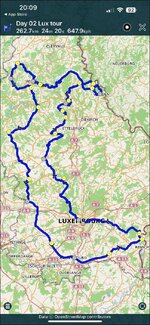
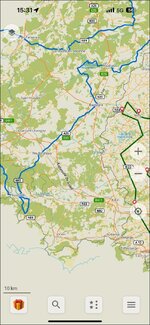
Maybe I did something wrong (I just bashed around) but the ‘route’ rendered up from a very good GPX file looks crude:

IMG_7103.jpg

Probably it’s sortable (it’s the classic straight line problem). That aside it was fast and the map download was very fast via 5G sat in a cafe in E1.

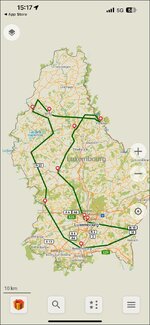
It should look like this:

IMG_7101.jpg
 
I am wondering if it can only work with GPX ‘tracks’ as opposed to ‘routes’?

No big problem if so, as it’s easy to make tracks from routes. The direction of travel (clockwise or anticlockwise) might not always be obvious from a track, But that’s a small price to pay for something free.
 
I am wondering if it can only work with GPX ‘tracks’ as opposed to ‘routes’?

No big problem if so, as it’s easy to make tracks from routes. The direction of travel (clockwise or anticlockwise) might not always be obvious from a track, But that’s a small price to pay for something free.

Bingo!

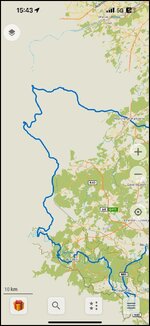
I downloaded a ‘track’ (not a ‘route’) and it looks OK:

IMG_7104.jpg

The downloaded maps was a bit hit and miss, as part is missing. But that’s probably because I am doing it in a hurry, just bashing about…. As I know I can’t break it!

IMG_7105.jpg

I suspect the app is designed mostly around walking / hiking, where ‘tracks’ are of more day-to-day use. But if it works on-road and is free, then who cares?
 
Last edited:
just tried it richard on an exported route from mra it imported track and route, rout was the straight line the track was perfect, so deleted the straight line route and left just the perfect track.
worked seamless,
 
Thank you again, Lee. That confirms that you have to use ‘tracks’ for the GPX import of a ‘route’.

The downside is that ‘tracks’ don’t bring any waypoints with them. If anyone needs a ‘Stop here for lunch’ point, they might need to find a way to insert it by hand (if possible). Me? If it isn’t easy to do, I’d simply end the journey there and create ‘Stage 2, after lunch’ separately.
 
I have found how to insert a ‘Stop here for lunch’ point. What I haven’t yet found out is how to run (ie. navigate) the ‘track’ as a ‘route’, so I don’t know if my insertion of ‘Stop here for lunch’ works.

I can though use the app to create and run A to B to C ‘routes’ quite easily. So, it’s the running of imported GPX files I’m struggling with… time to read the ‘Help’ files.
 
Last edited:
I have asked the app’s owners how to run an imported GPX file as a route, using it (for example) on an iPhone in a car. I can’t see the way to do it in the FAQ’s and Help section.
 
I have found how to insert a ‘Stop here for lunch’ point. What I haven’t yet found out is how to run (ie. navigate) the ‘track’ as a ‘route’, so I don’t know if my insertion of ‘Stop here for lunch’ works.

I can though use the app to create and run A to B to C ‘routes’ quite easily. So, it’s the running of imported GPX files I’m struggling with… time to read the ‘Help’ files.
I think it’s derived from Itchy Boots favourite, MapsMe
 
I think it’s derived from Itchy Boots favourite, MapsMe

That seems to true, from what I’ve read on the app and on the web. I’ve not watched Itchy Boots’ output.

:beerjug:

In other news, I have got the detailed map downloads to work. I can see the value of it as an offline app. That is, once I can get the running of bespoke GPX ‘routes’ to work. Maybe it’s just a ‘Follow the line’ thing? Ie. Pretty basic but it’s free. If nothing else, it’s a back-up app of sorts.

I know it comes at a cost, but it’s very hard to beat either:

A. A dedicated Garmin GPS device, or

B. MyRoute’s Navigation app

When it comes to ‘navigation’ with voice, good maps and a clear ‘route’ displayed.


If Google allowed the running of a route from Google My Maps, that would possibly be tip-top, too. It’s a mystery why they don’t allow it. It’s also odd that nobody has hacked together an app to do it. They seem to open up the workings of most other things at will. But we digress.
 
Last edited:
I use OSMand+ a fair bit and its worth £14.99 a year I've used the Maps+ edition for 3 years. Year one was on offer at £5.00 then £9.99 for the last two years. At £15 its still good. I wish I'd gone for the one time purchase at £30 when I initially tried the app I may yet go for it at £70. Also I seem to have access to OSMand Cloud even though its not supposed to be in maps+? Anyhow it also works well with MyRoute app for downloading tracks.

Advantages of OSMand

1. It navigates tracks and from the outset is designed to operate offline. Download the maps you need and you will have no roaming charges
2.It works on very old phones Android 7 and up Android 7 came out in 2016 the current version is 16
3. Because it runs tracks its not affected by poorly designed routes and routes designed on other map sets like Here or Google maps. You can set its tolerance I use 50 ft for motorcycling and 10ft for walking (id prefer not to fall off a cliff) :D
4. It has loads of profiles for different activities and you can set up the maps to suit I use it for walking and Motorcycling.
5. It handles POI's and Favourites well. They are relational and hold more information than MRA and about the same as basecamp.
6. The maps look good are customisable for looks and 3d is implemented well allowing on the fly navigation if in "Free Ride" mode
7. Works with Android Auto and Car Play so with screen mirroring devices

Disadvantages
1. Because it is track based it strips out Via points and POI's from imported routes. You can prod the screen and put in temporary flags or design routes within OSMand
2. Its very customisable so easy to get lost in the app.

To use it with a track created in MRA.
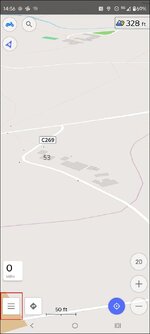
Open app and press three lines highlighted.
1767628820559.jpg

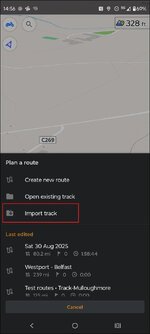
If you have downloaded the track from the MRA app to the phone go to this screen which is plan a route It will be in the downloads of your phone. Or if you have already imported it go to Open existing Track
1767630867019.jpg

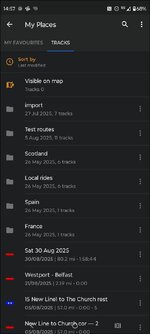
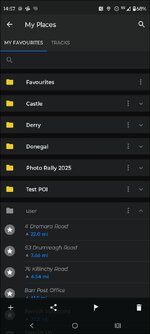
You can route directly from this or go to My places since you have imported it which is the three lines and my places and the imported track will be under Tracks My Favourites is where you can manage POI's
1767631295000.jpg

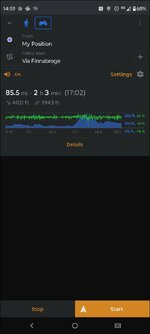
When you select a track you get this screen
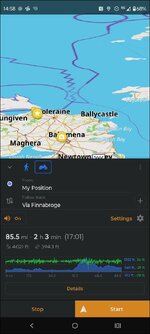
1767631478390.jpg
Under Details you can look at the turn by turn instructions. And all sorts of other stuff
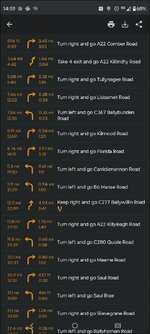
1767631663021.jpg

Hit start if you are happy

1767631727183.jpg

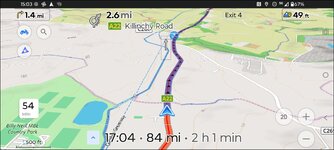
Under settings you can simulate the route. Portrait
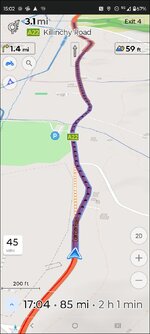
1767631930051.jpg

Or landscape

1767631977398.jpg

It is a very powerful and highly featured application. The OsmAnd Cloud website is pretty good too.

 

Attachments

  • 1767631247937.jpg
    1767631247937.jpg
    52.6 KB · Views: 1
Organic Maps does not require a specific "route format" to enable voice directions; the feature is built-in and uses your device's default Text-to-Speech (TTS) engine. Voice guidance is enabled by default, provided your device's settings are configured correctly.
To ensure voice directions work:
  • Check in-app settings: In the Organic Maps app, navigate to Settings and verify that the "Voice instructions" option is toggled on. You may need to restart the app after changing this setting.
  • Check device Text-to-Speech (TTS) settings:
    • Android: Go to your device's Settings > Accessibility (or System > Languages & input) > Text-to-speech output. Ensure a TTS engine (like Google's Speech Services or a third-party app like RHVoice) is selected and configured with a language pack installed.
    • iOS: Check your device's Settings > Accessibility > Spoken Content (or similar path) to ensure the system voice is set up correctly.
  • Check device volume: Ensure your phone's media volume is turned up and not muted or on vibrate.

Importing Routes
If you want to use a pre-planned route from another service, Organic Maps supports importing routes saved in standard formats like KML, KMZ, GPX, and GeoJSON. You can import these files and then follow the track within the app, but the standard turn-by-turn voice navigation is for routes calculated within Organic Maps itself from your current location.
 
Thank you, Mzokk.

Unless we can get Lee’s free app to navigate a bespoke GPX dowload, a paid for app seems to be the way to go…. Literally and figuratively. Skip a pint or two, job done.
 
Last edited:
Importing Routes
If you want to use a pre-planned route from another service, Organic Maps supports importing routes saved in standard formats like KML, KMZ, GPX, and GeoJSON. You can import these files and then follow the track within the app, but the standard turn-by-turn voice navigation is for routes calculated within Organic Maps itself from your current location.

Aha, as I guessed, it’s ‘follow the line’ for an imported GPX ‘route’. Not perfect but it’ll work and it’s free.

A good find still, Lee.

:beerjug:
 
richard i would think that if you had osm maps in garmin base camp and built a route using that i would imagine that would work with voice prompts as lt is the same map format
 
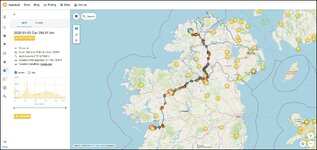
This is what the OSMand Cloud route planner looks like (With a load of unnecessary crap turned on).
1767633369353.jpg
And with one route Between POI's The Circles in the route are junctions with voice instructions that you can avoid by selecting them and hitting avoid.

1767633884776.jpg


Back
Top Bottom