Mapsource

  • Thread starter Thread starter Spanish Bob
  • Start date Start date

Spanish Bob

Guest
Whats the latest software version?

I have 5.4 in my SPIII. The newer versions - do they have any bugs. Would like to upgrade the maps for Spain as they are a bit bollocks, but not if the machine is going to start doing odd things.

anyone got any feedback?

bob
 
Actually, you don't

The latest production version of Mapsource (the PC program that displays and loads maps) is v5.4
There is also a test version of this program available which is v6.0.6 beta

The latest version of Mapsource City Navigator Europe (the maps) is v6.0

The latest version of the internal firmware for the SPIII is v2.50
 
Spanish Bob:

Burnie's statements are correct (above), but if you are new to the world of GPSR's on motos, a little bit of elaboration might help you understand things better.

There are actually several bits of software that you use in the whole process of loading maps to the GPSR and navigating around with it.

First is MapSource, which is an application (executable) that is installed on your personal computer to allow you to create routes and waypoints on the PC, and also to download those routes and waypoints, and map products that you own, to your GPSR.

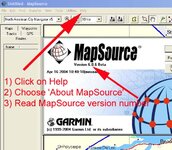
MapSource is currently at version 5.4, so it seems you have the most recent edition. The 6.x versions that are available are all 'beta' (testing) versions, if you are not a software enthusiast, then best if you just leave these alone and wait until Garmin releases a 'final' (meaning, non-beta) edition of 6.x. There are no features in the new version 6 of MapSource that we as motorcyclists really need. There are a lot of new features, but most are aimed at the boating and hiking crowd.

Second is the software that your GPS uses inside of it to do the route calculations, run the display, and so forth. This is currently at version 2.50 for the SP III. 2.50 has been out for quite a while - at least since last summer - and it is fully mature, which means that Garmin won't be releasing any new versions unless bug fixes are needed, or unless some awesome new trick comes along that can be supported by the hardware (processor) within the SP III.

Updates for the above two items of software are provided free of charge for the life of the GPSR by Garmin.

Third are the maps themselves (the cartography). Depending on when you bought it, your SP III could have come with CityNavigator (CN) version 4, 5 or 6 for Europe. The map updates are not free, you have to buy them. I toured Spain in the summer of 2002 using CN 4 on my SP III and I found that the map coverage was a bit spotty. So, it might be worthwhile for you to check the version number of your map product, and if it is version 4 or 5, consider updating to version 6 before you head off to Spain.

Maps from version 6 of CN take up more space on the data chip than maps from earlier versions (this makes sense - they contain more information), so keep in mind that you won't be able to fit quite so much map data on the same size of data chip. I'm going to guess here (and this is a rough guess) that for Spain, you are probably looking at about a 20% increase in space required on the data chip between CN version 4 and CN version 6. If you have a 128 meg data chip, this should not cause you any problems, but if you have a very old SP III that came with a 32 meg data chip, then upgrading to the new maps will probably mean that you will need to get a new (bigger) data chip to hold them on.

Hope this helps you comprehend it all better.

PanEuropean
 
Surely you are not saying that I am too blunt :)
I will try to be more diplomatic in future

blunt Burnie
 
Burnie:

No, no, not blunt at all - I didn't mean it that way - I just got the impression from the text of the original post that maybe Spanish Bob was not entirely clear about the differences between the three software components - so I just provided some background information to compliment the concise facts that you posted.

Michael
 
BurnieM said:
Surely you are not saying that I am too blunt :)
I will try to be more diplomatic in future

blunt Burnie

nah! Australian charm is needed - too much PC bullshit kills me!!!;)

thanks Burnie

but upgrading the mapsource software - am I going to get any "issues". the Spanish maps suck, I am fed up of riding up tarmac roads finished before Franco (the dictator not the GS riding Scotsman who lives in Nice) died that according to the software dont exist.

thanks for you efforts PanE, best to try o educate me slowly Im right at the bottom of the well of ignorance, so one step at a time!;)

cheers boys
 
Spanish Bob:

OK, here's a simplified version of the above:

1) Start MapSource on your computer, go to the HELP menu on the top, click on it, select ABOUT MAPSOURCE and you will see a version number. If it is 5.4 you have the latest. If it is lower than 5.4, go to the HELP menu again and there will be a line there that says CHECK FOR MAPSOURCE UPDATES or similar, click on that menu line, that will take you to the Garmin website.

Get version 5.4 - do not get any of the 6.anything betas - and download and double-click on 5.4, that will update your map reading and map-sending program automatically.

2) Now, start MapSource again, go to the VIEW menu, click on it, go way down until you see the line SHOW TOOLBARS, click on that, if there is not already a check mark beside the item VIEW TOOLBAR, click on VIEW TOOLBAR, if it already has a check beside it, don't touch it.

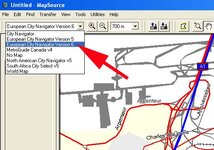
Now, look at the top of the computer screen, you will see that it says "European City Navigator Version ?" The ? represents the version number. If it is version 4, you really need to upgrade your maps (this costs money) before you go, otherwise, you will have the missing roads from before the revolution problem that you described earlier. If the number is version 5, well, then have a look at the maps on your computer and see if you are happy with what is there. Version 5 is about 20 months old. If the number is version 6, hey, you have the latest version of the maps, these are as complete as the Spanish Government has made them (so far).

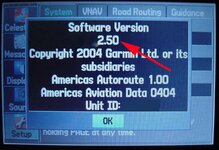
3) About your GPSR software (the system software): If you bought it new anytime after April 2003, good enough, leave it alone. If you bought it before then, you need to check the software version number in the GPSR. I can't remember how to do this - that was 3 GPSR's ago for me - and I don't have a SP III handy - maybe another SP III user can chime in here and explain how to find out what the version number of the loaded software is. I know you start by pressing the MENU button on the GPSR, after that, I can't remember.

PanEuropean

 
This is where your MAP version number is.
Maps are the only things you have to pay for, they cost serious money, and come on a CD.
 

Attachments

  • map version.jpg
    map version.jpg
    57.7 KB · Views: 182
This is your GPSR system software version number
NOTE: Your screen will look different, because you have a different model of GPSR than I do. But the general idea is the same.
 

Attachments

  • gpsr version.jpg
    gpsr version.jpg
    59.6 KB · Views: 173
6.0.6.0 Beta

Just to reiterate what Pan says about the Beta version of Mapsource. I had it loaded and aware of potential problems but dont mind a bit of exploring. However, if you haven't loaded Mapsource 6.0.6.0. don't. Spent some 5 hours last night trying to sort data transfer problems out. It seems that even though you may have a full European unlock code the software refuses to unlock many area's. Secondly it corrupts your unlock code and renders it unusable. Also it is not compatable with existing USB drivers. Update drivers are available from the Garmin site but without going into a long drawn out story you find it unable to download them. The final solution was to roll back to Mapsource 5.4 after removing all traces of Mapsource and Maps plus any undeleted remaining registry entries. I think mine is now working ok :(
 
Re: 6.0.6.0 Beta

gazza said:
Just to reiterate what Pan says about the Beta version of Mapsource. I had it loaded and aware of potential problems but dont mind a bit of exploring. However, if you haven't loaded Mapsource 6.0.6.0. don't. Spent some 5 hours last night trying to sort data transfer problems out. It seems that even though you may have a full European unlock code the software refuses to unlock many area's. Secondly it corrupts your unlock code and renders it unusable. Also it is not compatable with existing USB drivers. Update drivers are available from the Garmin site but without going into a long drawn out story you find it unable to download them. The final solution was to roll back to Mapsource 5.4 after removing all traces of Mapsource and Maps plus any undeleted remaining registry entries. I think mine is now working ok :(
blimey! thats exactly the sort of thing I didnt want!

bad luck Gazza but thanks for the info
 
Beta 6

Hi Gazza,

I have been running 6.0.6 and have not had any problems with routes or downloads.

The software updated the USB drivers when I installed it????

Maybe PC problem, I will stick with it for now.

How did you convert your files back to MPS after rollback to 5.4?


cheers

Gerry
 
Gazza, Gerry, Bob:

I have not had any problems with 6.06 either. However, only the reason I advised Spanish Bob to stay away from it is simply because it is a beta - and beta's of anything are for software enthusiasts - and Spanish Bob has made it very clear in his posts that he is not a software enthusiast. I want to make sure my comments are not interpreted as a unintentional dissing of 6.x.

Besides, the new features introduced in MapSource 6.x really don't do much for us - touring motorcyclists who use automotive GPSR's - if this was a marine forum, and we were all sailors and yachtsmen, I'd be recommending that Bob get 6.x just to take advantage of all the new marine features. But crap like water depth, temperature, etc. is useless to us in the automotive world.

The only reason I use the 6.x beta is to test it with the new model GPSR's I use. If I wasn't specifically doing testing, I would not have bothered to upgrade from 5.4. 5.4 works well, it's bulletproof, and it does everything we as motorcyclists need it to do.

PanEuropean
 
I have to say that 6.0.6 had performed faultlessly until I tried to load the whole 145 maps that 6.0.6 needs to cover the entire uk.
It didn't present a major problem because I was just experimenting to see how much the CF would hold. It appears there are almost double the amount of map panes required on 6.0.6 to cover the UK, hence I wanted to see if 5.4 would be a better option for enabling more maps and optimizing CF space.
Got to say Garmin support were really helpfull and provided prompt help.
 
PanEuropean said:
But crap like water depth, temperature, etc. is useless to us in the automotive world.

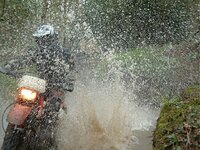
...not on rides that Blue Sweeper takes us on!

:D

Greg
 

Attachments

  • four.jpg
    four.jpg
    135.6 KB · Views: 111
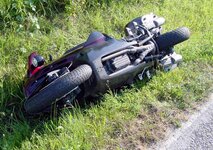
Oh - sorry, you have to keep in mind I have an underprivileged life, I only ride a street bike (well, mostly on the street, from time to time it's the ditch, but not intentionally...)

PanEuropean

Don't think all this GPS testing is easy...
 

Attachments

  • mooreaccident2.jpg
    mooreaccident2.jpg
    89.7 KB · Views: 42


Back
Top Bottom